> ## Documentation Index
> Fetch the complete documentation index at: https://ona.com/docs/llms.txt
> Use this file to discover all available pages before exploring further.
# Apply Cloudformation templates
Gitpod is deployed through Cloud Formation templates. They set up Kubernetes clusters and other essential AWS resources like lambdas and databases. They facilitate not just the deployment but also enable remote management capabilities for your Gitpod environment. You can read more about this in the Architecture section.
Due to specific permission requirements for installing Gitpod, we provide a preliminary template to set up a role with the necessary permissions. This role is then used when configuring the main Gitpod template. Therefore, deploying Gitpod involves two main steps:
## Step 1: Role Creation
To start, click on the first deep link URL to launch the role creation template. This action opens the AWS CloudFormation console to the welcome screen for setting up the template.
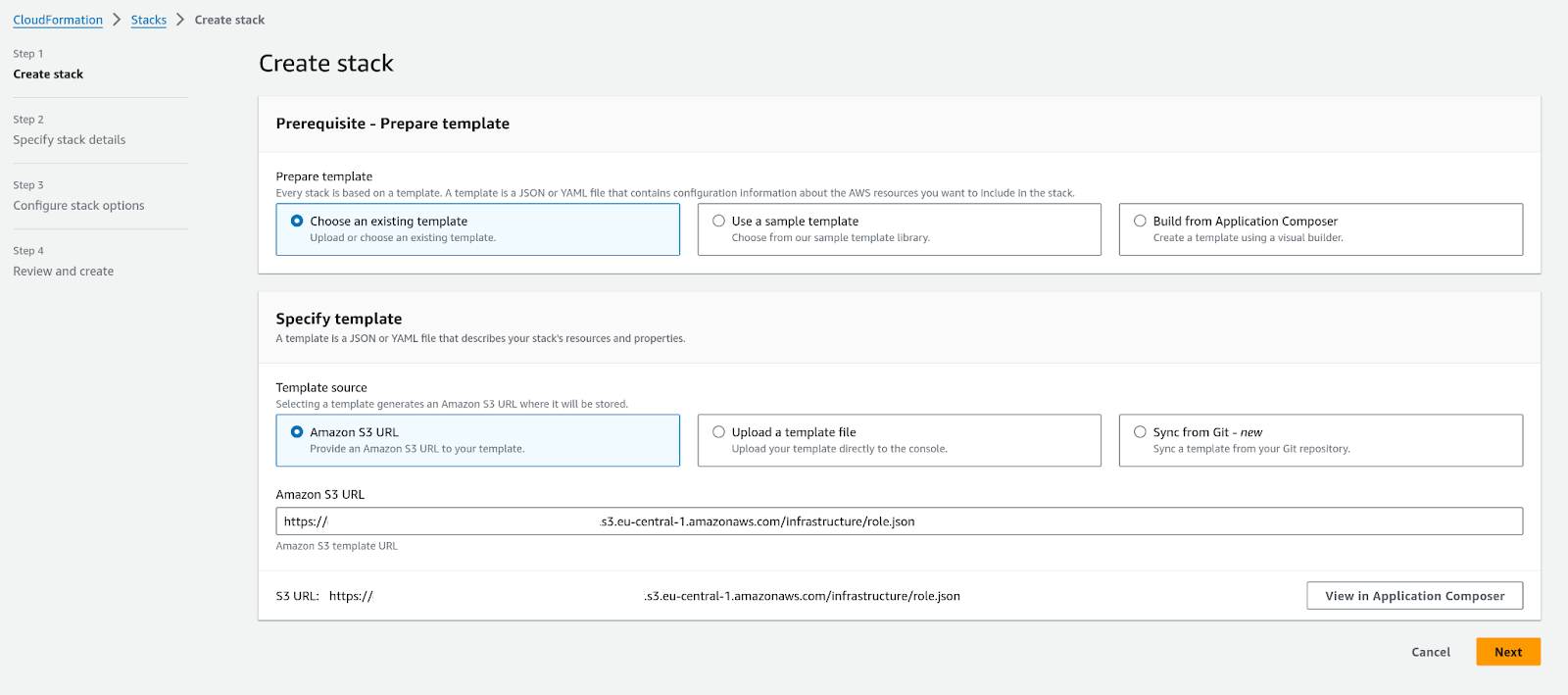 ### Parameters in the Role Creation Template
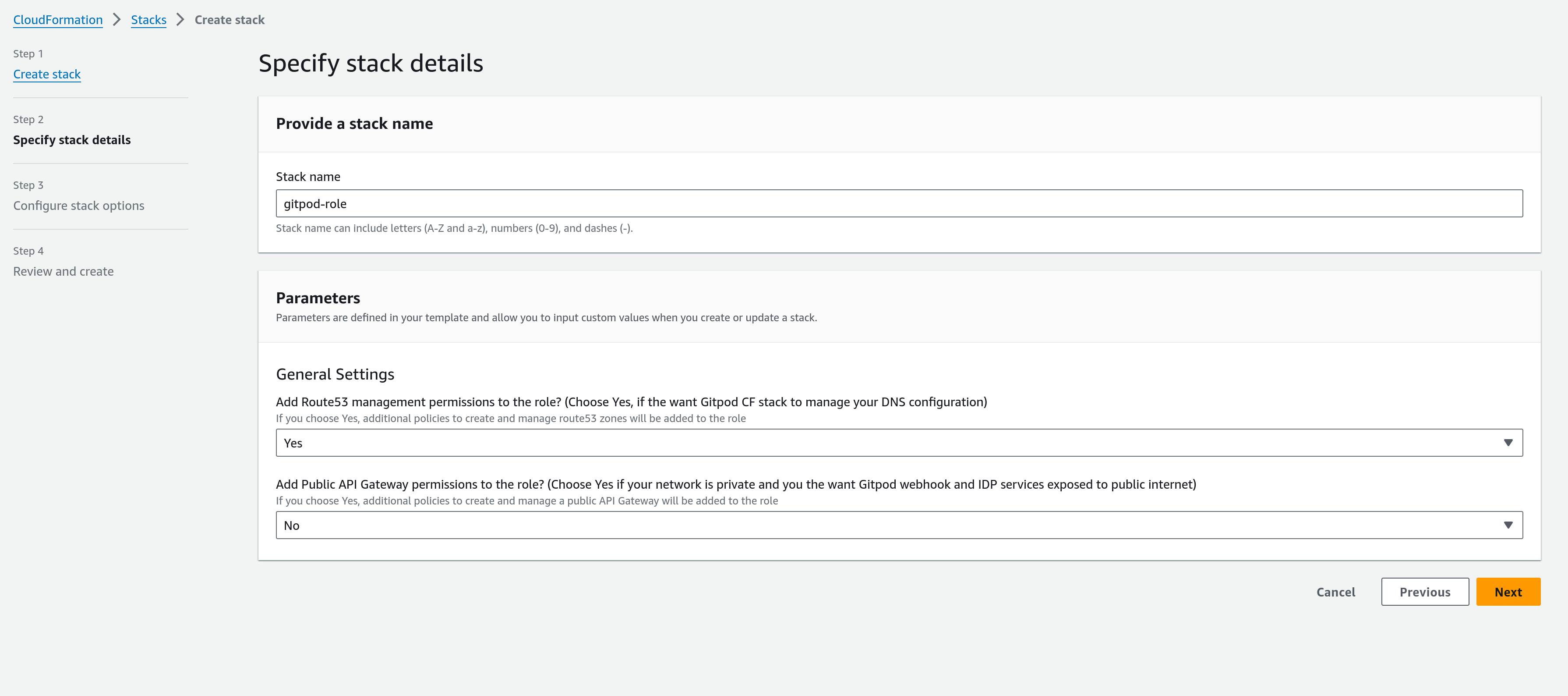 This template includes two configurable options:
* **Add Route 53 management permissions to the role**: If you plan to manage your DNS settings manually, you can opt to disable this option and not add Route53 specific permissions to the role.
* **Enable Public API Gateway Permissions**: This option should be considered based on how you intend to use Gitpod. If Gitpod is to be set up without public internet access, but you require GitHub webhooks and Identity Provider (IDP) features to be publicly accessible (e.g., for integration with a public SCM), then you will need to enable this feature in the main Gitpod CF template. Selecting "Yes" here ensures the necessary permissions are established.
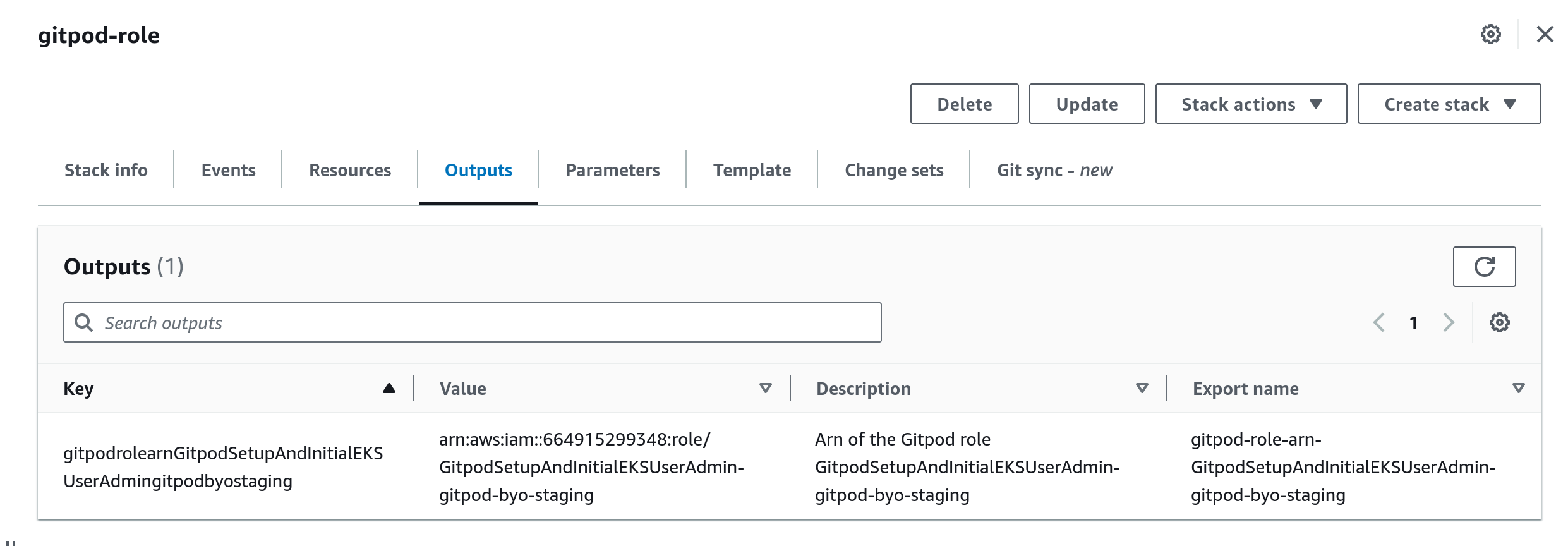
After configuring these parameters to suit your deployment needs, proceed to apply the template. Upon completion, the output section will display the name of the created role.
This template includes two configurable options:
* **Add Route 53 management permissions to the role**: If you plan to manage your DNS settings manually, you can opt to disable this option and not add Route53 specific permissions to the role.
* **Enable Public API Gateway Permissions**: This option should be considered based on how you intend to use Gitpod. If Gitpod is to be set up without public internet access, but you require GitHub webhooks and Identity Provider (IDP) features to be publicly accessible (e.g., for integration with a public SCM), then you will need to enable this feature in the main Gitpod CF template. Selecting "Yes" here ensures the necessary permissions are established.
After configuring these parameters to suit your deployment needs, proceed to apply the template. Upon completion, the output section will display the name of the created role.
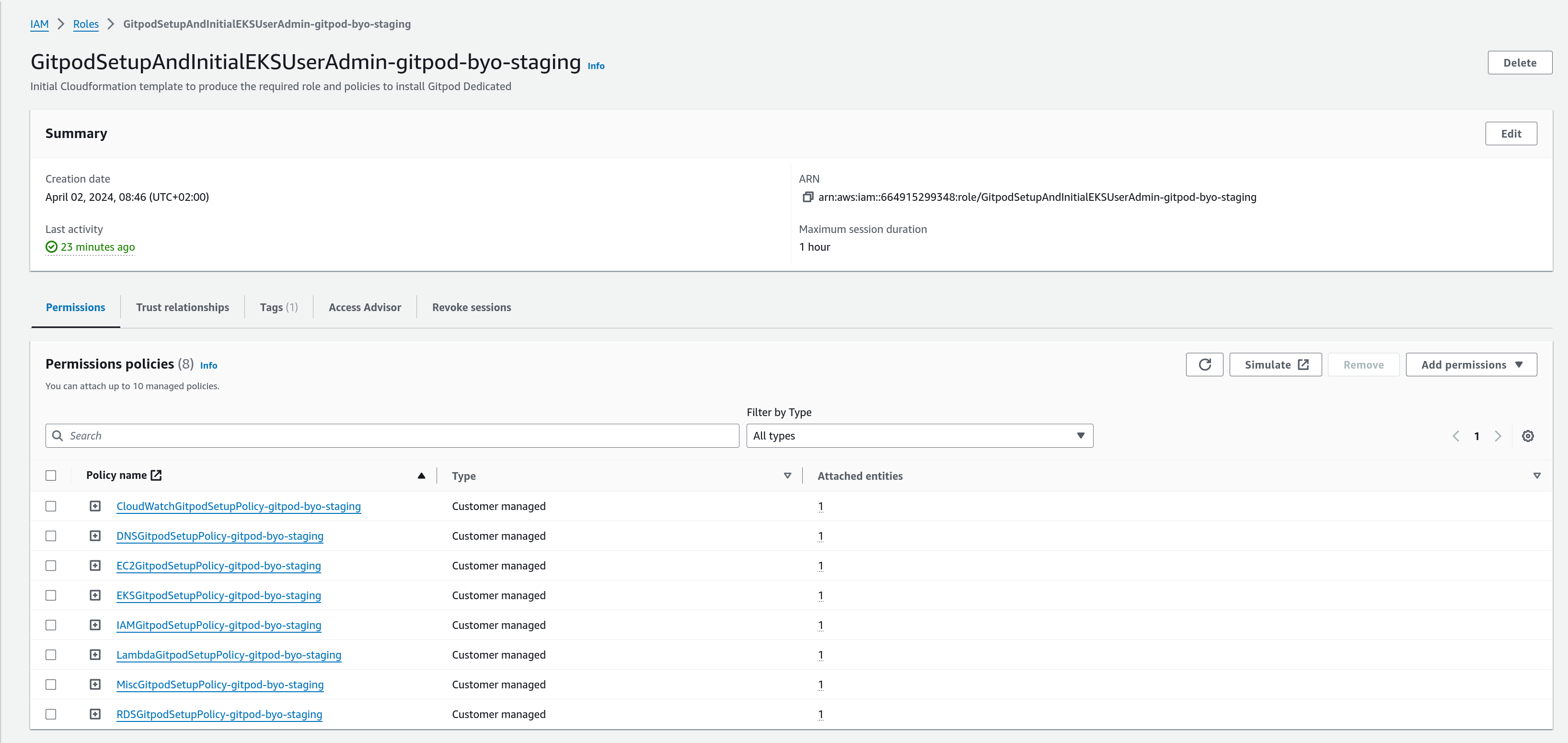
 You can inspect this role further by visiting the IAM console.
 ## Step 2: Deploying the Gitpod Instance
With the necessary role in place, the next step involves applying the main Gitpod deployment template. This section will guide you through the process, highlighting how to select the role created in the previous step and configure additional parameters for your Gitpod setup.
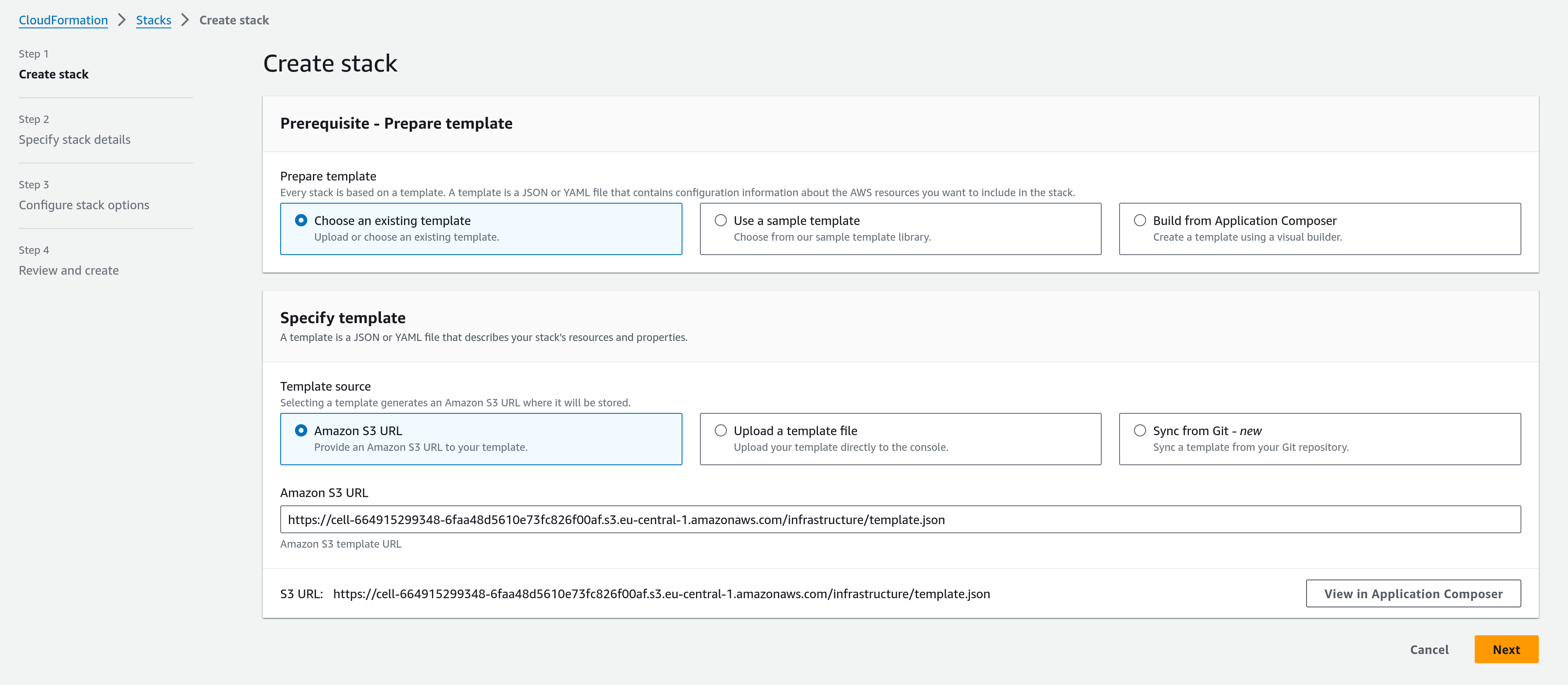
As you did with the role deep link URL, click and launch the gitpod instance creation template. You should land on a welcome screen that looks like this:
## Step 2: Deploying the Gitpod Instance
With the necessary role in place, the next step involves applying the main Gitpod deployment template. This section will guide you through the process, highlighting how to select the role created in the previous step and configure additional parameters for your Gitpod setup.
As you did with the role deep link URL, click and launch the gitpod instance creation template. You should land on a welcome screen that looks like this:
 ### Parameters in the Instance Creation Template
The deployment template includes numerous parameters, providing significant control over the configuration. These parameters are divided into sections on the page, which we will address section by section.
#### Networking Configurations
{' '}
Please refer to the [Network Setup](/classic/admin/getting-started/networking) to
understand the networking requirements and/or to create the network using our
standard CF templates
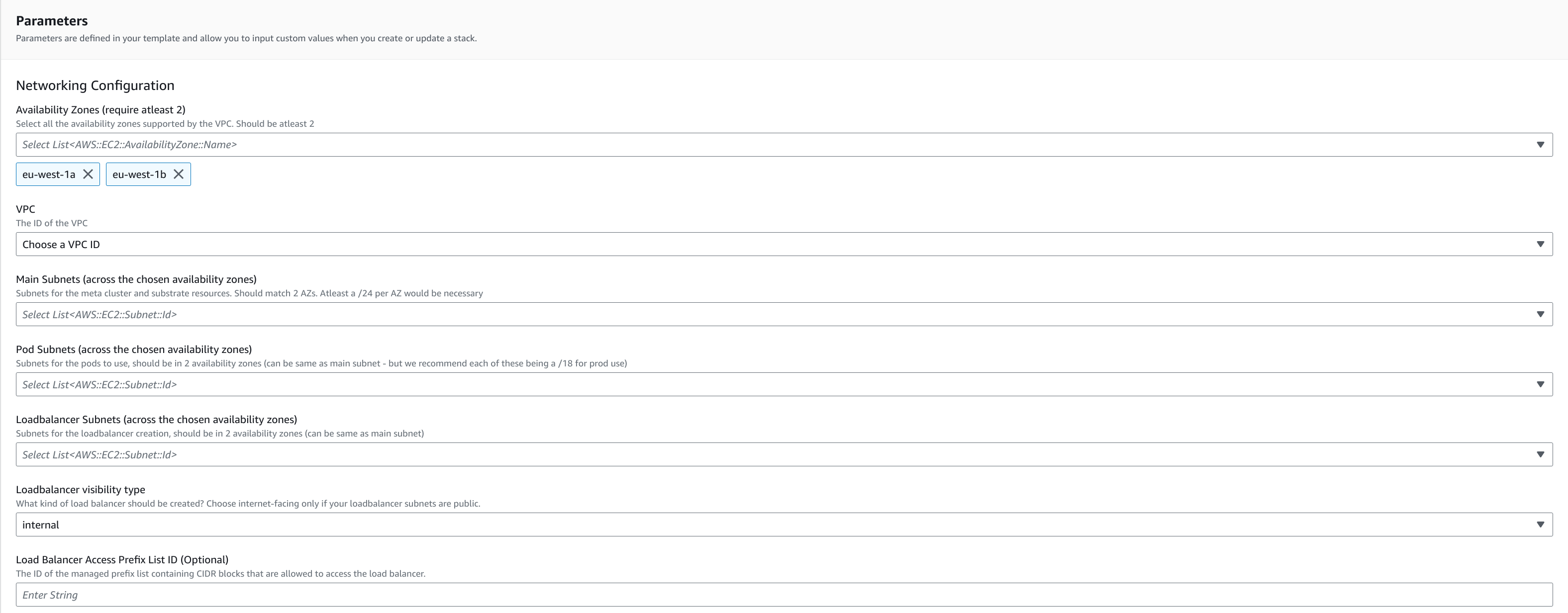
This section focuses on configuring the network settings for your Gitpod setup, including VPC selection, subnet configurations, and load balancer options.
### Parameters in the Instance Creation Template
The deployment template includes numerous parameters, providing significant control over the configuration. These parameters are divided into sections on the page, which we will address section by section.
#### Networking Configurations
{' '}
Please refer to the [Network Setup](/classic/admin/getting-started/networking) to
understand the networking requirements and/or to create the network using our
standard CF templates
This section focuses on configuring the network settings for your Gitpod setup, including VPC selection, subnet configurations, and load balancer options.
 | Parameter Name | Description | Required |
| ---------------------------------- | ---------------------------------------------------------------------------------------------------------------------------------------------------------------------------------------------------------------------------------------------------------------------------------------------------------------------------------------------------------------------------------------------------------------------------------------------------------------------------------------------------------------------------------------------------------------------------------------------------------------------------------------------------------------------------------------------------------------------------------------------------------------------------------------------------------------------------------------------------------------------------------------------------------------------------------------------------------------------------------------------- | -------- |
| Availability Zones | Select all the availability zones supported by the VPC. There should be at least 2. | Yes |
| VPC | The ID of the VPC. | Yes |
| Main Subnets | Primary subnet used by the installation. The clusters, databases, management lambdas etc. will be created here. Should match the number of AZs chosen. At least a /24 per AZ would be necessary. | Yes |
| Pod Subnets | Subnets for the pods in the Kubernetes clusters to use, should match the number of AZs chosen (**Can be same as Main Subnets** - but we recommend each of these being a /18 for prod use and no routing from external services are expected). | Yes |
| Loadbalancer Subnets | Subnets for the loadbalancer creation, Selection should match the availability zones chosen (**can be same as Main Subnets**). | Yes |
| Loadbalancer Visibility Type | What kind of load balancer should be created? Choose internet-facing only if your loadbalancer subnets are public. | Yes |
| Loadbalancer Access Prefix List ID | This parameter identifies the managed prefix list containing CIDR blocks allowed to access the load balancer. A [managed prefix list in AWS](https://docs.aws.amazon.com/vpc/latest/userguide/working-with-managed-prefix-lists.html) is a reusable set of CIDR blocks centrally managed to simplify network access control across VPCs, security groups, and route tables. To provide maximum flexibility and privacy, we let you manage the allowed loadbalancer traffic via a prefix list that you can manage separately. The security group of loadbalancer will allow traffic only from this prefix list. Follow [this](#creating-a-managed-prefix-list-to-control-traffic-to-loadbalancer) section below to see a step-by-step guide to create this. **Change for existing installations requires collaboration with Gitpod during an outage window. After the CloudFormation update is complete, during cleanup, Gitpod must then trigger an update to honor changed security groups.** | No |
| Parameter Name | Description | Required |
| ---------------------------------- | ---------------------------------------------------------------------------------------------------------------------------------------------------------------------------------------------------------------------------------------------------------------------------------------------------------------------------------------------------------------------------------------------------------------------------------------------------------------------------------------------------------------------------------------------------------------------------------------------------------------------------------------------------------------------------------------------------------------------------------------------------------------------------------------------------------------------------------------------------------------------------------------------------------------------------------------------------------------------------------------------- | -------- |
| Availability Zones | Select all the availability zones supported by the VPC. There should be at least 2. | Yes |
| VPC | The ID of the VPC. | Yes |
| Main Subnets | Primary subnet used by the installation. The clusters, databases, management lambdas etc. will be created here. Should match the number of AZs chosen. At least a /24 per AZ would be necessary. | Yes |
| Pod Subnets | Subnets for the pods in the Kubernetes clusters to use, should match the number of AZs chosen (**Can be same as Main Subnets** - but we recommend each of these being a /18 for prod use and no routing from external services are expected). | Yes |
| Loadbalancer Subnets | Subnets for the loadbalancer creation, Selection should match the availability zones chosen (**can be same as Main Subnets**). | Yes |
| Loadbalancer Visibility Type | What kind of load balancer should be created? Choose internet-facing only if your loadbalancer subnets are public. | Yes |
| Loadbalancer Access Prefix List ID | This parameter identifies the managed prefix list containing CIDR blocks allowed to access the load balancer. A [managed prefix list in AWS](https://docs.aws.amazon.com/vpc/latest/userguide/working-with-managed-prefix-lists.html) is a reusable set of CIDR blocks centrally managed to simplify network access control across VPCs, security groups, and route tables. To provide maximum flexibility and privacy, we let you manage the allowed loadbalancer traffic via a prefix list that you can manage separately. The security group of loadbalancer will allow traffic only from this prefix list. Follow [this](#creating-a-managed-prefix-list-to-control-traffic-to-loadbalancer) section below to see a step-by-step guide to create this. **Change for existing installations requires collaboration with Gitpod during an outage window. After the CloudFormation update is complete, during cleanup, Gitpod must then trigger an update to honor changed security groups.** | No |
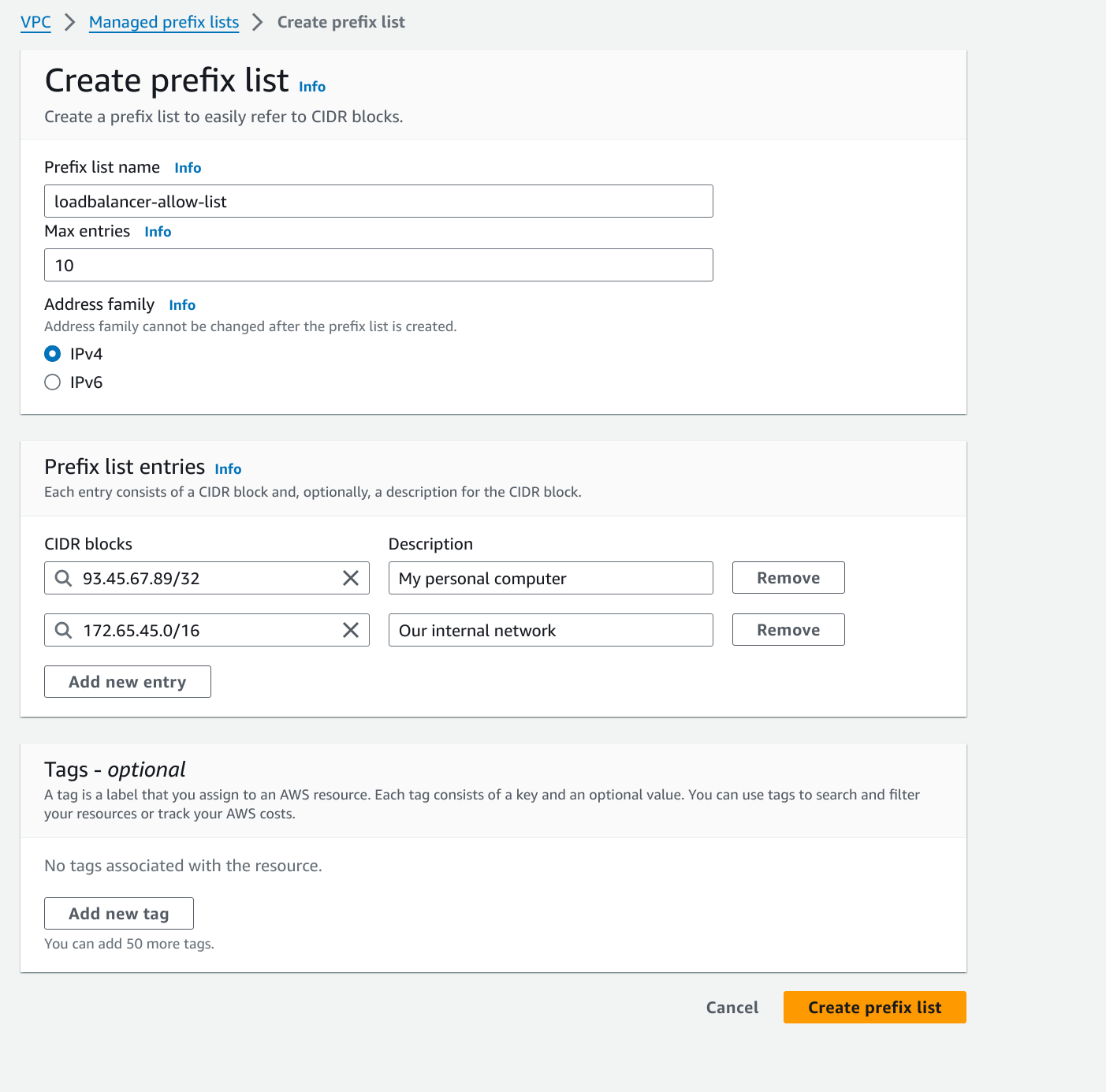
###### Creating a managed prefix list to control traffic to loadbalancer
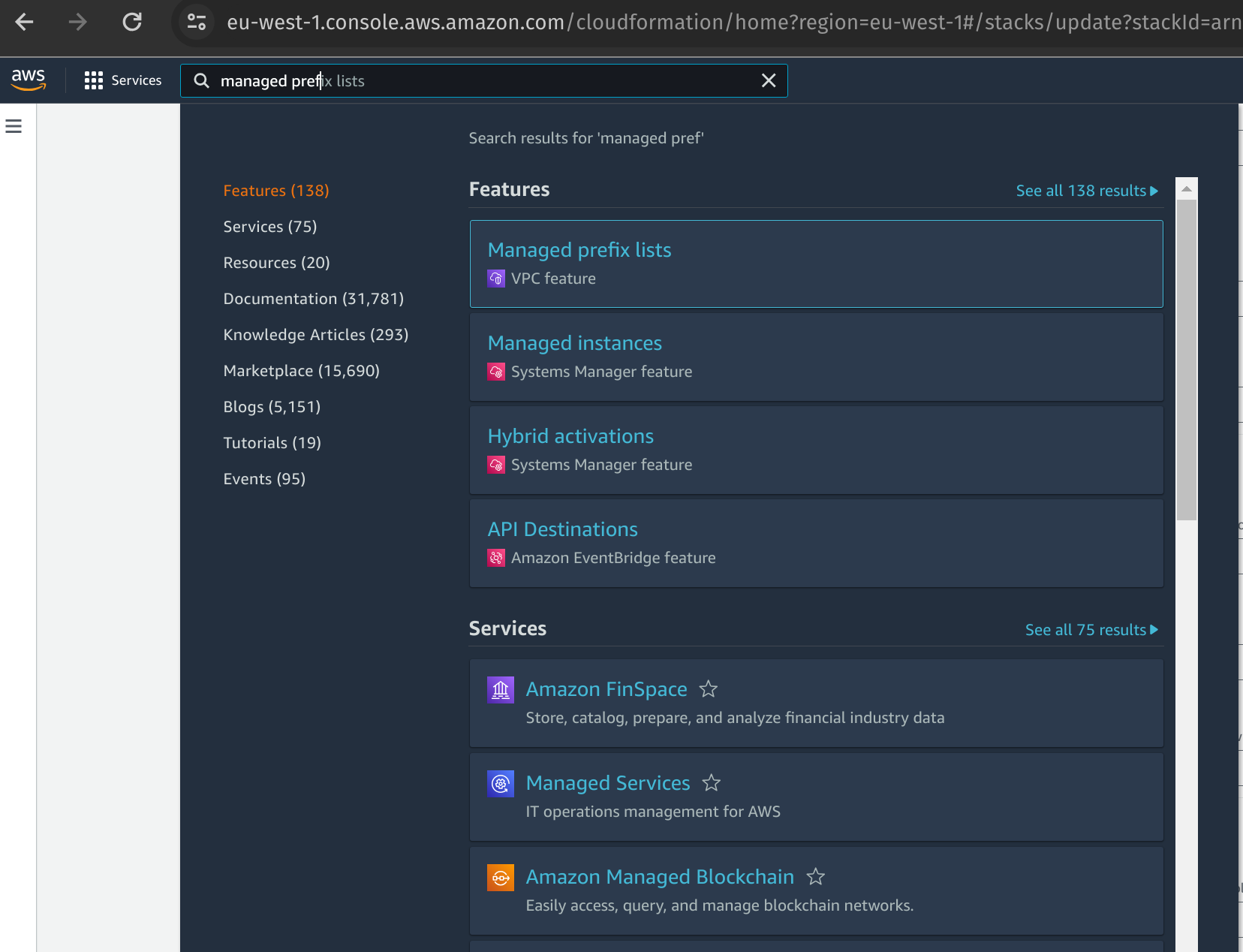
1. In the AWS Account in which you are deploying Gitpod Enterprise instance, go to the `Managed prefix list` console under the VPC services:
 2. Click on `Create Prefix List` at the top right corner of the page
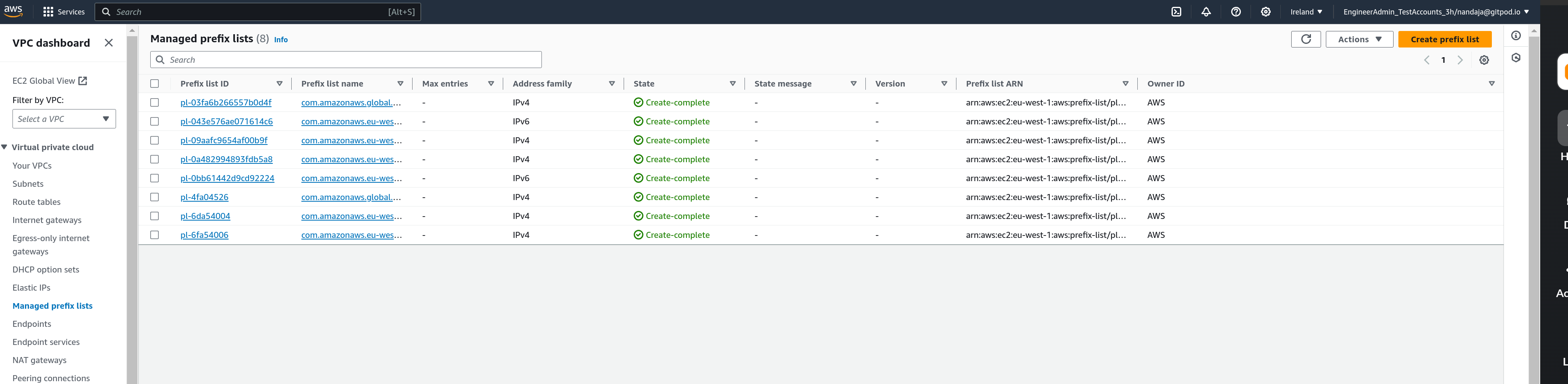 2. Give the Prefix list an appropriate name, choose the maximum number of CIDRs. The maximum number of CIDRs should be less that your account's rule per security group limit, which is by default 60 but more than the number of CIDRs you want to specify. Add the CIDRs using the `Add new entry` option.
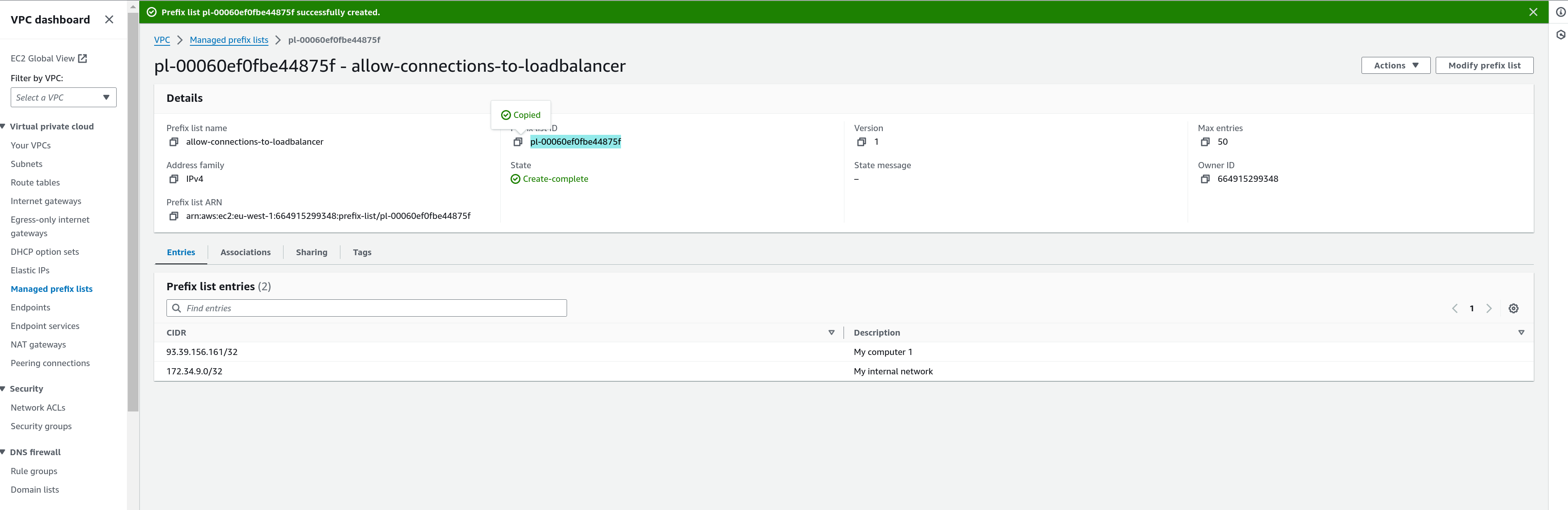
 3. Copy the ID of the Managed prefix list and use it directly as the value for cloudformation parameter `Loadbalancer Access Prefix List ID`
 #### DNS Configuration
For a seamless experience, Gitpod can manage a DNS name and corresponding certificate within our `*.gitpod.cloud domain`. Alternatively, you may opt to configure your own domain and match it with an ACM-stored certificate.
**Important**: The certificate must include SANs that match your specific
domain name, if your chosen domain name is `yourdomainname.com` , the the
certificate should cover:
`yourdomainname.com`
`*.yourdomainname.com`
`*.ws.yourdomainname.com`
If you decide to self-manage DNS, you'll receive domain mapping information as CloudFormation Outputs, which should be added to Route 53 or your DNS management service. More about this will be covered in the [Complete DNS Configuration](/classic/admin/deploy-gitpod/dns-setup) section.
If you're using the auto-generated domain by setting auto-generation to "Yes,"
ensure you've also selected "Yes" for the parameter `Add Route 53 management
permissions to the role?` in the role creation template. If this wasn't set
initially, please update the role template to align with your DNS configuration
choice.
Below are the parameters for DNS configuration:
#### DNS Configuration
For a seamless experience, Gitpod can manage a DNS name and corresponding certificate within our `*.gitpod.cloud domain`. Alternatively, you may opt to configure your own domain and match it with an ACM-stored certificate.
**Important**: The certificate must include SANs that match your specific
domain name, if your chosen domain name is `yourdomainname.com` , the the
certificate should cover:
`yourdomainname.com`
`*.yourdomainname.com`
`*.ws.yourdomainname.com`
If you decide to self-manage DNS, you'll receive domain mapping information as CloudFormation Outputs, which should be added to Route 53 or your DNS management service. More about this will be covered in the [Complete DNS Configuration](/classic/admin/deploy-gitpod/dns-setup) section.
If you're using the auto-generated domain by setting auto-generation to "Yes,"
ensure you've also selected "Yes" for the parameter `Add Route 53 management
permissions to the role?` in the role creation template. If this wasn't set
initially, please update the role template to align with your DNS configuration
choice.
Below are the parameters for DNS configuration:
 | Parameter | Description | Required |
| ------------------------------------------- | ------------------------------------------------------------------------------------------------------------------------------------------------------------------------------------------------------------------------------------------------------- | ------------------------- |
| Auto-generate route53 zone in the CF stack? | If set to 'Yes', Gitpod will auto-generate and manage a Route53 zone and certificate. 'No' requires manual DNS configuration. | Yes |
| Domain name | The domain name associated with Gitpod load balancers. Defaults to a `*.gitpod.cloud` subdomain if Gitpod manages DNS. | No |
| Certificate ARN for the domain | ARN of the ACM certificate that includes the necessary SANs for your domain. Mandatory for self-managed DNS. [Guidelines for creating/importing certs.](https://docs.aws.amazon.com/elasticloadbalancing/latest/network/tls-listener-certificates.html) | Yes, if self-managing DNS |
#### Application Settings (Optional)
This optional section allows for specifying custom CA certificates for your Gitpod workspaces. While these settings offer additional customization for specific scenarios, they are not required for all installations.
* **Additional Custom CA**:
If Gitpod needs to interact with resources that use a Custom CA (e.g., Source Control Management systems), you can specify the ARN of the secret where the certificate is stored. For guidance on using custom or private CAs with Gitpod, [refer back to our documentation in the preparation section]().
| Parameter | Description | Required |
| ------------------------------------------- | ------------------------------------------------------------------------------------------------------------------------------------------------------------------------------------------------------------------------------------------------------- | ------------------------- |
| Auto-generate route53 zone in the CF stack? | If set to 'Yes', Gitpod will auto-generate and manage a Route53 zone and certificate. 'No' requires manual DNS configuration. | Yes |
| Domain name | The domain name associated with Gitpod load balancers. Defaults to a `*.gitpod.cloud` subdomain if Gitpod manages DNS. | No |
| Certificate ARN for the domain | ARN of the ACM certificate that includes the necessary SANs for your domain. Mandatory for self-managed DNS. [Guidelines for creating/importing certs.](https://docs.aws.amazon.com/elasticloadbalancing/latest/network/tls-listener-certificates.html) | Yes, if self-managing DNS |
#### Application Settings (Optional)
This optional section allows for specifying custom CA certificates for your Gitpod workspaces. While these settings offer additional customization for specific scenarios, they are not required for all installations.
* **Additional Custom CA**:
If Gitpod needs to interact with resources that use a Custom CA (e.g., Source Control Management systems), you can specify the ARN of the secret where the certificate is stored. For guidance on using custom or private CAs with Gitpod, [refer back to our documentation in the preparation section]().
 | Parameter | Description | Required |
| -------------------- | ---------------------------------------------------- | -------- |
| Additional custom CA | ARN of the secret storing the Custom CA certificate. | No |
Remember, these settings are optional and should only be configured if your workspace environments require them.
#### Advanced Configuration (Optional)
This section contains settings for specific scenarios that might not be essential for every Gitpod instance but are critical for certain use cases, particularly if your deployment has unique requirements.
| Parameter | Description | Required |
| -------------------- | ---------------------------------------------------- | -------- |
| Additional custom CA | ARN of the secret storing the Custom CA certificate. | No |
Remember, these settings are optional and should only be configured if your workspace environments require them.
#### Advanced Configuration (Optional)
This section contains settings for specific scenarios that might not be essential for every Gitpod instance but are critical for certain use cases, particularly if your deployment has unique requirements.
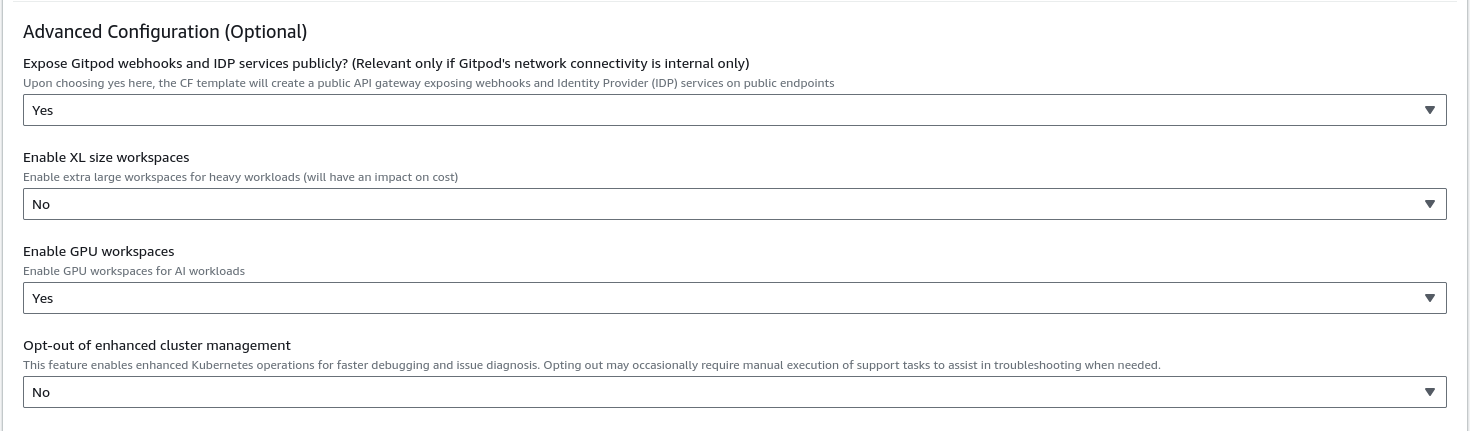 These advanced configurations offer you the ability to tailor your Gitpod setup more closely to your operational needs. If your VPC is private or has restricted access from the public internet, you will find the settings here especially relevant.
* **[Expose Gitpod Services Publicly](#expose-gitpod-services-publicly)**
Important: This setting is particularly relevant if your VPC is private or
restricts public internet access. It ensures that even with stringent
network controls, essential Gitpod services remain accessible as needed.
| Parameter | Description | Required |
| ------------------------------------------------- | ------------------------------------------------------------------------------------------------------------------------------------------------ | -------- |
| Expose Gitpod webhooks and IDP services publicly? | This option configures a public API gateway for webhooks and IDP services, which is crucial for internal-only network connectivity environments. | No |
When you enable this, a public API gateway will be established, allowing webhooks and IDP services to be accessed publicly, despite the VPC being private or internet-restricted. It is essential to configure this correctly for your Gitpod services to function as intended in a restricted network setup. It is required that you have selected Enable Public API Gateway Permissions in the role creation template otherwise the role we use to apply the cloud formation template will not have the required permissions.
* **[Enable super large workspaces (3XL and 4XL) for computationally intense workloads](#enable-xl-workspaces)**
Important: Enabling this option, will make these two new workspace classes
available in Gitpod
| Parameter | Description | Required |
| ------------------------- | ----------------------------------------------------------------------------------------------------------------------------------------------------------------------------------------------------------------------------------------------------------------------- | -------- |
| Enable XL size Workspaces | Enabling this field will introduce two new workspace classes to your Gitpod instance suitable for very heavy workloads. The specs of the classes are:
These advanced configurations offer you the ability to tailor your Gitpod setup more closely to your operational needs. If your VPC is private or has restricted access from the public internet, you will find the settings here especially relevant.
* **[Expose Gitpod Services Publicly](#expose-gitpod-services-publicly)**
Important: This setting is particularly relevant if your VPC is private or
restricts public internet access. It ensures that even with stringent
network controls, essential Gitpod services remain accessible as needed.
| Parameter | Description | Required |
| ------------------------------------------------- | ------------------------------------------------------------------------------------------------------------------------------------------------ | -------- |
| Expose Gitpod webhooks and IDP services publicly? | This option configures a public API gateway for webhooks and IDP services, which is crucial for internal-only network connectivity environments. | No |
When you enable this, a public API gateway will be established, allowing webhooks and IDP services to be accessed publicly, despite the VPC being private or internet-restricted. It is essential to configure this correctly for your Gitpod services to function as intended in a restricted network setup. It is required that you have selected Enable Public API Gateway Permissions in the role creation template otherwise the role we use to apply the cloud formation template will not have the required permissions.
* **[Enable super large workspaces (3XL and 4XL) for computationally intense workloads](#enable-xl-workspaces)**
Important: Enabling this option, will make these two new workspace classes
available in Gitpod
| Parameter | Description | Required |
| ------------------------- | ----------------------------------------------------------------------------------------------------------------------------------------------------------------------------------------------------------------------------------------------------------------------- | -------- |
| Enable XL size Workspaces | Enabling this field will introduce two new workspace classes to your Gitpod instance suitable for very heavy workloads. The specs of the classes are:
`3XLarge`: **30 vCPU, 128GB memory, 100GB disk**
`4XLarge`: **60 vCPU, 256GB memory, 100GB disk**
| No |
The setting for enabling large workspaces does not apply until the next application release. This is due to the need for a full application update to activate the feature. Releases happen daily at 2:00AM UTC. To verify your cell has been updated correctly, see the [Available Workspace Classes](/classic/user/configure/workspaces/workspace-classes#available-workspace-classes) section in your Gitpod instance organization settings.
* **[Enable GPU workspaces](#enable-gpu-workspaces)**
Important: Enabling this option, will make these a new workspace class available in
Gitpod
| Parameter | Description | Required |
| --------------------- | ----------------------------------------------------------------------------------------------------------------------------- | -------- |
| Enable GPU workspaces | Enabling this field will introduce a new workspace classes to your Gitpod instance suitable for AI workloads with GPU support | No |
The setting for enabling GPU workspaces does not apply until the next application release. This is due to the need for a full application update to activate the feature. Releases happen daily at 2:00AM UTC. To verify your cell has been updated correctly, see the [Available Workspace Classes](/classic/user/configure/workspaces/workspace-classes#available-workspace-classes) section in your Gitpod instance organization settings.
* **[Opt-out of enhanced cluster management](#opt-out-enhanced-cluster-management)**
| Parameter | Description | Required |
| -------------------------------------- | ------------------------------------------------------------------------------------------------------------------------------------------------------------------------------------------------------------- | -------- |
| Opt-out of enhanced cluster management | This feature enables enhanced Kubernetes operations for faster debugging and issue diagnosis. Opting out may occasionally require manual execution of support tasks to assist in troubleshooting when needed. | No |
This feature significantly reduces your Kubernetes management overhead by allowing the Gitpod Engineering team to perform essential maintenance operations when needed. For full transparency, you can audit all allowed permissions in the CloudFormation template and monitor any executed actions. All cluster outputs are sanitized at source, ensuring your sensitive information remains protected. This capability is vital for maintaining optimal cluster performance and enabling swift incident resolution, ultimately minimizing your team's operational burden while ensuring cluster reliability. For more details, see our [Enhanced Cluster Management documentation](/classic/admin/reference/enhanced-cluster-management).
### Choosing the right role for the stack execution
After choosing the right parameters based on your requirements, before proceeding to apply the CF template, we should choose the role that was created by the previous CF template to execute the current one. To do so, hit the `Next` button once you have chosen all the required parameters and you will end up in a page that looks like below:
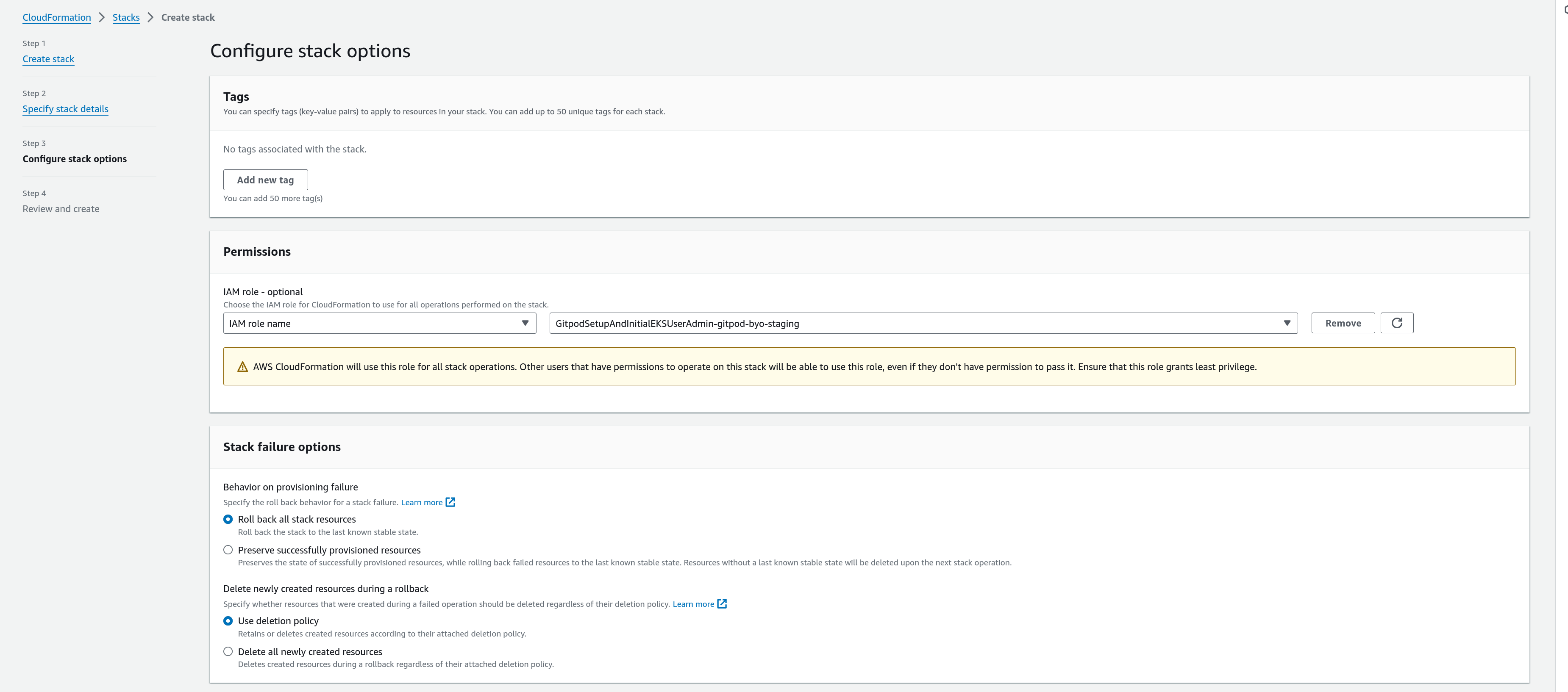 Choose the IAM Role that you found in the output of the role CF template from the dropdown. If you don't see the role there, try pressing the refresh icon to the side to get an updated list of roles. Once you have chosen this, you can proceed to apply your CF template, by continuing to the next page, checking the acknowledgement box and clicking `Submit`.
## Next Steps
The CF stack apply should take around 30 minutes to complete
Once the stack creation completes, you will see a stack output that looks like this
Choose the IAM Role that you found in the output of the role CF template from the dropdown. If you don't see the role there, try pressing the refresh icon to the side to get an updated list of roles. Once you have chosen this, you can proceed to apply your CF template, by continuing to the next page, checking the acknowledgement box and clicking `Submit`.
## Next Steps
The CF stack apply should take around 30 minutes to complete
Once the stack creation completes, you will see a stack output that looks like this
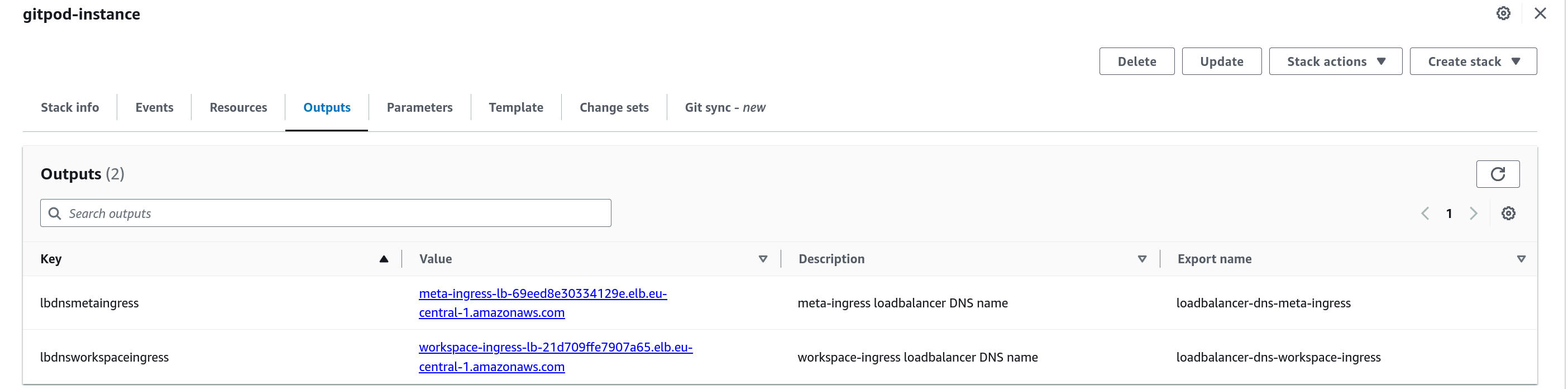 To complete your setup, go ahead and ensure that you complete the DNS setup pointing the loadbalancer endpoints to the corresponding subdomains and making sure you do any extra routing requirements as needed:
If you have chosen auto-configured DNS name and have no more routing
requirements, you can get in touch with your Gitpod account manager who
should generate an admin URL for your setup and you should be able to
proceed to [Configuring your instance](/classic/admin/manage-gitpod/overview).
### [Completing DNS Setup](/classic/admin/deploy-gitpod/dns-setup)
Learn how to finalize your DNS configuration, ensuring that your Gitpod instance is accessible and secure.
### [Using Private VPC Resolvers](/classic/admin/deploy-gitpod/using-private-vpc-resolvers)
Explore how to utilize private VPC resolvers within Gitpod for enhanced networking and connectivity.
To complete your setup, go ahead and ensure that you complete the DNS setup pointing the loadbalancer endpoints to the corresponding subdomains and making sure you do any extra routing requirements as needed:
If you have chosen auto-configured DNS name and have no more routing
requirements, you can get in touch with your Gitpod account manager who
should generate an admin URL for your setup and you should be able to
proceed to [Configuring your instance](/classic/admin/manage-gitpod/overview).
### [Completing DNS Setup](/classic/admin/deploy-gitpod/dns-setup)
Learn how to finalize your DNS configuration, ensuring that your Gitpod instance is accessible and secure.
### [Using Private VPC Resolvers](/classic/admin/deploy-gitpod/using-private-vpc-resolvers)
Explore how to utilize private VPC resolvers within Gitpod for enhanced networking and connectivity.