> ## Documentation Index
> Fetch the complete documentation index at: https://ona.com/docs/llms.txt
> Use this file to discover all available pages before exploring further.
# Overview
Enterprise is the single-tenant deployment mode of Gitpod, that is hosted in your AWS cloud account—yet managed and operated by us.
## Choosing between Pay-as-you-go and Enterprise
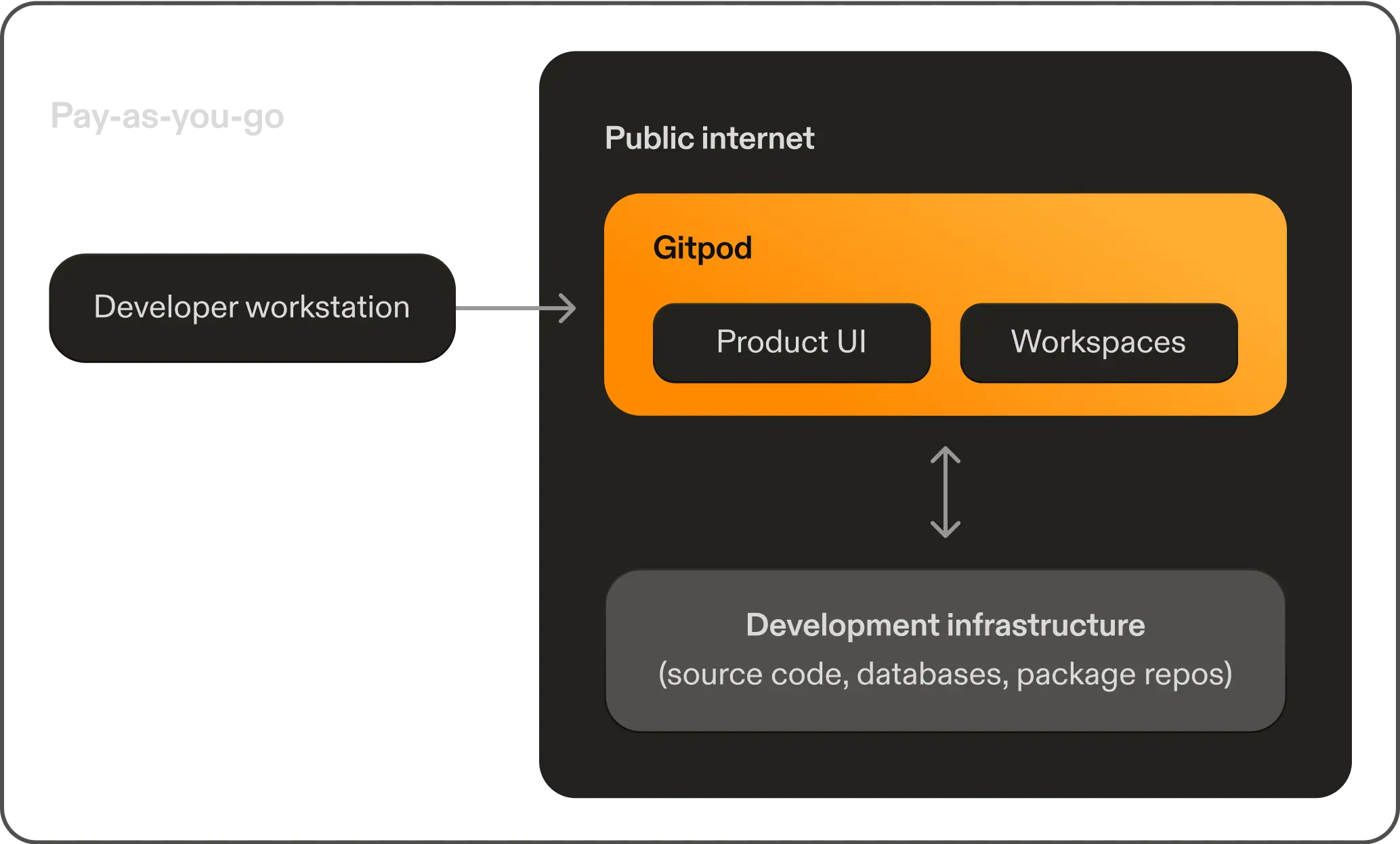
**Pay-as-you-go**: A secure multi-tenant solution that provides environment isolation through use of Linux namespaces. Pay-as-you-go is best for teams who do not have the strict compliance needs of a single-tenant solution.
 **Enterprise**: A single-tenant, operated by Gitpod. The application (data and control plane) is deployed into your AWS cloud account, achieving all of the benefits of a self-hosted solution. Gitpod connects to the Enterprise installation, but only for the purposes of monitoring infrastructure and ensuring timely updates.
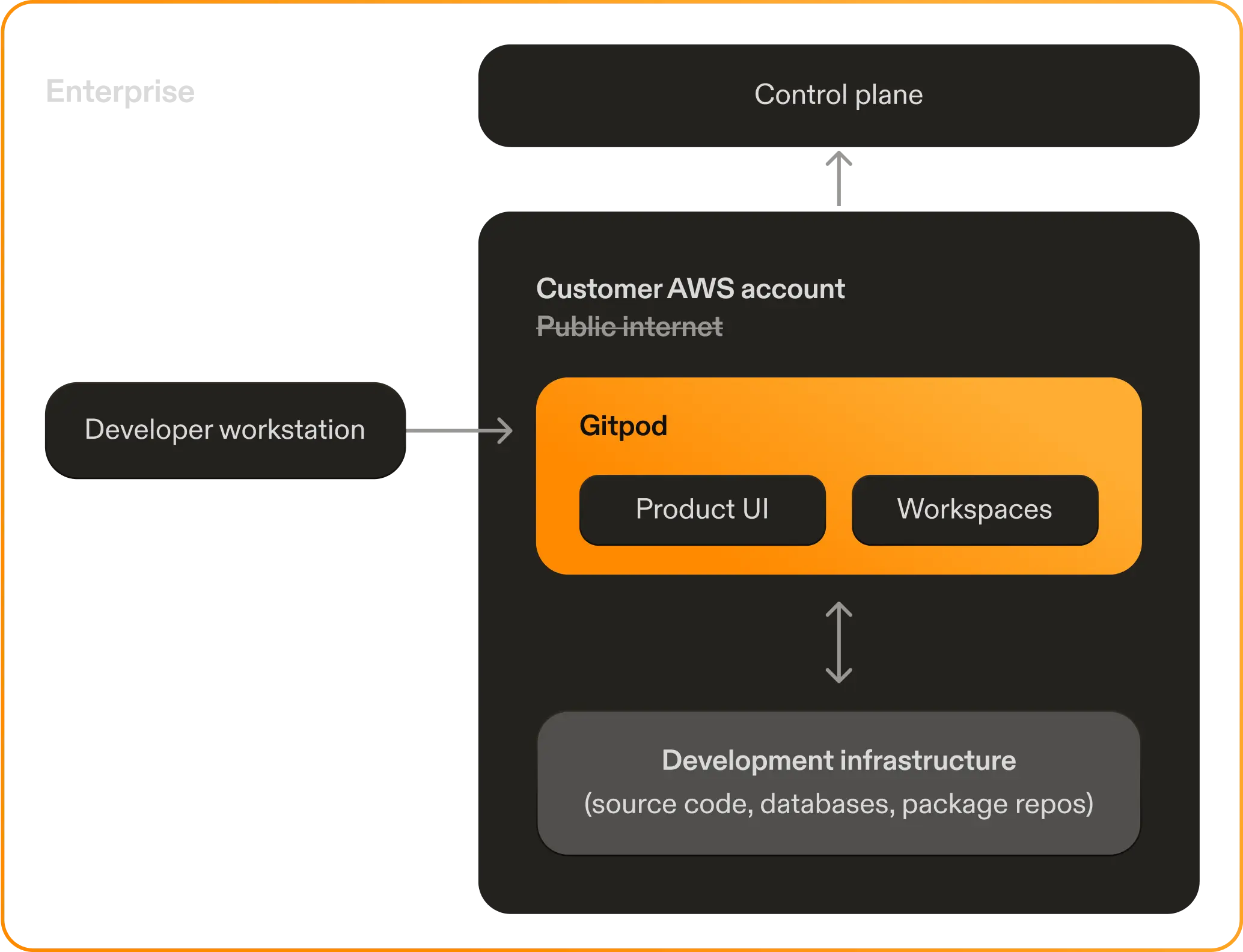 Running Enterprise within customer infrastructure ensures Gitpod does not have direct access to source code, running workspaces or other confidential data. Enterprise satisfies regulatory and compliance-related controls for data residency and access. Enterprise is best for organizations with strict security needs.
| | Pay-as-you-go | Enterprise |
| :---------------: | :---------------------------------------------------------------------------: | :-----------------------------------------------------------------------------------------: |
| Deployment | [Sign up](https://gitpod.io/workspaces/) and use 50h per month for free today | Apply a CloudFormation template in your AWS account |
| Management | Deployed and operated by Gitpod | Deployed and operated by Gitpod |
| Data Isolation | Application layer isolation. Data secured by Gitpod. | Infrastructure layer isolation. Data secured in your cloud account and network. |
| Compute Isolation | Shared infrastructure | Dedicated infrastructure running in your AWS account |
| Observability | Health info and metrics sent to Gitpod | Health info and metrics sent to Gitpod |
| Region | Fixed regions | Choose an [AWS region](https://aws.amazon.com/about-aws/global-infrastructure/regions_az/) |
| Cost | No fixed costs, purely usage-based. | Fixed cost for single-tenant control plane + usage-based. Cloud discounts can reduce costs. |
## The Enterprise Installation Process
Enterprise is deployed into your AWS account using a CloudFormation template. Installation takes as little 30 minutes.
1. Apply CloudFormation template.
2. Control plane is registered.
3. Gitpod is installed.
Once installed, you simply configure a Source Control Management (SCM) e.g. GitHub, GitLab or Bitbucket, and any required resources {/* */} on a corporate network privately using a Transit Gateway attachment. Gitpod then manages and operates the instance.
See [Deployment and Updates](/classic/admin/background/deployment-updates) for how software updates are handled.
Ready to get started? See [Getting started](/classic/admin/installation/overview) for more.
Running Enterprise within customer infrastructure ensures Gitpod does not have direct access to source code, running workspaces or other confidential data. Enterprise satisfies regulatory and compliance-related controls for data residency and access. Enterprise is best for organizations with strict security needs.
| | Pay-as-you-go | Enterprise |
| :---------------: | :---------------------------------------------------------------------------: | :-----------------------------------------------------------------------------------------: |
| Deployment | [Sign up](https://gitpod.io/workspaces/) and use 50h per month for free today | Apply a CloudFormation template in your AWS account |
| Management | Deployed and operated by Gitpod | Deployed and operated by Gitpod |
| Data Isolation | Application layer isolation. Data secured by Gitpod. | Infrastructure layer isolation. Data secured in your cloud account and network. |
| Compute Isolation | Shared infrastructure | Dedicated infrastructure running in your AWS account |
| Observability | Health info and metrics sent to Gitpod | Health info and metrics sent to Gitpod |
| Region | Fixed regions | Choose an [AWS region](https://aws.amazon.com/about-aws/global-infrastructure/regions_az/) |
| Cost | No fixed costs, purely usage-based. | Fixed cost for single-tenant control plane + usage-based. Cloud discounts can reduce costs. |
## The Enterprise Installation Process
Enterprise is deployed into your AWS account using a CloudFormation template. Installation takes as little 30 minutes.
1. Apply CloudFormation template.
2. Control plane is registered.
3. Gitpod is installed.
Once installed, you simply configure a Source Control Management (SCM) e.g. GitHub, GitLab or Bitbucket, and any required resources {/* */} on a corporate network privately using a Transit Gateway attachment. Gitpod then manages and operates the instance.
See [Deployment and Updates](/classic/admin/background/deployment-updates) for how software updates are handled.
Ready to get started? See [Getting started](/classic/admin/installation/overview) for more.