> ## Documentation Index
> Fetch the complete documentation index at: https://ona.com/docs/llms.txt
> Use this file to discover all available pages before exploring further.
# Setting up an NFS share for your workspaces
**Note**: This step is optional and only required when you want your workspaces to have access to an NFS share.
## Creating the NFS share
1. Use the AWS management console and select the account where your Gitpod installation is hosted.
2. Select the *EFS Managed File Storage for EC2* service
3. Select *Create file system*
4. Select the VPC of your Gitpod installation
5. Click the Customize button
6. In *Step 2 Network access* ensure that the Mount targets specify your [*Pod* subnets](/classic/admin/getting-started/networking#2-subnet-separation), in the availability zones for which you deployed Gitpod. The pod subnets should be CGNAT ranges.
* This requires you to create and specify a security group which allows inbound NFS (TCP 2049)
7. Create the NFS share
## How to use your NFS share from your workspace
1. Ensure you've followed steps from above.
2. Create a folder in your workspace like so, `sudo mkdir /efs`.
* Avoid mounting NFS within `/workspace`. It is not compatible.
3. Mount the share to `/efs` in your workspace.
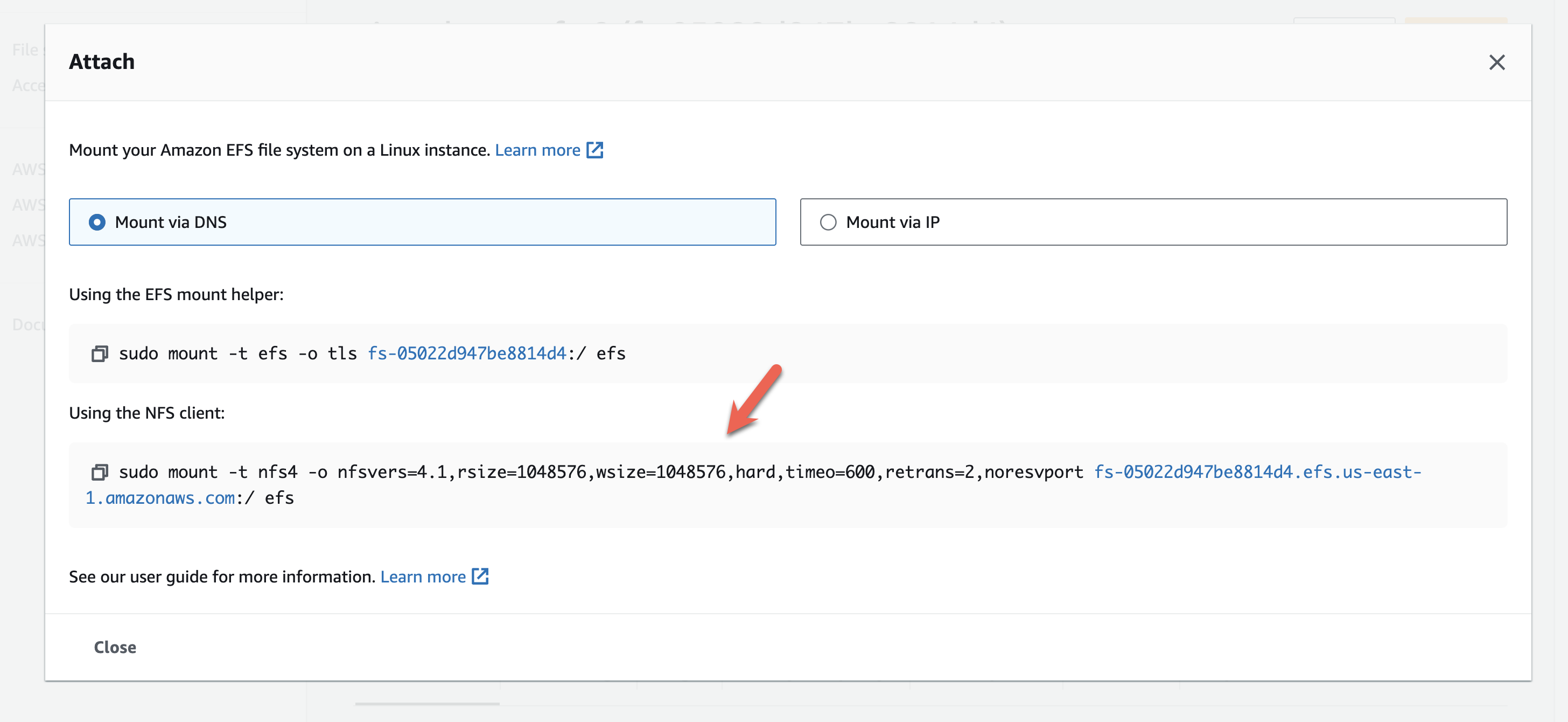
* Click the *Attach* button on the overview page of your EFS file system, copy the command for the NFS client.
* Adjust the copied command, such `efs` at the end is replaced with `/efs`.
 ## How to map users for NFS shares
This set of steps is necessary if you wish to alter how users are mapped.
There are a few prerequisites:
1. Create an NFS share as described above
2. Setup an [EFS Access Point](https://docs.aws.amazon.com/efs/latest/ug/efs-access-points.html) with the the desired properties
* This'll ensure file creation is done as a specific user and group.
3. Add [efs-utils](https://github.com/aws/efs-utils) to the workspace image.
* This'll ensure that from your workspace, you can use NFS via the EFS Access Point.
### Setup the EFS Access Point
Create an EFS Access Point in your AWS console and define the desired properties.
### Update your custom dockerfile
Add the following to your [custom Dockerfile](/classic/user/configure/workspaces/workspace-image#using-a-custom-dockerfile), this supports `efs-utils` in your workspace image.
```bash theme={null}
set -e
# install efs-utils
sudo apt-get update
sudo apt-get -y install git binutils rustc cargo pkg-config libssl-dev gettext
git clone https://github.com/aws/efs-utils && pushd efs-utils
./build-deb.sh
sudo apt-get -y install ./build/amazon-efs-utils*deb
popd && rm -rf ./efs-utils
# install a runtime dependency for efs-utils watchdog
sudo -H pip3 install botocore
```
### Mount the NFS share
Create a mount for the EFS Access Point like so:
```bash theme={null}
REGION="eu-central-1"
EFS_ACCESS_POINT_ID="fsap-12345678"
EFS_FILE_SYSTEM_ID="fs-87654321"
MOUNT_POINT="/efs"
sudo mkdir -p ${MOUNT_POINT}
sudo mount -t efs -o tls,region=${REGION},accesspoint=${EFS_ACCESS_POINT_ID} ${EFS_FILE_SYSTEM_ID}:/ ${MOUNT_POINT}
```
**Note**: Ignore the warning `Could not start amazon-efs-mount-watchdog, unrecognized init system "supervisor"` after doing the mount. `supervisor` is our component responsible for initializing your workspace.
**Suggestion**: Run `sudo amazon-efs-mount-watchdog &`, after creating the mount to the EFS Access Point. Why? As background, when you mount to an EFS Access Point, an `efs-proxy` process is started in your workspace. If it crashes, the watchdog will restart the `efs-proxy`. If `efs-proxy` is not running, you will be unable to use the mount, which is why the watchdog is helpful.
**Limitation**: Docker Compose lacks a plugin for mounting with EFS Access Points. So, you'll need to establish the mount before starting your containers, if using Docker Compose.
## How to map users for NFS shares
This set of steps is necessary if you wish to alter how users are mapped.
There are a few prerequisites:
1. Create an NFS share as described above
2. Setup an [EFS Access Point](https://docs.aws.amazon.com/efs/latest/ug/efs-access-points.html) with the the desired properties
* This'll ensure file creation is done as a specific user and group.
3. Add [efs-utils](https://github.com/aws/efs-utils) to the workspace image.
* This'll ensure that from your workspace, you can use NFS via the EFS Access Point.
### Setup the EFS Access Point
Create an EFS Access Point in your AWS console and define the desired properties.
### Update your custom dockerfile
Add the following to your [custom Dockerfile](/classic/user/configure/workspaces/workspace-image#using-a-custom-dockerfile), this supports `efs-utils` in your workspace image.
```bash theme={null}
set -e
# install efs-utils
sudo apt-get update
sudo apt-get -y install git binutils rustc cargo pkg-config libssl-dev gettext
git clone https://github.com/aws/efs-utils && pushd efs-utils
./build-deb.sh
sudo apt-get -y install ./build/amazon-efs-utils*deb
popd && rm -rf ./efs-utils
# install a runtime dependency for efs-utils watchdog
sudo -H pip3 install botocore
```
### Mount the NFS share
Create a mount for the EFS Access Point like so:
```bash theme={null}
REGION="eu-central-1"
EFS_ACCESS_POINT_ID="fsap-12345678"
EFS_FILE_SYSTEM_ID="fs-87654321"
MOUNT_POINT="/efs"
sudo mkdir -p ${MOUNT_POINT}
sudo mount -t efs -o tls,region=${REGION},accesspoint=${EFS_ACCESS_POINT_ID} ${EFS_FILE_SYSTEM_ID}:/ ${MOUNT_POINT}
```
**Note**: Ignore the warning `Could not start amazon-efs-mount-watchdog, unrecognized init system "supervisor"` after doing the mount. `supervisor` is our component responsible for initializing your workspace.
**Suggestion**: Run `sudo amazon-efs-mount-watchdog &`, after creating the mount to the EFS Access Point. Why? As background, when you mount to an EFS Access Point, an `efs-proxy` process is started in your workspace. If it crashes, the watchdog will restart the `efs-proxy`. If `efs-proxy` is not running, you will be unable to use the mount, which is why the watchdog is helpful.
**Limitation**: Docker Compose lacks a plugin for mounting with EFS Access Points. So, you'll need to establish the mount before starting your containers, if using Docker Compose.