> ## Documentation Index
> Fetch the complete documentation index at: https://ona.com/docs/llms.txt
> Use this file to discover all available pages before exploring further.
# Environment Variables
You can utilize environment variables with Gitpod in the same way as you do locally. You can set environment variables at repository level, which will make them available in all workspaces started on the repository in your organization.
For general information on using and setting up environment variables with Gitpod, see the [Environment Variables](/classic/user/configure/workspaces/environment-variables) documentation.
## Setting Environment Variables in repository settings
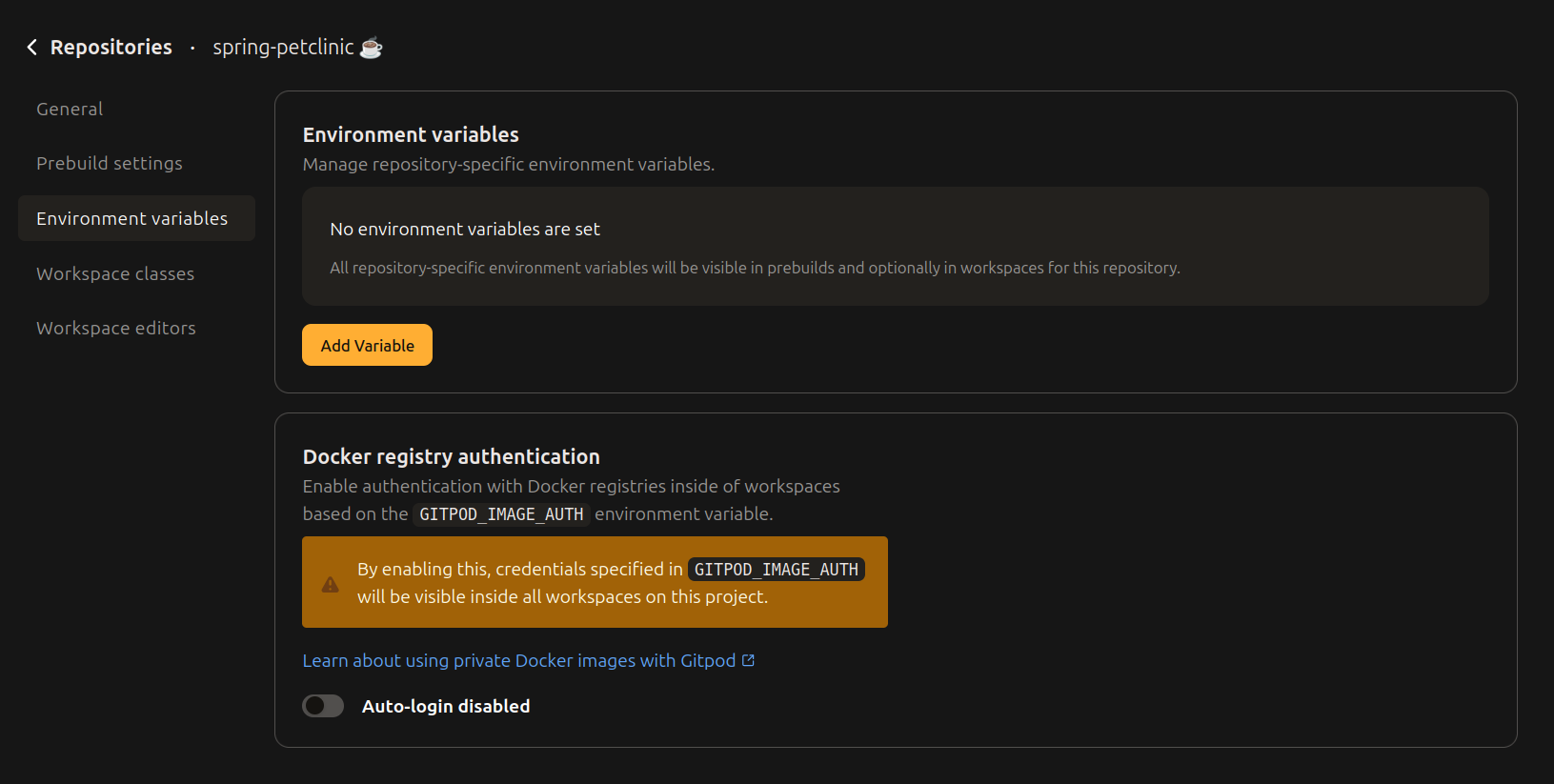 Repository-specific Environment Variables will take precedence over [User-specific Environment Variables](#user-specific-environment-variables). Only members of the [Gitpod organization](/classic/user/configure/orgs) where the repository resides will be able to access the environment variables inside a running workspace. Even if the imported repository is public, people outside your Gitpod organization will *not* have access to these environment variables.
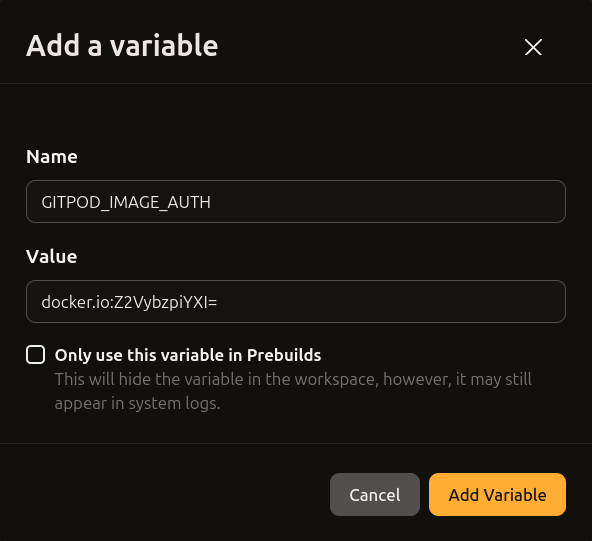 Environment variables defined in a [repositories](/classic/user/configure/repositories) settings will be visible in prebuilds and optionally also in workspaces. This is useful for prebuilds to access restricted services.
## Setting Environment Variables in `.gitpod.yml`
```yml .gitpod.yml theme={null}
tasks:
- name: Example of starting yarn with a custom environment variable set
command: |
# Example for referring to the existing system variables
export API_URL="$HOSTNAME"
# Print out the environment variable
echo "$API_URL"
yarn start
- name: Example of updating PATH environment variable inside a task shell
command: |
# Download and install `fzf` binary to ~/.local/bin/
mkdir -p ~/.local/bin
curl -sL "https://github.com/junegunn/fzf/releases/download/0.35.1/fzf-0.35.1-linux_amd64.tar.gz" | tar -C ~/.local/bin -xpz
# Update PATH variable
export PATH="$HOME/.local/bin:$PATH"
# Now `fzf` can be called without full path from the task shell
ls / | fzf
```
You can use this method when you need to refer to other variables or want to use scripting to set them conditionally.
See [`.gitpod.yml`](/classic/user/references/gitpod-yml#tasksnenv) for more details.
## Setting Environment Variables in Your Source Code
Alternatively, you can use the `env` property in your `.gitpod.yml` file to set non-secret, static environment variables. [Learn more](/classic/user/references/gitpod-yml#env).
Repository variables defined in the repository settings will take precedence and will override variables defined in the `.gitpod.yml`'s `env` property. See the [Environment Variable Prioritization Stack](/classic/user/configure/workspaces/environment-variables#workspace-environment-variable-prioritization-stack) for more.
## Docker Registry Authentication
Gitpod supports the special environment variable `GITPOD_IMAGE_AUTH` to configure access to private Docker registries (cmp. section ["Use a private Docker image"](/classic/user/configure/workspaces/workspace-image#use-a-private-docker-image)).
By default, the environment variable `GITPOD_IMAGE_AUTH` is *not* mounted into workspaces for security reasons. If this is wanted nonetheless (e.g. to enable developers to seamlessly use `docker pull` / `docker push`, or to enable the [`gp validate` workflow](/classic/user/configure/workspaces/workspace-image#validate-and-apply-a-workspace-image)), the repository configuration has a toggle to enable that.
When it's enabled, and `GITPOD_IMAGE_AUTH` is set - either on the repository or organization level -, `dockerd` will be configured with these credentials on workspace start. Also, `GITPOD_IMAGE_AUTH` is visible inside the workspace.
Environment variables defined in a [repositories](/classic/user/configure/repositories) settings will be visible in prebuilds and optionally also in workspaces. This is useful for prebuilds to access restricted services.
## Setting Environment Variables in `.gitpod.yml`
```yml .gitpod.yml theme={null}
tasks:
- name: Example of starting yarn with a custom environment variable set
command: |
# Example for referring to the existing system variables
export API_URL="$HOSTNAME"
# Print out the environment variable
echo "$API_URL"
yarn start
- name: Example of updating PATH environment variable inside a task shell
command: |
# Download and install `fzf` binary to ~/.local/bin/
mkdir -p ~/.local/bin
curl -sL "https://github.com/junegunn/fzf/releases/download/0.35.1/fzf-0.35.1-linux_amd64.tar.gz" | tar -C ~/.local/bin -xpz
# Update PATH variable
export PATH="$HOME/.local/bin:$PATH"
# Now `fzf` can be called without full path from the task shell
ls / | fzf
```
You can use this method when you need to refer to other variables or want to use scripting to set them conditionally.
See [`.gitpod.yml`](/classic/user/references/gitpod-yml#tasksnenv) for more details.
## Setting Environment Variables in Your Source Code
Alternatively, you can use the `env` property in your `.gitpod.yml` file to set non-secret, static environment variables. [Learn more](/classic/user/references/gitpod-yml#env).
Repository variables defined in the repository settings will take precedence and will override variables defined in the `.gitpod.yml`'s `env` property. See the [Environment Variable Prioritization Stack](/classic/user/configure/workspaces/environment-variables#workspace-environment-variable-prioritization-stack) for more.
## Docker Registry Authentication
Gitpod supports the special environment variable `GITPOD_IMAGE_AUTH` to configure access to private Docker registries (cmp. section ["Use a private Docker image"](/classic/user/configure/workspaces/workspace-image#use-a-private-docker-image)).
By default, the environment variable `GITPOD_IMAGE_AUTH` is *not* mounted into workspaces for security reasons. If this is wanted nonetheless (e.g. to enable developers to seamlessly use `docker pull` / `docker push`, or to enable the [`gp validate` workflow](/classic/user/configure/workspaces/workspace-image#validate-and-apply-a-workspace-image)), the repository configuration has a toggle to enable that.
When it's enabled, and `GITPOD_IMAGE_AUTH` is set - either on the repository or organization level -, `dockerd` will be configured with these credentials on workspace start. Also, `GITPOD_IMAGE_AUTH` is visible inside the workspace.