> ## Documentation Index
> Fetch the complete documentation index at: https://ona.com/docs/llms.txt
> Use this file to discover all available pages before exploring further.
# Environment Variables
You can utilize environment variables with Gitpod in the same way as you do locally. You can set environment variables at the user level, which will make them available in all your workspaces (or a specified subset of them).
For general information on using and setting up environment variables with Gitpod, see the [Environment Variables](/classic/user/configure/workspaces/environment-variables) documentation.
Gitpod supports encrypted, user-specific environment variables.
They are stored as part of your user settings and can be used to set access tokens, or pass any other kind of user-specific information to your workspaces.
## Ways of setting user-specific environment variables
### Using the account settings
You can also manage persistent environment variables in [your account settings](https://gitpod.io/user/variables), where you can add as many environment variables as you wish.
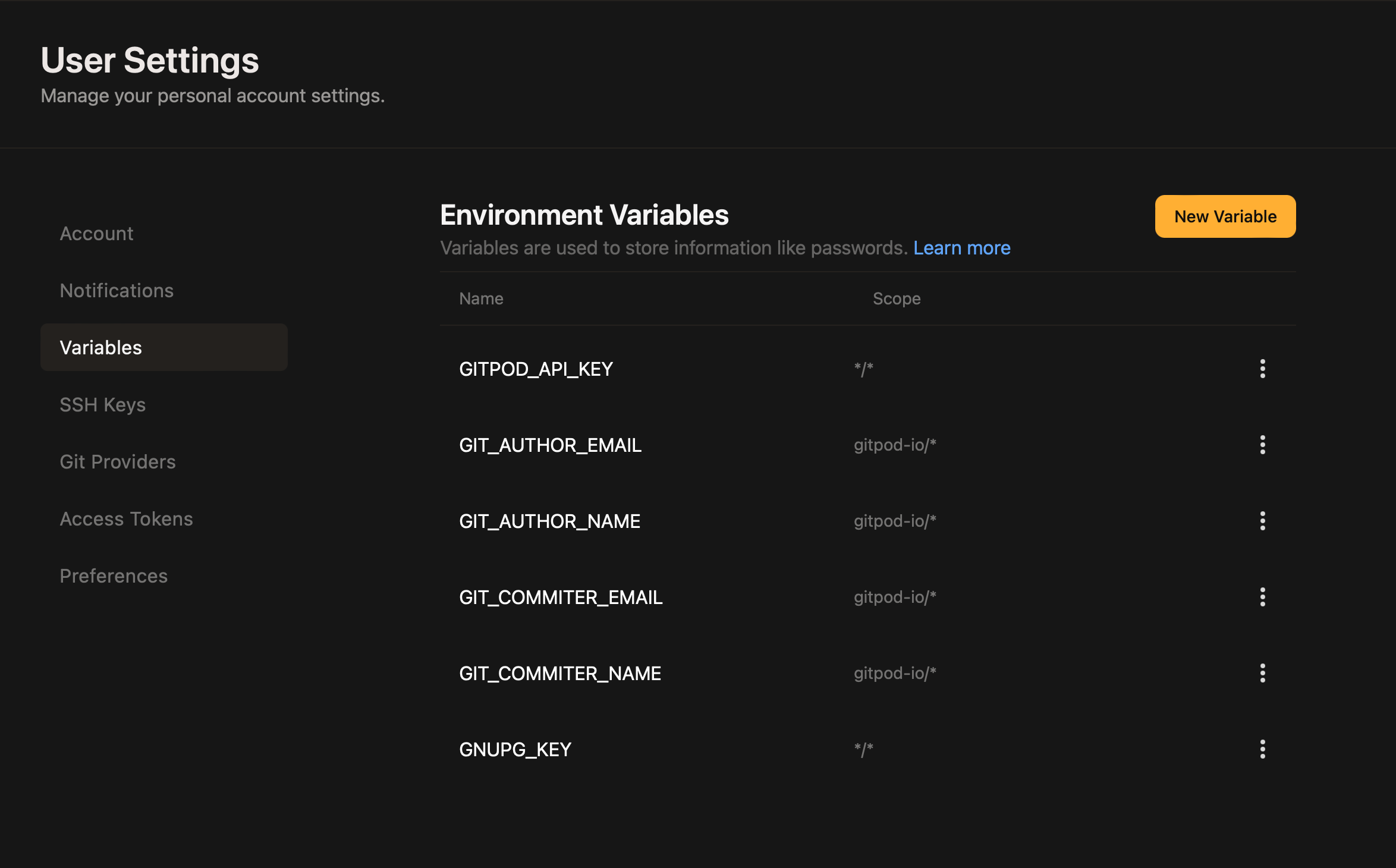 Scope is a feature of Variables that limits which organizations and repositories may use the variable values in workspaces.
Repository patterns follow the `owner/repository` pattern. You can use a wildcard on either of the parts, e.g. `gitpod-io/*` would make that variable available in all repositories owned by `gitpod-io`.
Conversely, `*/vscode` would make that variable available on all repositories called `vscode`, which is especially useful for forks.
`*/*` makes that variable available in all of your workspaces *with that exact hierarchy depth*. If you want to match *all* repositories, no matter the depth, use `*/**`.
**Note**: For GitLab, which allows to have nested group/repository structures like `owner/some-group/sub-group/repo`, the number of segments in the pattern has to match the number of segments in the repository name. This constraint exists to avoid surprises and leaking of content into unexpected repositories. For matching arbitrary segments to the right, there is a dedicated pattern of `**`.
Some example patterns (**for GitLab**) and results for the mentioned `owner/some-group/sub-group/repo` repository:
* `*/**`: ✅
* `*/*`: ❌
* `owner/some-group/*/*`: ✅
* `owner/some-group/*`: ❌
* `owner/some-group/**`: ✅
* `owner/**`: ✅
* `owner/some-group/sub-group/repo`: ✅
* `*/some-group/sub-group/repo`: ✅
While the variable values are stored encrypted, they are available as plain text inside a workspace. Be careful when sharing your live workspace or when using `*/*` or `*/**` as a repository pattern.
### Using the command line: `gp env`
The [Workspace CLI](/classic/user/configure/workspaces/gitpod-cli) prints and modifies the persistent environment variables associated with your user for the current repository.
To set the persistent environment variable `foo` to the value `bar` use:
```sh theme={null}
gp env foo=bar
```
Beware that this does not modify your current terminal session, but rather persists this variable for the next workspace on this repository.
`gp` can only interact with the persistent environment variables for this repository, not the environment variables of your terminal.
If you want to set that environment variable in your terminal, you can do so using `-e`:
```sh theme={null}
eval $(gp env -e foo=bar)
```
If you're using the `fish` shell:
```sh theme={null}
eval (gp env -e foo=bar)
```
To update the current terminal session with the latest set of persistent environment variables, use:
```sh theme={null}
eval $(gp env -e)
```
If you're using the `fish` shell:
```sh theme={null}
eval (gp env -e)
```
To delete a persistent environment variable use:
```sh theme={null}
gp env -u foo
# And if you want to remove it from your shell session too:
unset foo
```
Note that you can only delete/unset variables if their repository pattern matches the repository of the workspace exactly. This means that you cannot delete environment variables with a repository pattern such as `*/foo`, `foo/*` or `*/*`. To remove them, you can use the [account settings](#using-the-account-settings).
```sh theme={null}
Usage:
gp env [flags]
Flags:
-e, --export produce a script that can be eval'ed in Bash
-h, --help help for env
-u, --unset deletes/unsets persisted environment variables
```
Scope is a feature of Variables that limits which organizations and repositories may use the variable values in workspaces.
Repository patterns follow the `owner/repository` pattern. You can use a wildcard on either of the parts, e.g. `gitpod-io/*` would make that variable available in all repositories owned by `gitpod-io`.
Conversely, `*/vscode` would make that variable available on all repositories called `vscode`, which is especially useful for forks.
`*/*` makes that variable available in all of your workspaces *with that exact hierarchy depth*. If you want to match *all* repositories, no matter the depth, use `*/**`.
**Note**: For GitLab, which allows to have nested group/repository structures like `owner/some-group/sub-group/repo`, the number of segments in the pattern has to match the number of segments in the repository name. This constraint exists to avoid surprises and leaking of content into unexpected repositories. For matching arbitrary segments to the right, there is a dedicated pattern of `**`.
Some example patterns (**for GitLab**) and results for the mentioned `owner/some-group/sub-group/repo` repository:
* `*/**`: ✅
* `*/*`: ❌
* `owner/some-group/*/*`: ✅
* `owner/some-group/*`: ❌
* `owner/some-group/**`: ✅
* `owner/**`: ✅
* `owner/some-group/sub-group/repo`: ✅
* `*/some-group/sub-group/repo`: ✅
While the variable values are stored encrypted, they are available as plain text inside a workspace. Be careful when sharing your live workspace or when using `*/*` or `*/**` as a repository pattern.
### Using the command line: `gp env`
The [Workspace CLI](/classic/user/configure/workspaces/gitpod-cli) prints and modifies the persistent environment variables associated with your user for the current repository.
To set the persistent environment variable `foo` to the value `bar` use:
```sh theme={null}
gp env foo=bar
```
Beware that this does not modify your current terminal session, but rather persists this variable for the next workspace on this repository.
`gp` can only interact with the persistent environment variables for this repository, not the environment variables of your terminal.
If you want to set that environment variable in your terminal, you can do so using `-e`:
```sh theme={null}
eval $(gp env -e foo=bar)
```
If you're using the `fish` shell:
```sh theme={null}
eval (gp env -e foo=bar)
```
To update the current terminal session with the latest set of persistent environment variables, use:
```sh theme={null}
eval $(gp env -e)
```
If you're using the `fish` shell:
```sh theme={null}
eval (gp env -e)
```
To delete a persistent environment variable use:
```sh theme={null}
gp env -u foo
# And if you want to remove it from your shell session too:
unset foo
```
Note that you can only delete/unset variables if their repository pattern matches the repository of the workspace exactly. This means that you cannot delete environment variables with a repository pattern such as `*/foo`, `foo/*` or `*/*`. To remove them, you can use the [account settings](#using-the-account-settings).
```sh theme={null}
Usage:
gp env [flags]
Flags:
-e, --export produce a script that can be eval'ed in Bash
-h, --help help for env
-u, --unset deletes/unsets persisted environment variables
```