> ## Documentation Index
> Fetch the complete documentation index at: https://ona.com/docs/llms.txt
> Use this file to discover all available pages before exploring further.
# Multi-repo
> Configure Gitpod to clone multiple repositories into a single workspace.
Suppose your software project comprises of multiple source control repositories. In that case, it's possible to configure Gitpod to clone these additional repositories through the configuration keys of `additionalRepositories` and `mainConfiguration` in the [.gitpod.yml](/classic/user/references/gitpod-yml) file, which removes the need to run multiple workspaces. It makes it easier to configure services that need to be aware of each other.
## Cloning additional repositories
The `additionalRepositories` key is an array of repositories that contains two properties:
* `url`, specifying the source control URL to clone from
* `checkoutLocation`, determining where the repository is cloned (relative to `/workspaces`). By default, this is the cloned repository name
```yml .gitpod.yml theme={null}
# example .gitpod.yml from https://github.com/gitpod-io/demo-multi-repo-frontend
additionalRepositories:
- url: https://github.com/gitpod-io/demo-multi-repo-backend
checkoutLocation: backend
```
When the above configuration is defined, the following additional steps happen when Gitpod workspace starts:
1. If you open a workspace on a branch, Gitpod will clone the same-named branch in all repositories. If such a branch doesn’t exist, Gitpod will create it from the default branch.
2. The contents of `https://github.com/gitpod-io/demo-multi-repo-frontend` are cloned to `/workspaces/demo-multi-repo-frontend`
3. The contents of `https://github.com/gitpod-io/demo-multi-repo-backend` are cloned to `/workspaces/backend`
After all of the source control repositories have been cloned, the `before`, `init` and `command` [tasks](/classic/user/configure/workspaces/tasks) are executed as per usual. If you need to run commands (such as package installation or compilation) on the source control repositories that have been cloned, manually change your working directory of the task to the directory named you defined as the `checkoutLocation` for the additional repo, like so:
```yml .gitpod.yml theme={null}
# example .gitpod.yml from https://github.com/gitpod-io/demo-multi-repo-frontend
additionalRepositories:
- url: https://github.com/gitpod-io/demo-multi-repo-backend
checkoutLocation: backend
tasks:
- name: backend
# change working directory as per configured in `checkoutLocation`
# which is configured above as `/workspaces/backend`
before: |
cd ../backend
init: |
echo npm install
command: |
echo npm run dev
# changing of working directory is not required as these tasks will
# by default by executed in `/workspaces/demo-multi-repo-frontend`
- name: frontend
init: |
echo npm install
echo npm run build
command: |
echo npm run dev
```
Try it out at [https://github.com/gitpod-io/demo-multi-repo-frontend](https://github.com/gitpod-io/demo-multi-repo-frontend)
## Delegating configuration
The optional `mainConfiguration` configuration key, when configured with additional repositories points to the repository with the main [.gitpod.yml](/classic/user/references/gitpod-yml) file and makes it possible to open the same workspace from any issue, branch, or other context URL from any of the participating repositories. Since the main configuration is used for prebuilds, those will show up under the main project.
```yml .gitpod.yml theme={null}
# example .gitpod.yml from https://github.com/gitpod-io/demo-multi-repo-backend
mainConfiguration: https://github.com/gitpod-io/demo-multi-repo-frontend
```
Try it out at [https://github.com/gitpod-io/demo-multi-repo-backend](https://github.com/gitpod-io/demo-multi-repo-backend).
## Adding additional repo folders to VS Code Explorer
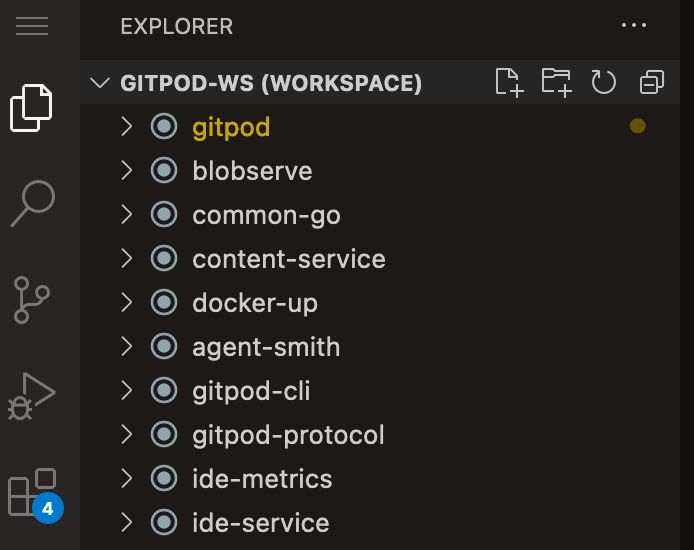 You might want to see the [`additionalRepositories`](#cloning-additional-repositories) on your VS Code.
To do so:
1. Create a file called `main.code-workspace` (for example) on your main(e.g. frontend) repository that everyone is expected to open via Gitpod.
2. Now you can define the folder paths:
```json theme={null}
{
// All paths are relative to your main repo
// The additional repos are cloned inside /workspace dir
"folders": [
{
"path": "." // Main repo that you will open in Gitpod (e.g. frontend)
},
{
"path": "../backend" // Additional repo
},
{
"path": "../db" // Additional repo
}
]
}
```
3. Specify your `.code-workspace` file path on `.gitpod.yml`:
```yml .gitpod.yml theme={null}
workspaceLocation: frontend/main.code-workspace # Relative to /workspace dir
```
4. [Validate your configuration changes](/classic/user/configure/workspaces#validate-your-gitpod-configuration) by running `gp validate` in your workspace.
5. [Apply your .gitpod.yml changes](/classic/user/configure/workspaces#apply-configuration-changes) by committing and restarting a new workspace.
## FAQs
### Single repo but instances of multiple branches
If you want to create multiple instances of one repository with different branches, you could use such a method:
```yml .gitpod.yml theme={null}
tasks:
- name: Multi branch
before: |
# Get primary repo dir path and name
main_repo_dir="${GITPOD_REPO_ROOT}"
primary_repo_name="${main_repo_dir##*/}"
# Array for BRANCH name(s).
extra_clone_branches=(
backend
docs
next
)
for reference in "${extra_clone_branches[@]}"; do {
dir="${main_repo_dir}-${reference}"
if test ! -e "${dir}" && git -C "${main_repo_dir}" show-ref --quiet "refs/heads/${reference}"; then {
printf 'INFO: %s\n' "Duplicating ${primary_repo_name} to ${dir} with ${reference} branch"
cp -ra "${main_repo_dir}" "${dir}"
git -C "${dir}" checkout "${reference}" 2>&1 | grep -v "Switched to branch '${reference}'"
} fi
} done
# Send signal to awaiting task(s)
gp sync-done multi_branch
- name: Some other task
command: |
# Wait for multi_branch to avoid race condition
gp sync-await multi_branch
echo hello
true 'something'
```
You might want to see the [`additionalRepositories`](#cloning-additional-repositories) on your VS Code.
To do so:
1. Create a file called `main.code-workspace` (for example) on your main(e.g. frontend) repository that everyone is expected to open via Gitpod.
2. Now you can define the folder paths:
```json theme={null}
{
// All paths are relative to your main repo
// The additional repos are cloned inside /workspace dir
"folders": [
{
"path": "." // Main repo that you will open in Gitpod (e.g. frontend)
},
{
"path": "../backend" // Additional repo
},
{
"path": "../db" // Additional repo
}
]
}
```
3. Specify your `.code-workspace` file path on `.gitpod.yml`:
```yml .gitpod.yml theme={null}
workspaceLocation: frontend/main.code-workspace # Relative to /workspace dir
```
4. [Validate your configuration changes](/classic/user/configure/workspaces#validate-your-gitpod-configuration) by running `gp validate` in your workspace.
5. [Apply your .gitpod.yml changes](/classic/user/configure/workspaces#apply-configuration-changes) by committing and restarting a new workspace.
## FAQs
### Single repo but instances of multiple branches
If you want to create multiple instances of one repository with different branches, you could use such a method:
```yml .gitpod.yml theme={null}
tasks:
- name: Multi branch
before: |
# Get primary repo dir path and name
main_repo_dir="${GITPOD_REPO_ROOT}"
primary_repo_name="${main_repo_dir##*/}"
# Array for BRANCH name(s).
extra_clone_branches=(
backend
docs
next
)
for reference in "${extra_clone_branches[@]}"; do {
dir="${main_repo_dir}-${reference}"
if test ! -e "${dir}" && git -C "${main_repo_dir}" show-ref --quiet "refs/heads/${reference}"; then {
printf 'INFO: %s\n' "Duplicating ${primary_repo_name} to ${dir} with ${reference} branch"
cp -ra "${main_repo_dir}" "${dir}"
git -C "${dir}" checkout "${reference}" 2>&1 | grep -v "Switched to branch '${reference}'"
} fi
} done
# Send signal to awaiting task(s)
gp sync-done multi_branch
- name: Some other task
command: |
# Wait for multi_branch to avoid race condition
gp sync-await multi_branch
echo hello
true 'something'
```