> ## Documentation Index
> Fetch the complete documentation index at: https://ona.com/docs/llms.txt
> Use this file to discover all available pages before exploring further.
# Tasks
To get the most out of ephemeral developer environments, it is important to let Gitpod know how to build your project. We can achieve this by defining `tasks` in the [`.gitpod.yml`](/classic/user/references/gitpod-yml) configuration file.
In your local developer environment, you likely set up your project only once. If you work in a team, you probably have written instructions on how to get started. With Gitpod, you automate these manual steps so that a new environment can be set up repeatedly by Gitpod.
Tasks are shell scripts that run on top of the Docker image you configure (learn more about [custom Docker images](/classic/user/configure/workspaces/workspace-image)).
## Task types and execution order
Tasks in Gitpod are categorized into three types:
* `before`: Preparatory steps that should run before the main setup, such as setting up tools or permissions.
* `init`: Long running processes that setup the project and workspace file system, like downloading dependencies and building code.
* `command`: Commands that start your main application or services.
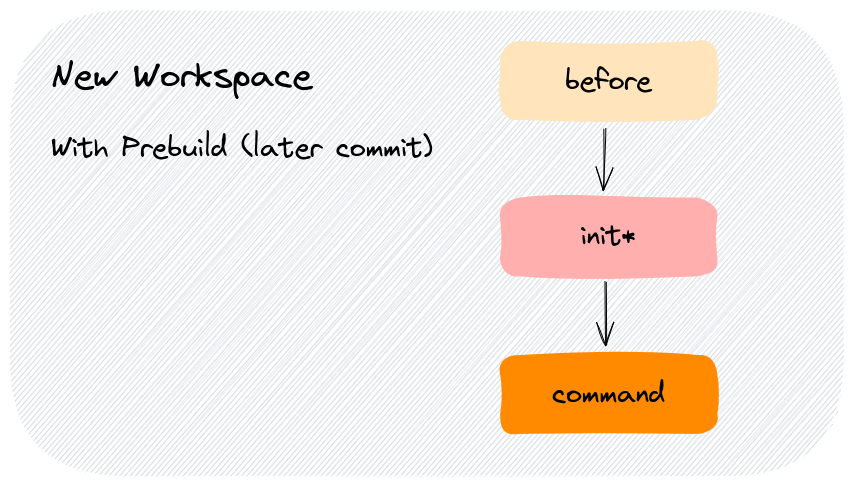
The execution of tasks varies, it depends on whether prebuilds are [enabled](#start-a-workspace-with-prebuild) or [not](#start-a-workspace-without-prebuild), and if the [prebuild is incremental](#prebuild%3A-incremental).
### Task immutability
Tasks are set on workspace create, and are immutable over the lifespan of a workspace (start/stop/restart).
**With prebuilds enabled:**
* Tasks are set using the most recent, successful prebuild
**With prebuilds disabled:**
* Tasks are set using the context (a SCM repo, a snapshot from `gp snapshot`, etc.)
**With or without prebuilds:**
* If you modify Tasks in an existing workspace or push it to your repository, the change will not be reflected in existing workspaces
```bash theme={null}
tasks:
- before: echo "before" >> /workspace/tasks # inline script is immutable
init: echo "init" >> /workspace/tasks
command: ./.gitpod/command.sh # the script contents are mutable
```
#### Mutable Tasks
Reference shell script files in your Tasks (see above Command in the example), if you'd like mutability.
Prebuilds have been updated to trigger less frequently, now by default occurring on every 20th commit to reduce resource consumption and improve efficiency (see the [prebuild docs](/classic/user/configure/repositories/prebuilds)).
> **Caveats**
>
> * Any file changes made outside of `/workspace` file hierarchy from `init` tasks will be lost on workspace start when prebuilds are enabled. [Learn more](/classic/user/configure/repositories/prebuilds#workspace-directory-only)
> * User specific environment variables are not loaded automatically for `init` and `before` tasks but can be loaded if you want. [Learn more](/classic/user/configure/repositories/prebuilds#user-specific-environment-variables-in-prebuilds)
### Iterating on Tasks
There are two styles or loops for iterating on tasks:
* The inner loop - from within a workspace - faster, use for quick iteration
* The outer loop - from Gitpod's dashboard - slower, use for end-to-end testing
#### Inner loop
Customize Tasks and use [`gp validate` or `gp validate --prebuild`](/classic/user/configure/workspaces/overview#validate-your-gitpod-configuration) to test in a debug workspace. The debug workspace runs as a container within your workspace and shares its file system.
`gp validate` will incur an image build. After which, iteration is quick because docker images have been pulled and built.
You are responsible for managing `/workspace` content. For example, if Tasks mutate state or consume freespace, as you iterate, reset state or delete files in `/workspace` as needed. For example, state could be programs you build, test harness output, or cached docker images.
#### Outer loop
Push your changes, trigger a prebuild if the repository has them enabled, and create a new workspace.
### Prebuilds
Prebuilds allow for pre caching of dependencies, build artifacts and other setup steps. Prebuilds run in the background and execute the `before` and `init` tasks. Workspaces are then created based on the result of the most recent prebuild, which allows for faster workspace startup times.
The `init` task is where you want to do things like:
* Download & install dependencies
* Compile your source code
* Run database migrations
* Run code generation
* Any other long-running, terminating processes necessary to prepare your project
`init` tasks can be re-run on the same file-system state under certain conditions (cmp. [Prebuild: Incremental](#prebuild-incremental)), so they should be **idempotent**: no matter how often they are triggered, they should return the same result.
Changing either the `before` or `init` tasks will always trigger a new prebuild. See [Use of prebuilds](/classic/user/configure/repositories/prebuilds#use-of-prebuilds) for more information.
[Enable prebuilds](/classic/user/configure/repositories/prebuilds#configuring-prebuilds), and let Gitpod run the time-consuming `init` tasks continuously behind the scene so you and anyone who opens your project on Gitpod doesn't have to wait.
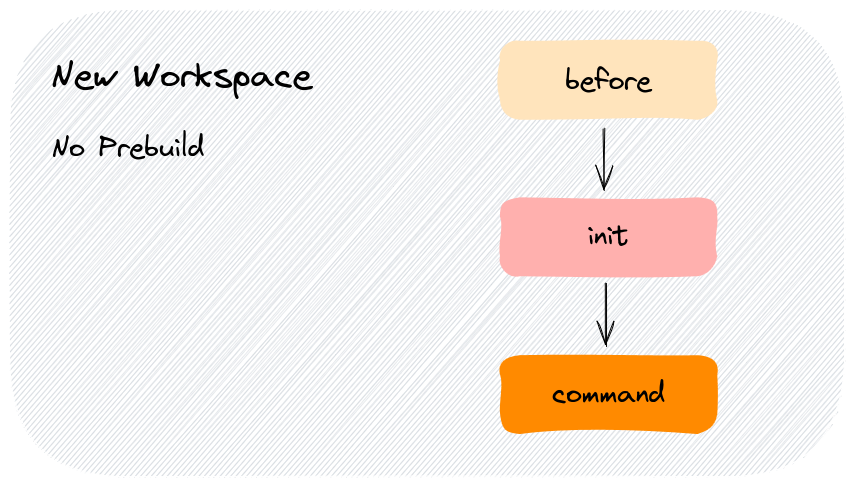
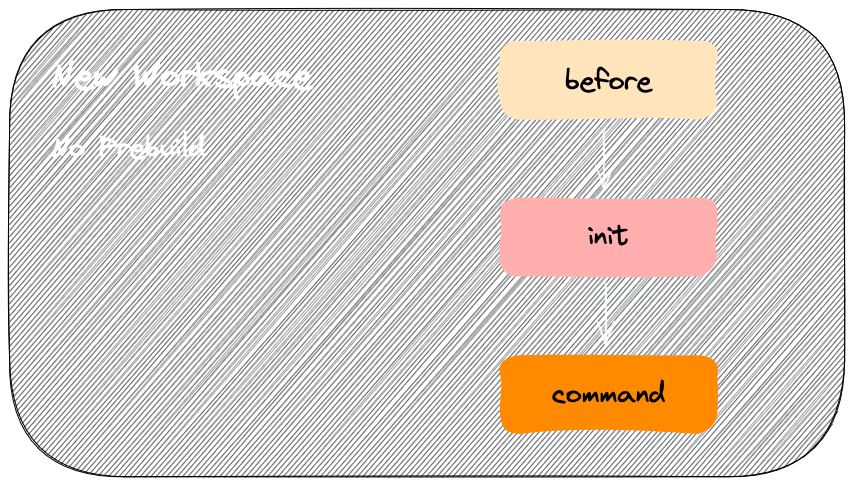
### Start a workspace (without prebuild)
The workspace is started, but Gitpod can't find a suitable prebuild (yet): all tasks `before`, `init` and `command` are executed in that order.
### Start a workspace (with prebuild)
Which tasks are executed depends on the exact commit used to start a) your workspace and b) the prebuild. There are two scenarios: "perfect match" and "incremental".
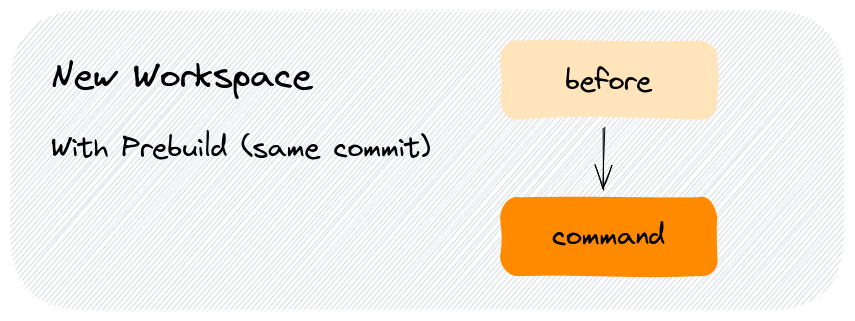
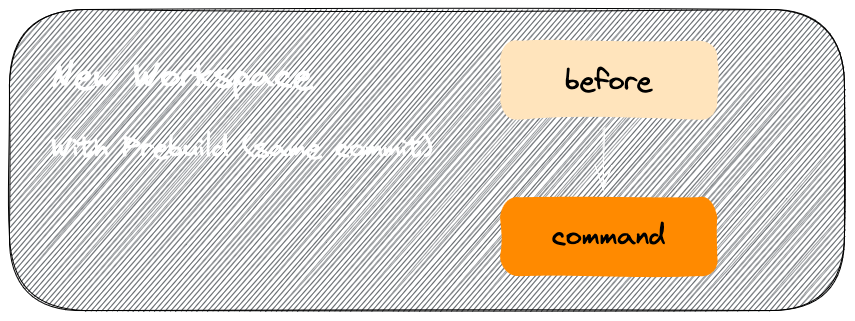
#### Prebuild: Perfect match
The workspace is started, and Gitpod was able to find a prebuild that ran on exactly the same commit.
In this case, your `before` and `command` tasks are executed: `init` already ran as part of the prebuild.
#### Prebuild: Incremental
The workspace is started, and Gitpod found a prebuild that ran on a slightly older commit than the workspace (cmp. the [Commit Interval](/classic/user/configure/repositories/prebuilds#configuring-prebuilds) setting).
In this case, we have to refresh the prebuild: all tasks `before`, `init` (!) and `command` are executed.
Although `init` is executed like on a regular workspace startup, the execution should still be way faster: Caches are pre-fetched, external dependencies downloaded, and almost all build systems support incremental builds.
### Restart a Workspace
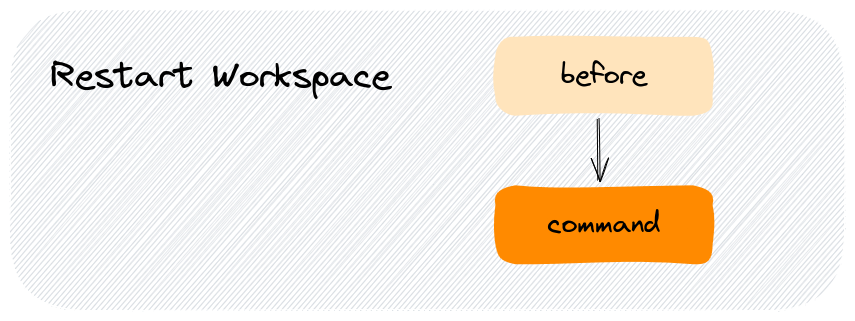
When you restart a workspace, Gitpod already executed the `init` task ([see above](#prebuild-and-new-workspaces)) either as part of a prebuild or when you started the workspace for the first time.
As part of a workspace restart, Gitpod executes the `before` and `command` tasks:
### Start a Snapshot
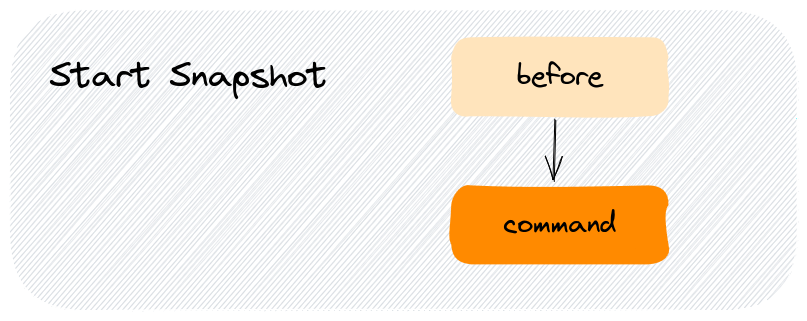
When you start a snapshot, Gitpod already executed the `init` task ([see above](#prebuild-and-new-workspaces)) either as part of a prebuild or when you or a team member started the snapshot's initial workspace for the first time.
As part of starting a snapshot, Gitpod executes the `before` and `command` tasks:
## Configure the terminal
You can configure where terminals open using the `openMode` properties below.
Please note that this information is used if no previous terminals in the layout exist.
Snapshots will first try to reuse existing terminals in the layout, before opening new ones.
```yml theme={null}
tasks:
- name: Static Server
command: python3 -m http.server 8080
- name: DB Server
command: sh ./scripts/start-db.sh
openMode: split-right
```
### openMode
You can configure how the terminal should be opened relative to the previous task.
| openMode | Description |
| ------------------------ | ---------------------------------------------------------- |
| `openMode: tab-after` | Opens in the same tab group right after the previous tab |
| `openMode: tab-before` | Opens in the same tab group left before the previous tab |
| `openMode: split-right` | Splits and adds the terminal to the right |
| `openMode: split-left` | Splits and adds the terminal to the left |
| `openMode: split-top` | **Deprecated**. Splits and adds the terminal to the top |
| `openMode: split-bottom` | **Deprecated**. Splits and adds the terminal to the bottom |
## Example Tasks
The examples below are common use cases you can get inspired by and adjust for your project's needs.
> **Note**: `before` and `init` tasks need to terminate while `command` can run indefinitely (i.e. until cancelled with Ctrl + C). This is because `before` and `init` may run as part of a prebuild and if these tasks do not terminate, the prebuild will eventually fail with a timeout.
### One-line tasks
Each task contains a single `npm` command. The `init` task terminates once the dependencies are installed while the `command` task starts a development server and does not terminate.
```yml theme={null}
tasks:
- name: Dev Server
init: npm install
command: npm run dev
```
### Multi-line tasks
To run multiple commands for a given task, you can use the `|` notation where each line below (make sure you indent correctly) runs in sequence once the previous command terminates.
In the following example, the `init` task installs dependencies and configures a database. Then, the `command` task starts the dev server(s).
> **Note**: In case of multiple terminals, there is no guarantee on the order in which tasks execute. The only guarantee you have is that `before`, `init` and `command` execute in that sequence **per terminal**.
```yml theme={null}
tasks:
- name: Dependencies & Database
init: |
npm install
npm run configure-database
command: npm run dev
```
This doesn't stop execution on errors. If `npm install` in the example above fails, the `npm run configure-database` will still run. See [how to exit after failure](#immediately-exit-for-any-command-failure-within-a-task) below for a workaround.
### Wait for commands to complete
When working with multiple terminals, you may have a situation where terminal 1 runs build scripts and terminal 2 and 3 require that these scripts complete first. This can be achieved with [`gp sync-await`](/classic/user/references/gitpod-cli#sync-await) and [`gp sync-done`](/classic/user/references/gitpod-cli#sync-done).
```yml .gitpod.yml theme={null}
tasks:
- name: Rails
init: >
bundle install &&
yarn install --check-files &&
rails db:setup &&
gp sync-done bundle # 'bundle' is an arbitrary name
command: rails server
- name: Webpack
init: gp sync-await bundle # wait for the above 'init' to finish
command: bin/webpack-dev-server
- name: Redis
init: gp sync-await bundle
command: redis-server
- name: Sidekiq
init: gp sync-await bundle
command: sidekiq
```
### Wait for a port to be available
Let's say you have a web app dev server that takes a moment to start up to listen on port 3000. Once it's up and running, you want to run end-to-end tests against `http://localhost:3000`.
You can achieve this with two terminals and the `gp ports await` CLI command.
```yml .gitpod.yml theme={null}
tasks:
- name: Dev Server
init: npm install
command: npm run dev
- name: e2e Tests
command: |
gp ports await 3000
npm run test
```
### Immediately exit for any command failure within a task
If you wish to halt an entire task with for an error within the task script, then you could do the following:
```yml .gitpod.yml theme={null}
tasks:
- init: |
(
set -e # Tells bash to immediately exit on failure off a command
bundle install
yarn install --frozen-lockfile
bundle exec rake
bundle exec nanoc compile
)
```
Gitpod starts all your `tasks` inside separate `bash` (`$SHELL`) shells. Gitpod can only assert the exit status of the shell process of a task. Normally `bash` or other shells don't halt on a failure of a command unless you explicitly ask it to. `bash` only inherits the last exit status of a script run with it before it's own `exit`. Hence Gitpod can't determine if all of your commands inside the `init` task succeeded. To have that effect, you can put `set -e;` on top of task shell-commands and wrap your whole task-script with `()` to configure that particular task shell to halt and immediately exit with an error code for a failure of any command. This can be specially helpful for prebuilds (i.e `init` tasks)
### Task Coupling
Gitpod creates terminal sessions for tasks based on your `.gitpod.yml` configuration. Consider the following example where tasks are defined within a single terminal session:
```yaml .gitpod.yml theme={null}
tasks:
- before: export PORT=8080
init: npm install
command: |
cp .env.example .env
npm run dev
```
Gitpod couples these tasks into a chained bash command, executing them sequentially in one terminal as a whole command, as shown below:
```bash theme={null}
{ export PORT=8080; } && { npm install; } && {
cp .env.example .env
npm run dev
}
```
When a prebuild is involved, the execution might look like this after a workspace starts:
```bash theme={null}
{ export PORT=8080; } && { cat /workspace/.gitpod/prebuild-logs-0; } && {
cp .env.example .env
npm run dev
}
```
Now, consider this `.gitpod.yml` configuration:
```yaml .gitpod.yml theme={null}
tasks:
- before: touch .foo
- init: npm install
- command: |
cp .env.example .env
npm run dev
```
In this case, instead of coupling the `before`, `init`, and `command` steps in one terminal, each task runs in a separate terminal in parallel. This approach is sometimes desired, and in such cases, you might also be interested in our [gp sync-await](/classic/user/configure/workspaces/gitpod-cli#sync-await) command.
 ### Start a workspace (with prebuild)
Which tasks are executed depends on the exact commit used to start a) your workspace and b) the prebuild. There are two scenarios: "perfect match" and "incremental".
#### Prebuild: Perfect match
The workspace is started, and Gitpod was able to find a prebuild that ran on exactly the same commit.
In this case, your `before` and `command` tasks are executed: `init` already ran as part of the prebuild.
### Start a workspace (with prebuild)
Which tasks are executed depends on the exact commit used to start a) your workspace and b) the prebuild. There are two scenarios: "perfect match" and "incremental".
#### Prebuild: Perfect match
The workspace is started, and Gitpod was able to find a prebuild that ran on exactly the same commit.
In this case, your `before` and `command` tasks are executed: `init` already ran as part of the prebuild.
 #### Prebuild: Incremental
The workspace is started, and Gitpod found a prebuild that ran on a slightly older commit than the workspace (cmp. the [Commit Interval](/classic/user/configure/repositories/prebuilds#configuring-prebuilds) setting).
In this case, we have to refresh the prebuild: all tasks `before`, `init` (!) and `command` are executed.
#### Prebuild: Incremental
The workspace is started, and Gitpod found a prebuild that ran on a slightly older commit than the workspace (cmp. the [Commit Interval](/classic/user/configure/repositories/prebuilds#configuring-prebuilds) setting).
In this case, we have to refresh the prebuild: all tasks `before`, `init` (!) and `command` are executed.
 ### Start a Snapshot
When you start a snapshot, Gitpod already executed the `init` task ([see above](#prebuild-and-new-workspaces)) either as part of a prebuild or when you or a team member started the snapshot's initial workspace for the first time.
As part of starting a snapshot, Gitpod executes the `before` and `command` tasks:
### Start a Snapshot
When you start a snapshot, Gitpod already executed the `init` task ([see above](#prebuild-and-new-workspaces)) either as part of a prebuild or when you or a team member started the snapshot's initial workspace for the first time.
As part of starting a snapshot, Gitpod executes the `before` and `command` tasks:
 ## Configure the terminal
You can configure where terminals open using the `openMode` properties below.
Please note that this information is used if no previous terminals in the layout exist.
Snapshots will first try to reuse existing terminals in the layout, before opening new ones.
```yml theme={null}
tasks:
- name: Static Server
command: python3 -m http.server 8080
- name: DB Server
command: sh ./scripts/start-db.sh
openMode: split-right
```
### openMode
You can configure how the terminal should be opened relative to the previous task.
## Configure the terminal
You can configure where terminals open using the `openMode` properties below.
Please note that this information is used if no previous terminals in the layout exist.
Snapshots will first try to reuse existing terminals in the layout, before opening new ones.
```yml theme={null}
tasks:
- name: Static Server
command: python3 -m http.server 8080
- name: DB Server
command: sh ./scripts/start-db.sh
openMode: split-right
```
### openMode
You can configure how the terminal should be opened relative to the previous task.