> ## Documentation Index
> Fetch the complete documentation index at: https://ona.com/docs/llms.txt
> Use this file to discover all available pages before exploring further.
# AWS Bedrock Mantle
> Set up AWS Bedrock Mantle for OpenAI model routing on an AWS EC2 runner
Available for Enterprise organizations where OpenAI model routing is enabled. [Contact sales](https://ona.com/contact/sales) to learn more.
This feature is only supported in **AWS EC2 Runners**.
Use AWS Bedrock Mantle when your AWS EC2 runner should route OpenAI model requests through a Bedrock Mantle endpoint.
This page covers the OpenAI setup exposed in Ona. For Anthropic Claude models through AWS Bedrock Runtime, see [AWS Bedrock](/ona/agents/llm-providers/bedrock).
## Prerequisites
* Your organization has OpenAI model routing enabled.
* You have an AWS EC2 runner configured in Ona.
* You have a Bedrock Mantle endpoint and token.
* The runner can reach the Bedrock Mantle endpoint over HTTPS.
## Configure the endpoint
Use the Bedrock Mantle endpoint for your AWS region:
```bash theme={null}
https://bedrock-mantle..api.aws/openai/v1/responses
```
The Ona UI defaults to:
```bash theme={null}
https://bedrock-mantle.us-east-1.api.aws/openai/v1/responses
```
## Add the integration with the UI
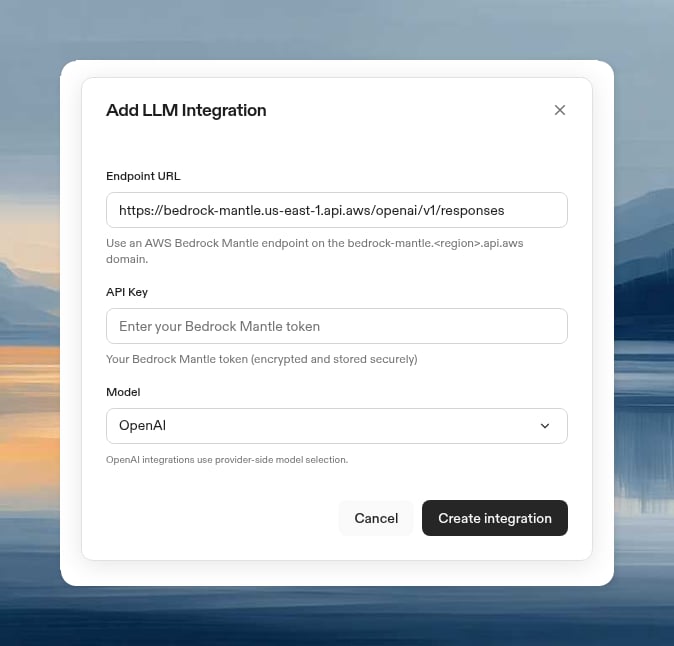
1. Go to the [Runners settings page](https://app.ona.com/settings/runners).
2. Select the AWS EC2 runner where you want to configure Bedrock Mantle.
3. Scroll to **LLM Providers**.
4. Click **Configure**.
5. Select **AWS Bedrock Mantle**.
6. Confirm that the model option is **OpenAI**.
7. Enter your Bedrock Mantle endpoint.
8. Paste the Bedrock Mantle token into **API Key**.
9. Click **Create Integration**.
 ## Add the integration with the CLI
```bash theme={null}
gitpod runner config llm-integration create SUPPORTED_MODEL_OPENAI_AUTO https://bedrock-mantle..api.aws/openai/v1/responses
```
To verify the integration:
```bash theme={null}
gitpod runner config llm-integration list
```
## Verify the integration
1. Create a new environment with the configured AWS EC2 runner.
2. Start an agent that uses OpenAI model routing.
3. Confirm that the agent can answer a simple code question.
## Troubleshooting
AWS Bedrock Mantle is available only on AWS EC2 runners when OpenAI model routing is enabled for your organization. It is not shown on GCP runners.
Use an endpoint on the `bedrock-mantle..api.aws` domain. For OpenAI model routing, include the `/openai/v1/responses` path.
Confirm that the value in **API Key** is a Bedrock Mantle token. AWS Bedrock Mantle does not use the IAM-based credential flow from the AWS Bedrock Runtime integration.
## Add the integration with the CLI
```bash theme={null}
gitpod runner config llm-integration create SUPPORTED_MODEL_OPENAI_AUTO https://bedrock-mantle..api.aws/openai/v1/responses
```
To verify the integration:
```bash theme={null}
gitpod runner config llm-integration list
```
## Verify the integration
1. Create a new environment with the configured AWS EC2 runner.
2. Start an agent that uses OpenAI model routing.
3. Confirm that the agent can answer a simple code question.
## Troubleshooting
AWS Bedrock Mantle is available only on AWS EC2 runners when OpenAI model routing is enabled for your organization. It is not shown on GCP runners.
Use an endpoint on the `bedrock-mantle..api.aws` domain. For OpenAI model routing, include the `/openai/v1/responses` path.
Confirm that the value in **API Key** is a Bedrock Mantle token. AWS Bedrock Mantle does not use the IAM-based credential flow from the AWS Bedrock Runtime integration.