> ## Documentation Index
> Fetch the complete documentation index at: https://ona.com/docs/llms.txt
> Use this file to discover all available pages before exploring further.
# OpenAI BYOK
> Set up a runner LLM integration that uses your OpenAI API key
Available for Enterprise organizations where OpenAI model routing is enabled. [Contact sales](https://ona.com/contact/sales) to learn more.
Use OpenAI BYOK when your organization wants OpenAI model requests to use your OpenAI API key or OpenAI-compatible endpoint.
This page covers organization-level runner configuration. To connect a user's ChatGPT plan for Codex, see [Connect Codex to ChatGPT](/ona/integrations/configure-codex).
## Prerequisites
* Your organization has OpenAI model routing enabled.
* You have an enterprise runner configured in Ona.
* The runner can reach your OpenAI or OpenAI-compatible endpoint over HTTPS.
* You have an OpenAI API key or the credentials required by your OpenAI-compatible endpoint.
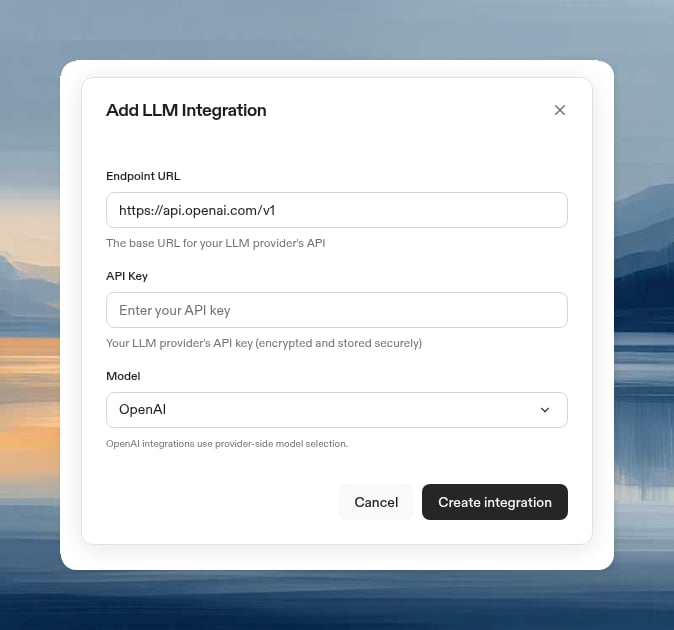
## Add the integration with the UI
1. Go to the [Runners settings page](https://app.ona.com/settings/runners).
2. Select the runner where you want to configure OpenAI BYOK.
3. Scroll to **LLM Providers**.
4. Click **Configure**.
5. Select **OpenAI**.
6. Use the **OpenAI** model option.
7. Use `https://api.openai.com/v1` for direct OpenAI, or enter your OpenAI-compatible endpoint.
8. Paste the API key into **API Key**.
9. Click **Create Integration**.
 ## Add the integration with the CLI
```bash theme={null}
gitpod runner config llm-integration create SUPPORTED_MODEL_OPENAI_AUTO https://api.openai.com/v1
```
For an OpenAI-compatible endpoint, replace `https://api.openai.com/v1` with your endpoint URL.
To verify the integration:
```bash theme={null}
gitpod runner config llm-integration list
```
## Verify the integration
1. Create a new environment with the configured runner.
2. Start an agent that uses OpenAI model routing.
3. Confirm that the agent can answer a simple code question.
## Troubleshooting
OpenAI BYOK is available only when OpenAI model routing is enabled for your organization. Contact your account manager if you expect this option to be available.
Verify that the API key is active and has access to the OpenAI endpoint you configured. If you use an OpenAI-compatible endpoint, confirm that the endpoint expects the same bearer-token authentication format.
Confirm that the runner can reach the endpoint over HTTPS. If the runner is in a private network, check outbound routing, firewall rules, and any proxy configuration required by your network.
## Add the integration with the CLI
```bash theme={null}
gitpod runner config llm-integration create SUPPORTED_MODEL_OPENAI_AUTO https://api.openai.com/v1
```
For an OpenAI-compatible endpoint, replace `https://api.openai.com/v1` with your endpoint URL.
To verify the integration:
```bash theme={null}
gitpod runner config llm-integration list
```
## Verify the integration
1. Create a new environment with the configured runner.
2. Start an agent that uses OpenAI model routing.
3. Confirm that the agent can answer a simple code question.
## Troubleshooting
OpenAI BYOK is available only when OpenAI model routing is enabled for your organization. Contact your account manager if you expect this option to be available.
Verify that the API key is active and has access to the OpenAI endpoint you configured. If you use an OpenAI-compatible endpoint, confirm that the endpoint expects the same bearer-token authentication format.
Confirm that the runner can reach the endpoint over HTTPS. If the runner is in a private network, check outbound routing, firewall rules, and any proxy configuration required by your network.