> ## Documentation Index
> Fetch the complete documentation index at: https://ona.com/docs/llms.txt
> Use this file to discover all available pages before exploring further.
# GitHub, GitLab & Bitbucket tools
> Built-in tools for managing pull requests, issues, and code reviews
Ona Agent includes built-in tools for GitHub, GitLab, and Bitbucket Cloud. Agents can create pull requests, manage issues, add code review comments, and search repositories without additional configuration beyond connecting your source control provider.
**Supported providers:** GitHub (including Enterprise), GitLab (including self-hosted), Bitbucket Cloud
Azure DevOps supports [repository access](/ona/source-control/overview) but agent tools are not yet available. Bitbucket Server / Data Center is not yet supported. Only Bitbucket Cloud (bitbucket.org) is supported.
## Capabilities
* Create, update, read, and merge pull requests and merge requests
* Add, update, and delete general and inline code review comments
* Create, update, and manage issues and issue comments
* Search issues and pull requests
* Read workflow runs (GitHub Actions) and pipeline status (GitLab)
**Example prompts:**
* "Create a pull request for my changes titled 'Add input validation'"
* "Review PR #42 and add inline comments for issues you find"
* "Create an issue for refactoring the authentication module"
* "Search for open issues related to 'timeout errors'"
## Organization controls
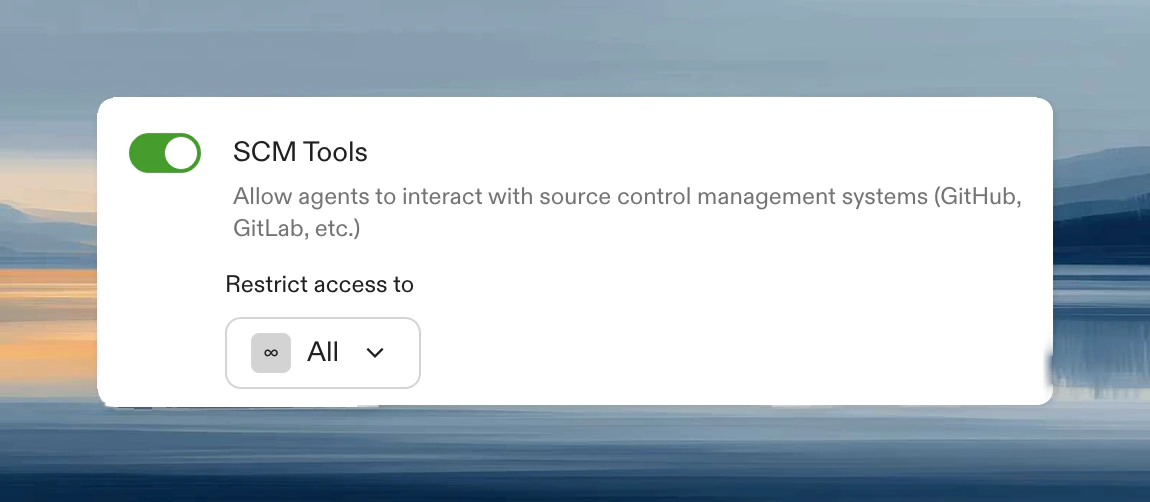 SCM tools are enabled by default. Administrators can configure access in [Settings > Agents > Policies](https://app.ona.com/settings/agent-policies):
* **Enabled for all members** (default)
* **Enabled for specific group**: gradual rollout or team restrictions
* **Disabled**: agents use git commands only, no PR/issue tools
When disabled, agents can still clone, commit, and push but cannot interact with the GitHub/GitLab/Bitbucket API.
## Provider differences
| Feature | GitHub | GitLab | Bitbucket Cloud |
| --------------- | --------------- | ------------------ | ------------------- |
| Inline comments | Direct comments | Discussion threads | Inline comments |
| Draft PRs/MRs | Supported | Supported | Supported |
| Assignees | Username-based | Requires user IDs | Not supported |
| Issues | Full support | Full support | Not supported |
| CI status | GitHub Actions | Pipelines | Bitbucket Pipelines |
## Prerequisites
1. [Configure source control](/ona/source-control/overview) on your runner.
2. Authorize via OAuth or PAT when creating your first environment.
**Required scopes:**
* GitHub: `repo`, `read:user`, `workflow` (if editing Actions files)
* GitLab: `api`, `read_repository`, `read_user`
* Bitbucket Cloud: `account`, `pullrequest:write`, `pipeline` (`pullrequest:write` implicitly grants `pullrequest`, `repository:write`, and `repository`)
## Limitations
* Cannot sync PR branches with base branch
* Cannot approve or request changes on PRs
* Bitbucket Cloud: no issue tracking tools (Bitbucket issues API is limited)
## Troubleshooting
Verify source control is configured and you have authorized access. Restart your environment to reload tools.
Check token scopes and repository permissions. For GitHub organizations, ensure [OAuth app access is granted](/ona/source-control/github#granting-access-to-additional-github-organizations).
SCM tools are enabled by default. Administrators can configure access in [Settings > Agents > Policies](https://app.ona.com/settings/agent-policies):
* **Enabled for all members** (default)
* **Enabled for specific group**: gradual rollout or team restrictions
* **Disabled**: agents use git commands only, no PR/issue tools
When disabled, agents can still clone, commit, and push but cannot interact with the GitHub/GitLab/Bitbucket API.
## Provider differences
| Feature | GitHub | GitLab | Bitbucket Cloud |
| --------------- | --------------- | ------------------ | ------------------- |
| Inline comments | Direct comments | Discussion threads | Inline comments |
| Draft PRs/MRs | Supported | Supported | Supported |
| Assignees | Username-based | Requires user IDs | Not supported |
| Issues | Full support | Full support | Not supported |
| CI status | GitHub Actions | Pipelines | Bitbucket Pipelines |
## Prerequisites
1. [Configure source control](/ona/source-control/overview) on your runner.
2. Authorize via OAuth or PAT when creating your first environment.
**Required scopes:**
* GitHub: `repo`, `read:user`, `workflow` (if editing Actions files)
* GitLab: `api`, `read_repository`, `read_user`
* Bitbucket Cloud: `account`, `pullrequest:write`, `pipeline` (`pullrequest:write` implicitly grants `pullrequest`, `repository:write`, and `repository`)
## Limitations
* Cannot sync PR branches with base branch
* Cannot approve or request changes on PRs
* Bitbucket Cloud: no issue tracking tools (Bitbucket issues API is limited)
## Troubleshooting
Verify source control is configured and you have authorized access. Restart your environment to reload tools.
Check token scopes and repository permissions. For GitHub organizations, ensure [OAuth app access is granted](/ona/source-control/github#granting-access-to-additional-github-organizations).