> ## Documentation Index
> Fetch the complete documentation index at: https://ona.com/docs/llms.txt
> Use this file to discover all available pages before exploring further.
# Command deny list
> Block specific commands from being executed by Ona Agent.
Block specific commands from being executed by Ona Agent. Use deny lists to prevent dangerous operations, enforce security policies, and maintain compliance. This is part of [Guardrails](/ona/guardrails/overview).
 ## How it works
1. User provides input to Ona Agent
2. Agent decides to execute a command
3. System checks command against deny list
4. Command is executed (if allowed) or blocked with error message
### Pattern matching
| Pattern | Effect |
| ----------- | ------------------------------------------------ |
| `shutdown` | Blocks exactly "shutdown" |
| `shutdown*` | Blocks "shutdown", "shutdown -h", "shutdown now" |
| `rm *` | Blocks all `rm` commands with arguments |
**Slash commands** (`/clear`, `/support-bundle`) are not blocked by deny lists. They are converted to prompts before reaching the agent. **Bash commands** (prefixed with `!`) are subject to deny list filtering.
## Configuration
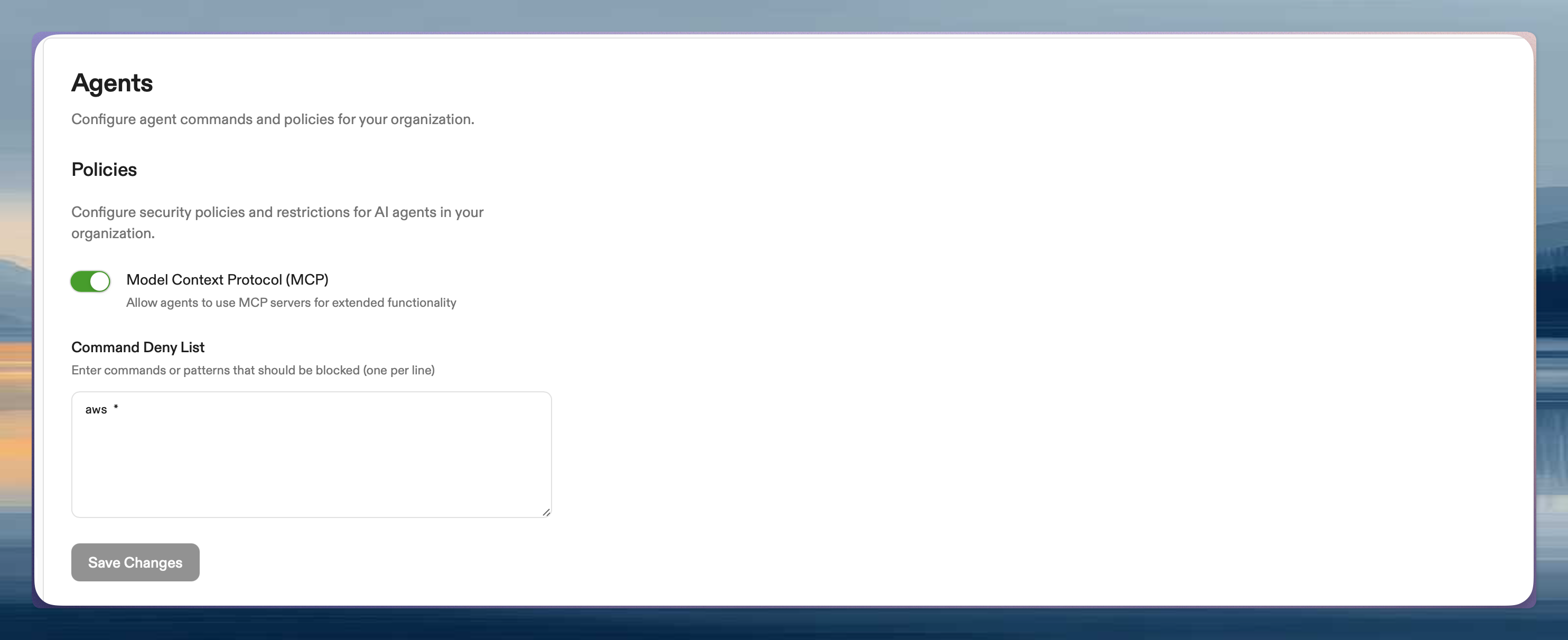
Go to [Settings → Agents → Policies](https://app.ona.com/settings/agent-policies). Only administrators can access.
1. Add patterns to **Command Deny List** (one per line)
2. Save changes
Changes apply to new agent sessions. Existing sessions must be restarted.
### Example patterns
```
# Block package management
apt *
yum *
dnf *
# Block cloud provider CLIs
aws *
gcloud *
```
## Effect on users
When blocked, users see:
```
command execution prohibited: command matches deny pattern: rm *. Do not attempt to retry this command as it is blocked by security policy
```
* **Manual commands unaffected**: Users can still run commands directly in terminal
* **Agent only**: Only Ona Agent execution is restricted
* **No retries**: Agent is instructed not to retry blocked commands
## Security considerations
**Protects against:**
* Accidental destructive commands
* Malicious prompt injection
* Compliance violations
* Resource abuse
**Does not protect against:**
* Direct user commands in terminal
* Application-level actions
* Slash commands (cannot be blocked via deny lists)
For kernel-level binary blocking that applies to all processes (not only the agent), see the [executable deny list](/ona/organizations/policies/executable-deny-list).
## Best practices
* Start with broad patterns (`aws *` instead of listing variants)
* Test in a non-production environment first
* Document why patterns were added
* Review and update periodically
## Testing
1. Create a new environment
2. Ask Ona Agent to run a blocked command
3. Verify the error message appears
## Getting help
Enterprise customers can contact your account representative.
## How it works
1. User provides input to Ona Agent
2. Agent decides to execute a command
3. System checks command against deny list
4. Command is executed (if allowed) or blocked with error message
### Pattern matching
| Pattern | Effect |
| ----------- | ------------------------------------------------ |
| `shutdown` | Blocks exactly "shutdown" |
| `shutdown*` | Blocks "shutdown", "shutdown -h", "shutdown now" |
| `rm *` | Blocks all `rm` commands with arguments |
**Slash commands** (`/clear`, `/support-bundle`) are not blocked by deny lists. They are converted to prompts before reaching the agent. **Bash commands** (prefixed with `!`) are subject to deny list filtering.
## Configuration
Go to [Settings → Agents → Policies](https://app.ona.com/settings/agent-policies). Only administrators can access.
1. Add patterns to **Command Deny List** (one per line)
2. Save changes
Changes apply to new agent sessions. Existing sessions must be restarted.
### Example patterns
```
# Block package management
apt *
yum *
dnf *
# Block cloud provider CLIs
aws *
gcloud *
```
## Effect on users
When blocked, users see:
```
command execution prohibited: command matches deny pattern: rm *. Do not attempt to retry this command as it is blocked by security policy
```
* **Manual commands unaffected**: Users can still run commands directly in terminal
* **Agent only**: Only Ona Agent execution is restricted
* **No retries**: Agent is instructed not to retry blocked commands
## Security considerations
**Protects against:**
* Accidental destructive commands
* Malicious prompt injection
* Compliance violations
* Resource abuse
**Does not protect against:**
* Direct user commands in terminal
* Application-level actions
* Slash commands (cannot be blocked via deny lists)
For kernel-level binary blocking that applies to all processes (not only the agent), see the [executable deny list](/ona/organizations/policies/executable-deny-list).
## Best practices
* Start with broad patterns (`aws *` instead of listing variants)
* Test in a non-production environment first
* Document why patterns were added
* Review and update periodically
## Testing
1. Create a new environment
2. Ask Ona Agent to run a blocked command
3. Verify the error message appears
## Getting help
Enterprise customers can contact your account representative.