> ## Documentation Index
> Fetch the complete documentation index at: https://ona.com/docs/llms.txt
> Use this file to discover all available pages before exploring further.
# Startup tasks & services
> Automate environment setup and define repeatable actions for humans and agents.
Tasks and services automate the repetitive work of setting up and operating development environments: seeding databases, starting servers, running tests, authenticating with cloud providers. Define it once and it runs automatically or on-demand.
For agents, tasks and services are essential. When Ona can run `npm test` or `docker compose up` reliably, it can iterate autonomously without human intervention.
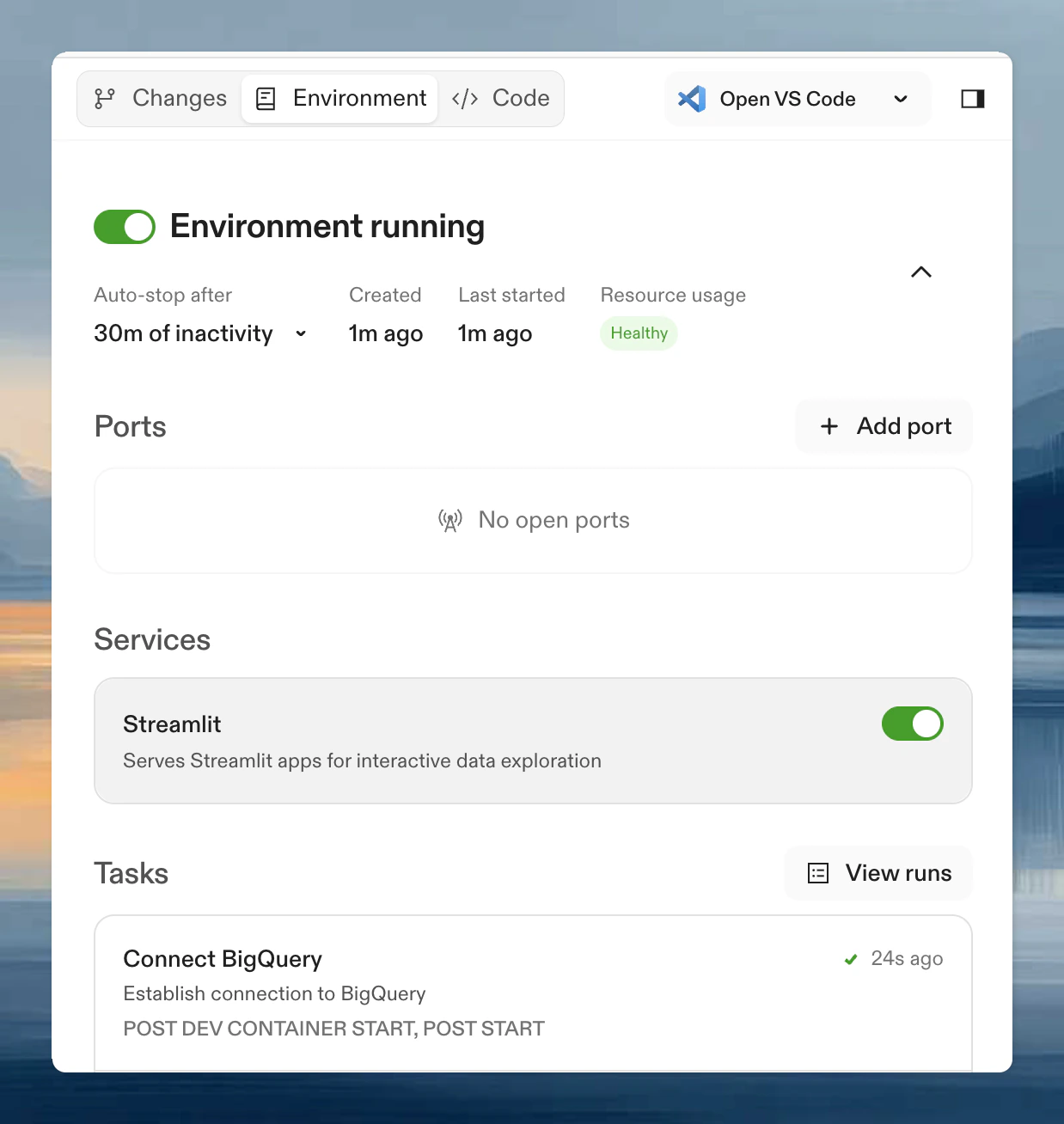 ## Tasks vs Services
**Services** are long-running processes that stay active throughout your session:
* Databases (PostgreSQL, MySQL)
* Backend and frontend servers
* Caching systems (Redis)
**Tasks** are one-off actions that run and complete:
* Installing dependencies
* Running tests
* Seeding databases
* Authenticating with cloud providers
A service's `start` command must **stay running** (block) for the service to remain active. If the command exits, the service transitions to Stopped (exit code 0) or Failed (non-zero). For example, `npm start` or `docker run postgres` block and keep the service alive, while `docker run -d postgres` returns immediately and the service stops.
## Quick example
```yaml theme={null}
# .ona/automations.yaml
services:
database:
name: PostgreSQL
commands:
start: docker compose up postgres
ready: docker compose exec postgres pg_isready
triggeredBy:
- postDevcontainerStart
tasks:
seed:
name: Seed database
command: npm run db:seed
dependsOn:
- database
triggeredBy:
- postDevcontainerStart
test:
name: Run tests
command: npm test
triggeredBy:
- manual
```
This configuration:
1. Starts PostgreSQL when the environment starts
2. Waits until the database is ready
3. Seeds the database with test data
4. Makes "Run tests" available as a manual action
## Triggers
Control when tasks and services run:
| Trigger | Services | Tasks | When it runs |
| ----------------------- | -------- | ----- | ------------------------------------------------------------------------------------------------------------------ |
| `manual` | ✓ | ✓ | On-demand via the CLI or UI |
| `postDevcontainerStart` | ✓ | ✓ | After the Dev Container starts in a user environment (first start or rebuild). Does **not** fire during prebuilds. |
| `postEnvironmentStart` | ✓ | ✓ | Every time the environment starts or resumes |
| `prebuild` | ✓ | ✓ | During prebuild execution only (no user secrets available). Does **not** fire in user environments. |
| `beforeSnapshot` | ✗ | ✓ | Before an environment snapshot is created |
See [automations.yaml schema](/ona/reference/automations-yaml-schema#triggers) for complete trigger documentation, including [how triggers interact with prebuilds](/ona/reference/automations-yaml-schema#prebuilds-and-triggers).
## Run automations across repositories
Tasks and services run within individual environments. For cross-repository automation at scale (migrations, security scanning, bulk updates), see [Automations](/ona/automations/overview).
## Next steps
* [automations.yaml schema](/ona/reference/automations-yaml-schema) - field reference for all fields, commands, triggers, and execution environments
* [Examples](/ona/configuration/tasks-and-services/examples) - common patterns for databases, servers, and CI
* [Dynamic configuration](/ona/configuration/tasks-and-services/generating-tasks-and-services) - create tasks and services programmatically
## Tasks vs Services
**Services** are long-running processes that stay active throughout your session:
* Databases (PostgreSQL, MySQL)
* Backend and frontend servers
* Caching systems (Redis)
**Tasks** are one-off actions that run and complete:
* Installing dependencies
* Running tests
* Seeding databases
* Authenticating with cloud providers
A service's `start` command must **stay running** (block) for the service to remain active. If the command exits, the service transitions to Stopped (exit code 0) or Failed (non-zero). For example, `npm start` or `docker run postgres` block and keep the service alive, while `docker run -d postgres` returns immediately and the service stops.
## Quick example
```yaml theme={null}
# .ona/automations.yaml
services:
database:
name: PostgreSQL
commands:
start: docker compose up postgres
ready: docker compose exec postgres pg_isready
triggeredBy:
- postDevcontainerStart
tasks:
seed:
name: Seed database
command: npm run db:seed
dependsOn:
- database
triggeredBy:
- postDevcontainerStart
test:
name: Run tests
command: npm test
triggeredBy:
- manual
```
This configuration:
1. Starts PostgreSQL when the environment starts
2. Waits until the database is ready
3. Seeds the database with test data
4. Makes "Run tests" available as a manual action
## Triggers
Control when tasks and services run:
| Trigger | Services | Tasks | When it runs |
| ----------------------- | -------- | ----- | ------------------------------------------------------------------------------------------------------------------ |
| `manual` | ✓ | ✓ | On-demand via the CLI or UI |
| `postDevcontainerStart` | ✓ | ✓ | After the Dev Container starts in a user environment (first start or rebuild). Does **not** fire during prebuilds. |
| `postEnvironmentStart` | ✓ | ✓ | Every time the environment starts or resumes |
| `prebuild` | ✓ | ✓ | During prebuild execution only (no user secrets available). Does **not** fire in user environments. |
| `beforeSnapshot` | ✗ | ✓ | Before an environment snapshot is created |
See [automations.yaml schema](/ona/reference/automations-yaml-schema#triggers) for complete trigger documentation, including [how triggers interact with prebuilds](/ona/reference/automations-yaml-schema#prebuilds-and-triggers).
## Run automations across repositories
Tasks and services run within individual environments. For cross-repository automation at scale (migrations, security scanning, bulk updates), see [Automations](/ona/automations/overview).
## Next steps
* [automations.yaml schema](/ona/reference/automations-yaml-schema) - field reference for all fields, commands, triggers, and execution environments
* [Examples](/ona/configuration/tasks-and-services/examples) - common patterns for databases, servers, and CI
* [Dynamic configuration](/ona/configuration/tasks-and-services/generating-tasks-and-services) - create tasks and services programmatically