> ## Documentation Index
> Fetch the complete documentation index at: https://ona.com/docs/llms.txt
> Use this file to discover all available pages before exploring further.
# Archive & auto-delete
> How Ona archives and deletes inactive environments.
Ona manages inactive environments in two stages: archival after a period of inactivity, then auto-deletion based on your plan and organization policy.
## Timelines
| Plan | Archive after | Auto-delete after archival |
| ---------- | ---------------------------------------------- | ---------------------------------- |
| Core | 3 days | 4 days |
| Enterprise | 3 days by default; configurable from 1-30 days | Configurable (1-4 weeks, or never) |
 ## Archiving
Stopped environments are archived after the inactive period for your plan. Enterprise organization policies can replace the default archive timing. You can also archive an environment manually from its actions menu. If the environment is running, Ona stops it before moving it to Archived.
Archived environments move to a separate view and can be unarchived or deleted. You receive an email when environments are archived automatically.
## Viewing archived environments
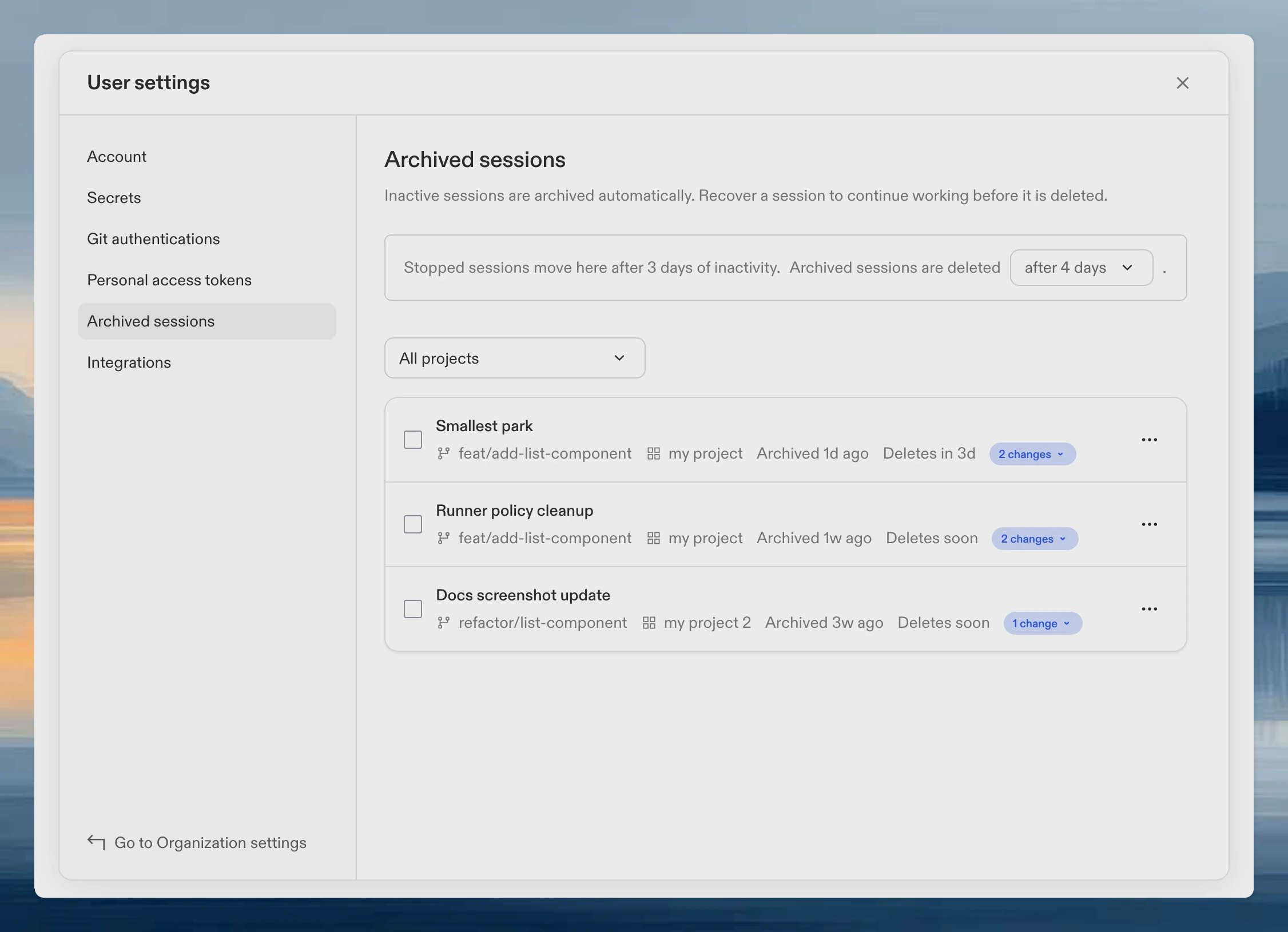
Open **User settings > Archived sessions** to view archived environments.
## Archiving
Stopped environments are archived after the inactive period for your plan. Enterprise organization policies can replace the default archive timing. You can also archive an environment manually from its actions menu. If the environment is running, Ona stops it before moving it to Archived.
Archived environments move to a separate view and can be unarchived or deleted. You receive an email when environments are archived automatically.
## Viewing archived environments
Open **User settings > Archived sessions** to view archived environments.
 ## Managing archived environments
Select archived environments with the row checkboxes to use bulk actions, or open a row's actions menu to manage one environment.
* **Unarchive** - returns the environment to your main list.
* **Delete** - permanently removes the environment after you confirm.
Deleting an environment permanently removes all content. This cannot be undone.
## Archive timing settings
Enterprise admins can configure when stopped environments move to Archived from **Settings > Organization > Policies**. The minimum is 1 day and the maximum is 30 days. Core organizations archive stopped environments after 3 days. See [Archive timing policy](/ona/organizations/policies/archive-timing) for details.
## Auto-delete settings
## Managing archived environments
Select archived environments with the row checkboxes to use bulk actions, or open a row's actions menu to manage one environment.
* **Unarchive** - returns the environment to your main list.
* **Delete** - permanently removes the environment after you confirm.
Deleting an environment permanently removes all content. This cannot be undone.
## Archive timing settings
Enterprise admins can configure when stopped environments move to Archived from **Settings > Organization > Policies**. The minimum is 1 day and the maximum is 30 days. Core organizations archive stopped environments after 3 days. See [Archive timing policy](/ona/organizations/policies/archive-timing) for details.
## Auto-delete settings
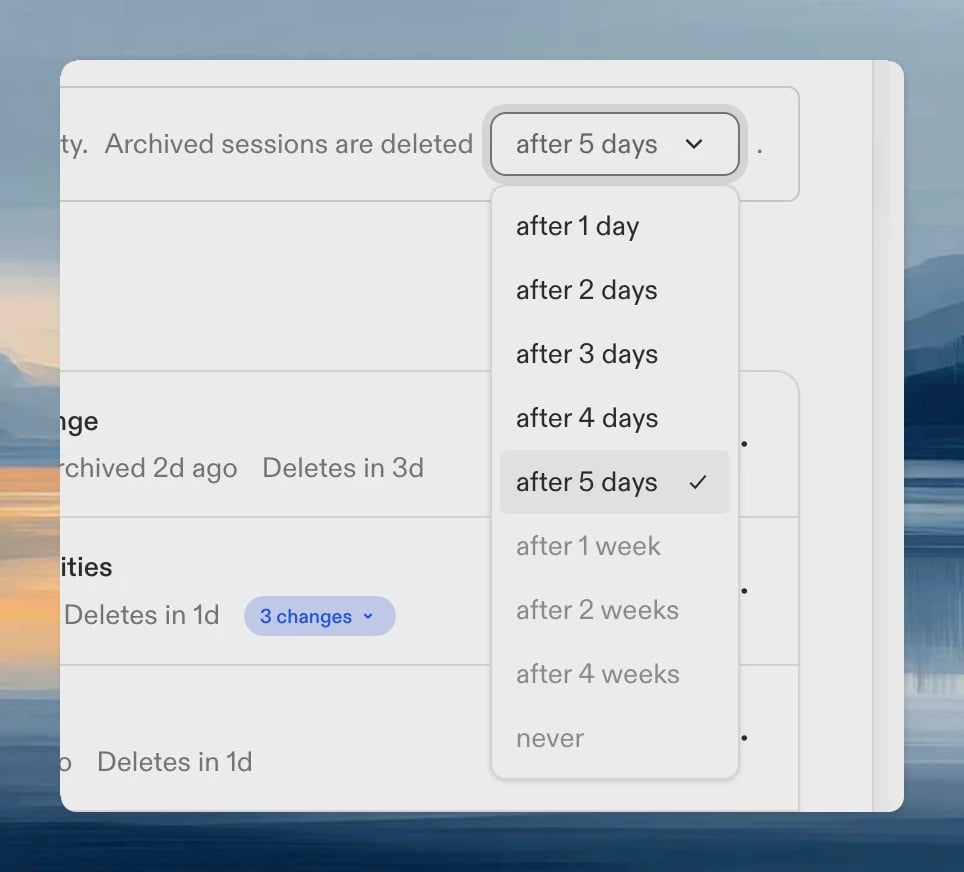 Options: **After 1 day**, **After 2 days**, **After 3 days**, **After 4 days**, **After 5 days**, **After 1 week**, **After 2 weeks**, **After 4 weeks**, or **Never**.
Auto-delete preferences are available on Enterprise plans. Core organizations auto-delete environments 4 days after archival.
Organization policies and plan limits override user preferences when more restrictive. Disabled options in the dropdown indicate those restrictions.
## FAQ
Core environments archive after 3 days of inactivity. Enterprise environments archive after 3 days by default, or after the organization policy period.
No. Only archived environments can be restored.
Your organization policy enforces a maximum retention period.
Automatic archival only applies to stopped environments. If you archive a running environment manually, Ona stops it before moving it to Archived.
Check organization policy restrictions.
Options: **After 1 day**, **After 2 days**, **After 3 days**, **After 4 days**, **After 5 days**, **After 1 week**, **After 2 weeks**, **After 4 weeks**, or **Never**.
Auto-delete preferences are available on Enterprise plans. Core organizations auto-delete environments 4 days after archival.
Organization policies and plan limits override user preferences when more restrictive. Disabled options in the dropdown indicate those restrictions.
## FAQ
Core environments archive after 3 days of inactivity. Enterprise environments archive after 3 days by default, or after the organization policy period.
No. Only archived environments can be restored.
Your organization policy enforces a maximum retention period.
Automatic archival only applies to stopped environments. If you archive a running environment manually, Ona stops it before moving it to Archived.
Check organization policy restrictions.