> ## Documentation Index
> Fetch the complete documentation index at: https://ona.com/docs/llms.txt
> Use this file to discover all available pages before exploring further.
# Browser extension
> One-click environment creation from GitHub, GitLab, Bitbucket, and Azure DevOps.
The browser extension adds an "Open in Ona" button to repository pages on GitHub, GitLab, Bitbucket, and Azure DevOps (including self-hosted instances).
 ## Install
| Browser | Link |
| ------------------- | ---------------------------------------------------------------------------------------------------- |
| Chrome, Edge, Brave | [Chrome Web Store](https://chromewebstore.google.com/detail/gitpod/dodmmooeoklaejobgleioelladacbeki) |
| Firefox | [Firefox Add-ons](https://addons.mozilla.org/en-US/firefox/addon/onahq/) |
## Settings
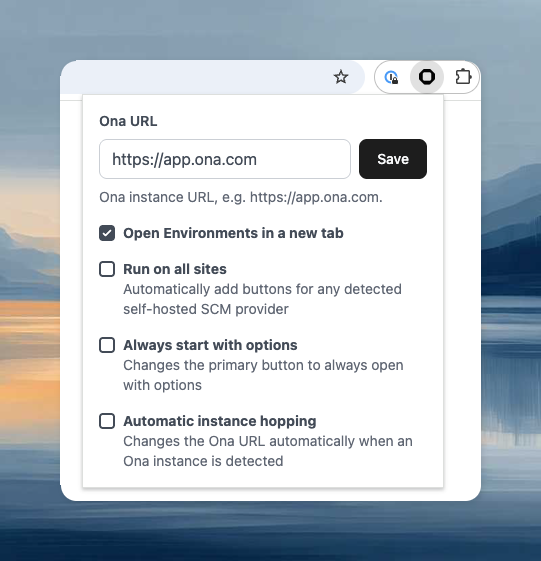
Click the extension icon in your browser toolbar to access settings. The settings panel is the same across Chrome, Edge, Brave, and Firefox.
## Install
| Browser | Link |
| ------------------- | ---------------------------------------------------------------------------------------------------- |
| Chrome, Edge, Brave | [Chrome Web Store](https://chromewebstore.google.com/detail/gitpod/dodmmooeoklaejobgleioelladacbeki) |
| Firefox | [Firefox Add-ons](https://addons.mozilla.org/en-US/firefox/addon/onahq/) |
## Settings
Click the extension icon in your browser toolbar to access settings. The settings panel is the same across Chrome, Edge, Brave, and Firefox.
 ## Self-hosted SCM providers
The extension works automatically on `github.com`, `gitlab.com`, `bitbucket.org`, and `dev.azure.com`. For self-hosted instances (GitLab CE/EE, Bitbucket Datacenter), enable **Run on all sites** in the extension settings, or right-click the extension icon and select **Enable on this domain**.
## Custom Ona instance
If using a self-hosted Ona instance, open the extension settings and enter your instance URL.
## Migrating from Gitpod Classic
If the extension's "Open" button launches Gitpod Classic instead of Ona, update the Ona URL:
1. Click the extension icon in your browser toolbar
2. Either enable **Automatic instance hopping** and visit [app.ona.com](https://app.ona.com) to trigger the update, or manually set the **Ona URL** to `https://app.ona.com`
The extension is [open source](https://github.com/gitpod-io/browser-extension).
## Self-hosted SCM providers
The extension works automatically on `github.com`, `gitlab.com`, `bitbucket.org`, and `dev.azure.com`. For self-hosted instances (GitLab CE/EE, Bitbucket Datacenter), enable **Run on all sites** in the extension settings, or right-click the extension icon and select **Enable on this domain**.
## Custom Ona instance
If using a self-hosted Ona instance, open the extension settings and enter your instance URL.
## Migrating from Gitpod Classic
If the extension's "Open" button launches Gitpod Classic instead of Ona, update the Ona URL:
1. Click the extension icon in your browser toolbar
2. Either enable **Automatic instance hopping** and visit [app.ona.com](https://app.ona.com) to trigger the update, or manually set the **Ona URL** to `https://app.ona.com`
The extension is [open source](https://github.com/gitpod-io/browser-extension).