> ## Documentation Index
> Fetch the complete documentation index at: https://ona.com/docs/llms.txt
> Use this file to discover all available pages before exploring further.
# Insights
Available on the Enterprise plan. [Contact sales](https://ona.com/contact/sales) to learn more.
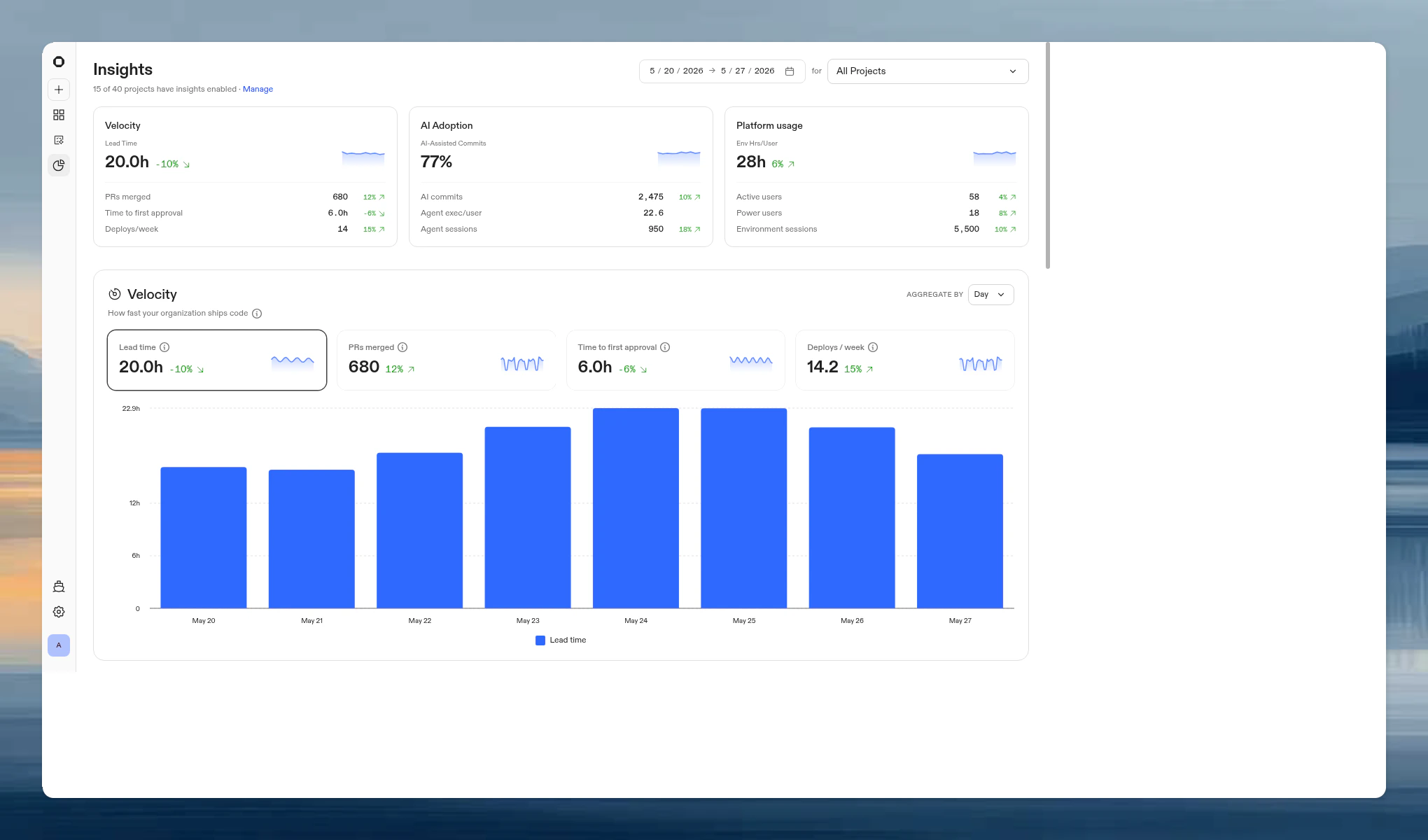
Insights gives organization admins and Insights Viewers visibility into how their teams ship code, adopt AI tooling, and use environments. Access it from **Insights** in the left navigation menu.
The page is organized into three sections:
* **Velocity.** How fast your organization ships code.
* **AI Adoption.** How your organization leverages AI to ship code.
* **Platform usage.** How your organization uses Ona environments.
 ## Enabling insights
Velocity and AI Adoption require per-project enablement. Platform usage data is collected automatically for all projects.
To enable insights for a project:
1. Go to **Insights** and click **Manage** in the page header.
2. Toggle on the projects you want to track.
## Enabling insights
Velocity and AI Adoption require per-project enablement. Platform usage data is collected automatically for all projects.
To enable insights for a project:
1. Go to **Insights** and click **Manage** in the page header.
2. Toggle on the projects you want to track.
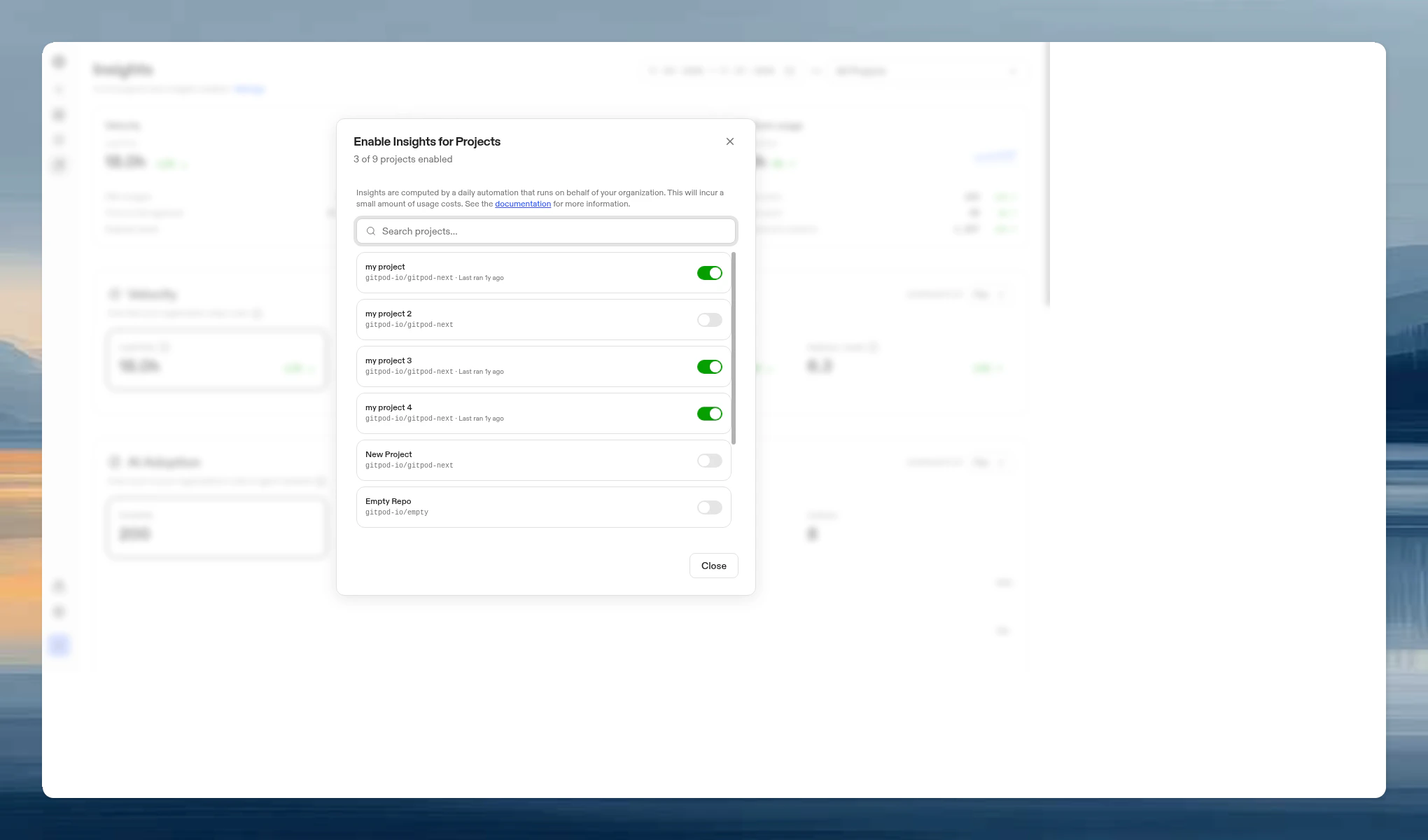 You can also enable insights from a project's settings page under the **Insights** toggle.
When you enable insights for a project, a daily automation runs on behalf of your organization to analyze development activity. This incurs a small amount of usage costs.
After enabling, the first analysis is triggered automatically. Initial results may take up to 24 hours to appear depending on repository size and history. Subsequent analyses run automatically.
The page header shows how many of your projects have insights enabled (e.g. "3 of 12 projects have insights enabled") and when the last analysis ran.
## Filters
All three sections share a set of filters at the top of the page:
* **Date range.** Pick a preset (Last 7 days, Last 14 days, Last 30 days, Last 90 days, Last 6 months, Last year) or enter a custom range. The maximum range is one year.
* **Project.** Scope all metrics to a single project, or view across all projects.
* **Team.** Scope all metrics to a specific team.
Charts support brush-zoom: click and drag on any chart to zoom into a narrower date range.
Each section also has an **Aggregate by** toggle to switch between daily and weekly granularity.
## Summary cards
At the top of the page, three summary cards provide an at-a-glance overview:
| Card | Hero metric | Additional stats |
| ------------------ | ----------------------- | ------------------------------------------------ |
| **Velocity** | Lead time | PRs merged, Time to first approval, Deploys/week |
| **AI Adoption** | AI-assisted commits (%) | AI commits, Agent exec/user, Agent sessions |
| **Platform usage** | Env hrs/user | Active users, Power users, Environment sessions |
Each card includes a sparkline and trend indicator comparing the selected period to the previous period of equal length. Click a card to scroll to its section.
## Velocity
You can also enable insights from a project's settings page under the **Insights** toggle.
When you enable insights for a project, a daily automation runs on behalf of your organization to analyze development activity. This incurs a small amount of usage costs.
After enabling, the first analysis is triggered automatically. Initial results may take up to 24 hours to appear depending on repository size and history. Subsequent analyses run automatically.
The page header shows how many of your projects have insights enabled (e.g. "3 of 12 projects have insights enabled") and when the last analysis ran.
## Filters
All three sections share a set of filters at the top of the page:
* **Date range.** Pick a preset (Last 7 days, Last 14 days, Last 30 days, Last 90 days, Last 6 months, Last year) or enter a custom range. The maximum range is one year.
* **Project.** Scope all metrics to a single project, or view across all projects.
* **Team.** Scope all metrics to a specific team.
Charts support brush-zoom: click and drag on any chart to zoom into a narrower date range.
Each section also has an **Aggregate by** toggle to switch between daily and weekly granularity.
## Summary cards
At the top of the page, three summary cards provide an at-a-glance overview:
| Card | Hero metric | Additional stats |
| ------------------ | ----------------------- | ------------------------------------------------ |
| **Velocity** | Lead time | PRs merged, Time to first approval, Deploys/week |
| **AI Adoption** | AI-assisted commits (%) | AI commits, Agent exec/user, Agent sessions |
| **Platform usage** | Env hrs/user | Active users, Power users, Environment sessions |
Each card includes a sparkline and trend indicator comparing the selected period to the previous period of equal length. Click a card to scroll to its section.
## Velocity
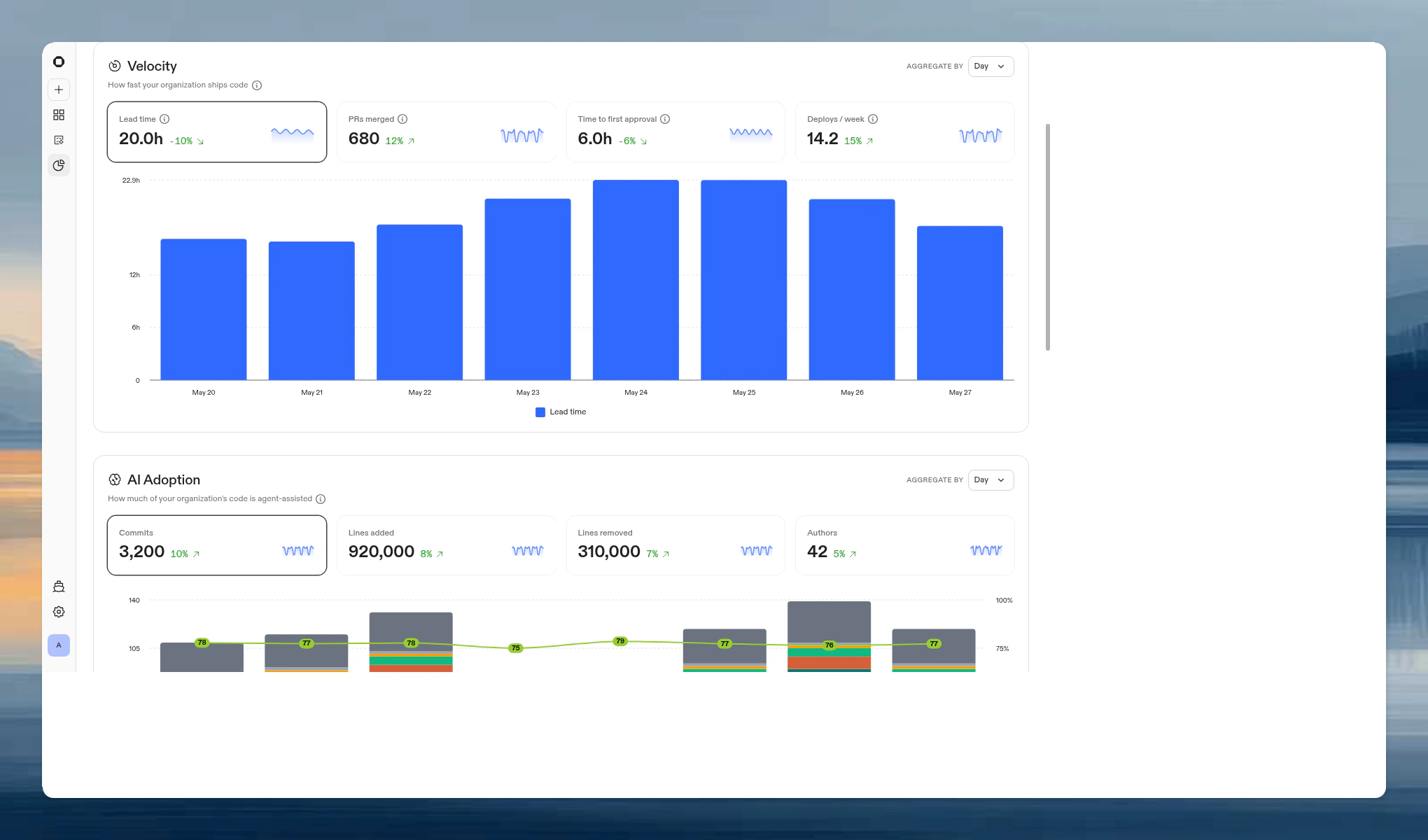 Tracks PR shipping speed across all projects with insights enabled.
| Metric | Definition |
| -------------------------- | ------------------------------------------------------------------------------------------------------------ |
| **Lead time** | Median time from first commit on a branch to PR merge |
| **PRs merged** | Total pull requests merged across all projects in scope |
| **Time to first approval** | Median time from PR opened to first approving review |
| **Deploys/week** | PRs merged to each project's configured branch, per week. Projects without a configured branch are excluded. |
Click a metric card to view its time-series chart. Use the **Aggregate by** toggle to switch between daily and weekly buckets.
For lead time and time to first approval, a downward trend is positive (faster shipping). For PRs merged and deploys/week, an upward trend is positive.
## AI Adoption
Tracks PR shipping speed across all projects with insights enabled.
| Metric | Definition |
| -------------------------- | ------------------------------------------------------------------------------------------------------------ |
| **Lead time** | Median time from first commit on a branch to PR merge |
| **PRs merged** | Total pull requests merged across all projects in scope |
| **Time to first approval** | Median time from PR opened to first approving review |
| **Deploys/week** | PRs merged to each project's configured branch, per week. Projects without a configured branch are excluded. |
Click a metric card to view its time-series chart. Use the **Aggregate by** toggle to switch between daily and weekly buckets.
For lead time and time to first approval, a downward trend is positive (faster shipping). For PRs merged and deploys/week, an upward trend is positive.
## AI Adoption
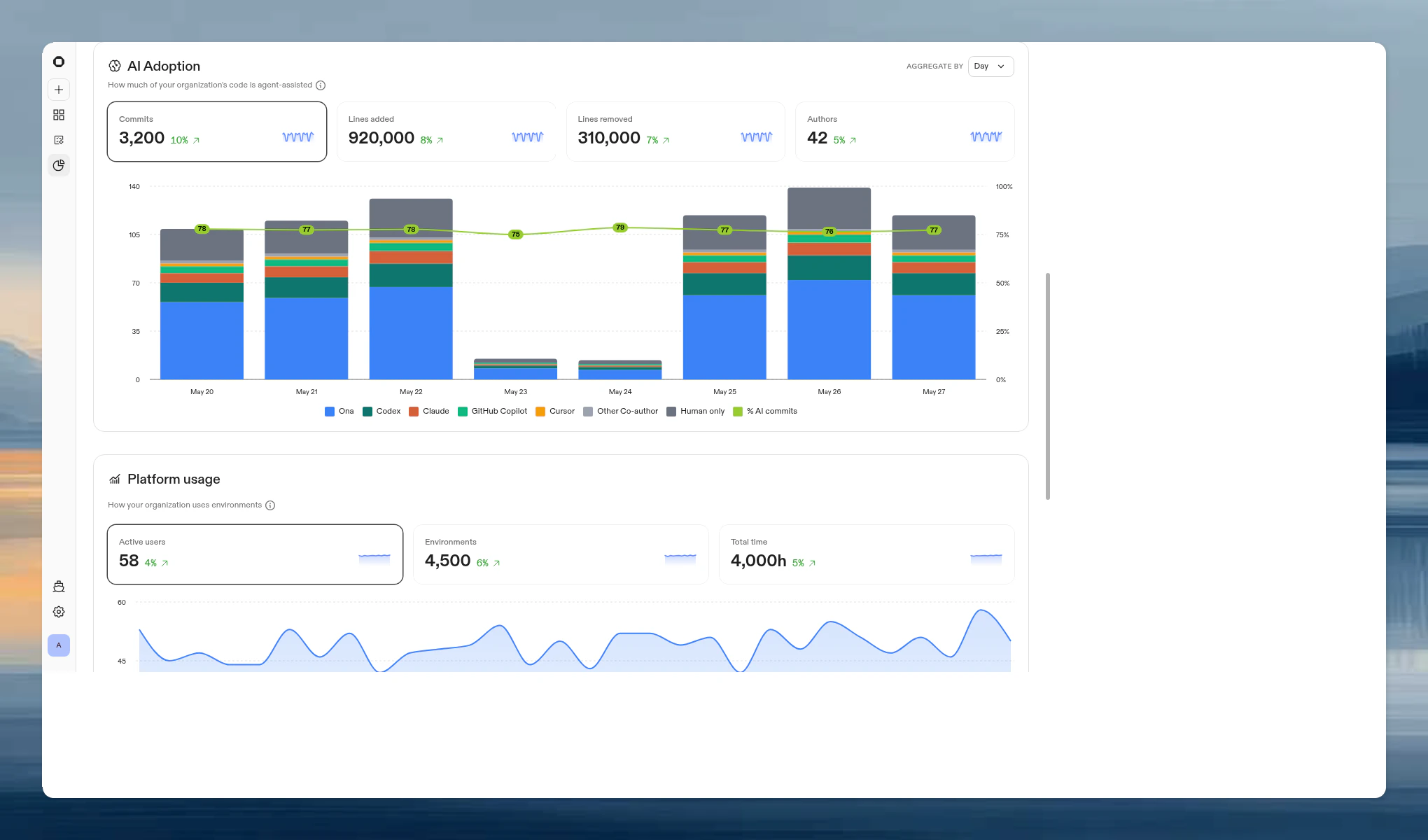 Shows how your organization leverages AI agents in development. Uses commit co-author trailers and AI authorship metadata to attribute changes to tools like Ona, Copilot, Cursor, Codex, and Claude.
### Metric cards
| Metric | Definition |
| ----------------- | ------------------------------------ |
| **Commits** | Total commits in the selected period |
| **Lines added** | Total lines added |
| **Lines removed** | Total lines removed |
| **Authors** | Distinct commit authors |
Click a metric card to view its time-series chart.
### Breakdown modes
For the **Lines added** and **Lines removed** views, a toggle switches between two attribution methods:
* **By co-author.** Attributes lines based on `Co-authored-by` git trailers. Breaks down into: Ona, Codex, Claude, GitHub Copilot, Cursor, Other AI, Other Co-author, and Human only.
* **By agent output.** Attributes lines based on AI authorship metadata tracked at the session level.
Each breakdown includes a table below the chart showing per-tool totals and percentages.
## Platform usage
Shows how your organization leverages AI agents in development. Uses commit co-author trailers and AI authorship metadata to attribute changes to tools like Ona, Copilot, Cursor, Codex, and Claude.
### Metric cards
| Metric | Definition |
| ----------------- | ------------------------------------ |
| **Commits** | Total commits in the selected period |
| **Lines added** | Total lines added |
| **Lines removed** | Total lines removed |
| **Authors** | Distinct commit authors |
Click a metric card to view its time-series chart.
### Breakdown modes
For the **Lines added** and **Lines removed** views, a toggle switches between two attribution methods:
* **By co-author.** Attributes lines based on `Co-authored-by` git trailers. Breaks down into: Ona, Codex, Claude, GitHub Copilot, Cursor, Other AI, Other Co-author, and Human only.
* **By agent output.** Attributes lines based on AI authorship metadata tracked at the session level.
Each breakdown includes a table below the chart showing per-tool totals and percentages.
## Platform usage
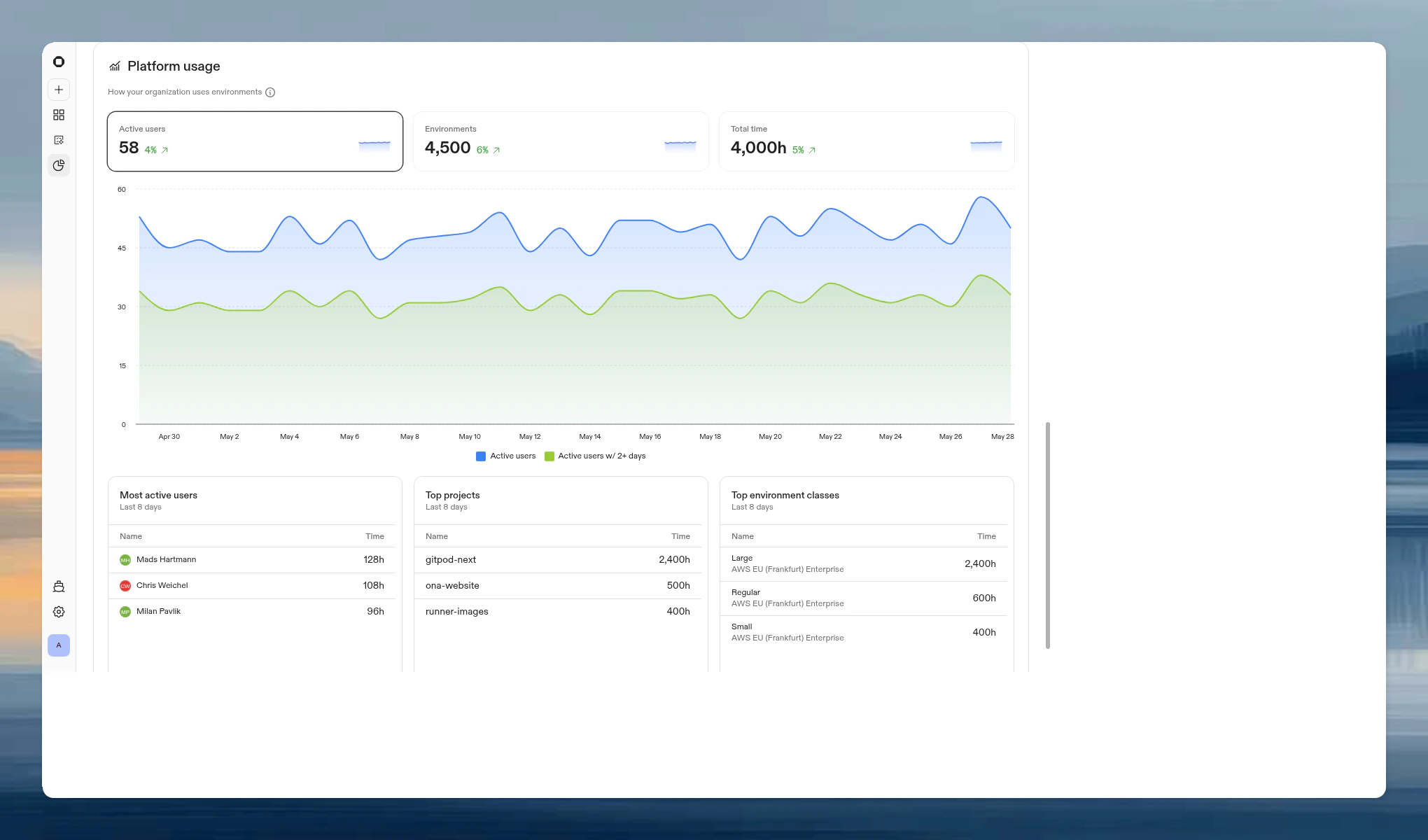 Tracks how your organization uses Ona environments across all projects. This data is collected automatically and does not require per-project enablement.
### Metric cards
| Metric | Definition |
| ---------------- | --------------------------------------------------------------------- |
| **Active users** | Unique users who used at least one environment in the selected period |
| **Environments** | Number of environments that were active in the selected period |
| **Total time** | Accumulated environment runtime hours |
Click a metric card to view its time-series chart.
### Detailed views
Below the chart, three tables show:
| Table | Shows |
| --------------------------- | --------------------------------------------------------------------------------------------------------------------- |
| **Most active users** | Users ranked by total runtime hours |
| **Top projects** | Projects ranked by total environment usage time |
| **Top environment classes** | Resource consumption by class (e.g. Large, Regular). Local runners are aggregated for comparison with remote runners. |
## FAQ
Organization admins can view and manage Insights. Members with the Insights Viewer organization role can view Insights, but cannot enable project insights.
No. The daily analysis runs in a separate environment and does not interfere with developer workflows.
Ona, Codex, Claude, GitHub Copilot, and Cursor. Other AI co-authors are grouped under "Other AI". Human co-authors (pair programming) are shown separately.
A PR merged to the project's configured branch. If a project does not have a configured branch, it is excluded from the deploys metric.
Yes, platform usage data persists after environments are deleted.
Platform usage data is available from May 16, 2025 onwards regardless of when you enabled insights. Velocity and AI Adoption data starts from when you enable insights for each project.
Tracks how your organization uses Ona environments across all projects. This data is collected automatically and does not require per-project enablement.
### Metric cards
| Metric | Definition |
| ---------------- | --------------------------------------------------------------------- |
| **Active users** | Unique users who used at least one environment in the selected period |
| **Environments** | Number of environments that were active in the selected period |
| **Total time** | Accumulated environment runtime hours |
Click a metric card to view its time-series chart.
### Detailed views
Below the chart, three tables show:
| Table | Shows |
| --------------------------- | --------------------------------------------------------------------------------------------------------------------- |
| **Most active users** | Users ranked by total runtime hours |
| **Top projects** | Projects ranked by total environment usage time |
| **Top environment classes** | Resource consumption by class (e.g. Large, Regular). Local runners are aggregated for comparison with remote runners. |
## FAQ
Organization admins can view and manage Insights. Members with the Insights Viewer organization role can view Insights, but cannot enable project insights.
No. The daily analysis runs in a separate environment and does not interfere with developer workflows.
Ona, Codex, Claude, GitHub Copilot, and Cursor. Other AI co-authors are grouped under "Other AI". Human co-authors (pair programming) are shown separately.
A PR merged to the project's configured branch. If a project does not have a configured branch, it is excluded from the deploys metric.
Yes, platform usage data persists after environments are deleted.
Platform usage data is available from May 16, 2025 onwards regardless of when you enabled insights. Velocity and AI Adoption data starts from when you enable insights for each project.