> ## Documentation Index
> Fetch the complete documentation index at: https://ona.com/docs/llms.txt
> Use this file to discover all available pages before exploring further.
# Organization roles
Available on the Enterprise plan. [Contact sales](https://ona.com/contact/sales) to learn more.
Organization roles let you delegate administrative and read-only responsibilities without granting full organization admin access. Assign these roles to [groups](/ona/organizations/groups) to give team members role-specific capabilities across the organization.
## Available roles
| Role | Description |
| --------------------- | --------------------------------------------------------- |
| **Runners Admin** | Full admin access to all runners in the organization |
| **Projects Admin** | Full admin access to all projects in the organization |
| **Groups Admin** | Full admin access to all groups in the organization |
| **Automations Admin** | Full admin access to all automations (services and tasks) |
| **Insights Viewer** | Read-only access to Insights and project insights data |
| **Audit Log Reader** | Read-only access to audit logs |
| **Billing Viewer** | Read-only access to billing and usage information |
## How it works
When you assign an organization role to a group:
1. All group members receive the role's capabilities
2. Resource-scoped roles apply to existing and future resources where relevant
3. Removing the role revokes the related access
This differs from [Sharing resources](/ona/organizations/sharing-resources), which grants access to specific projects or runners one at a time.
## Assign an organization role
Only organization admins can assign organization roles.
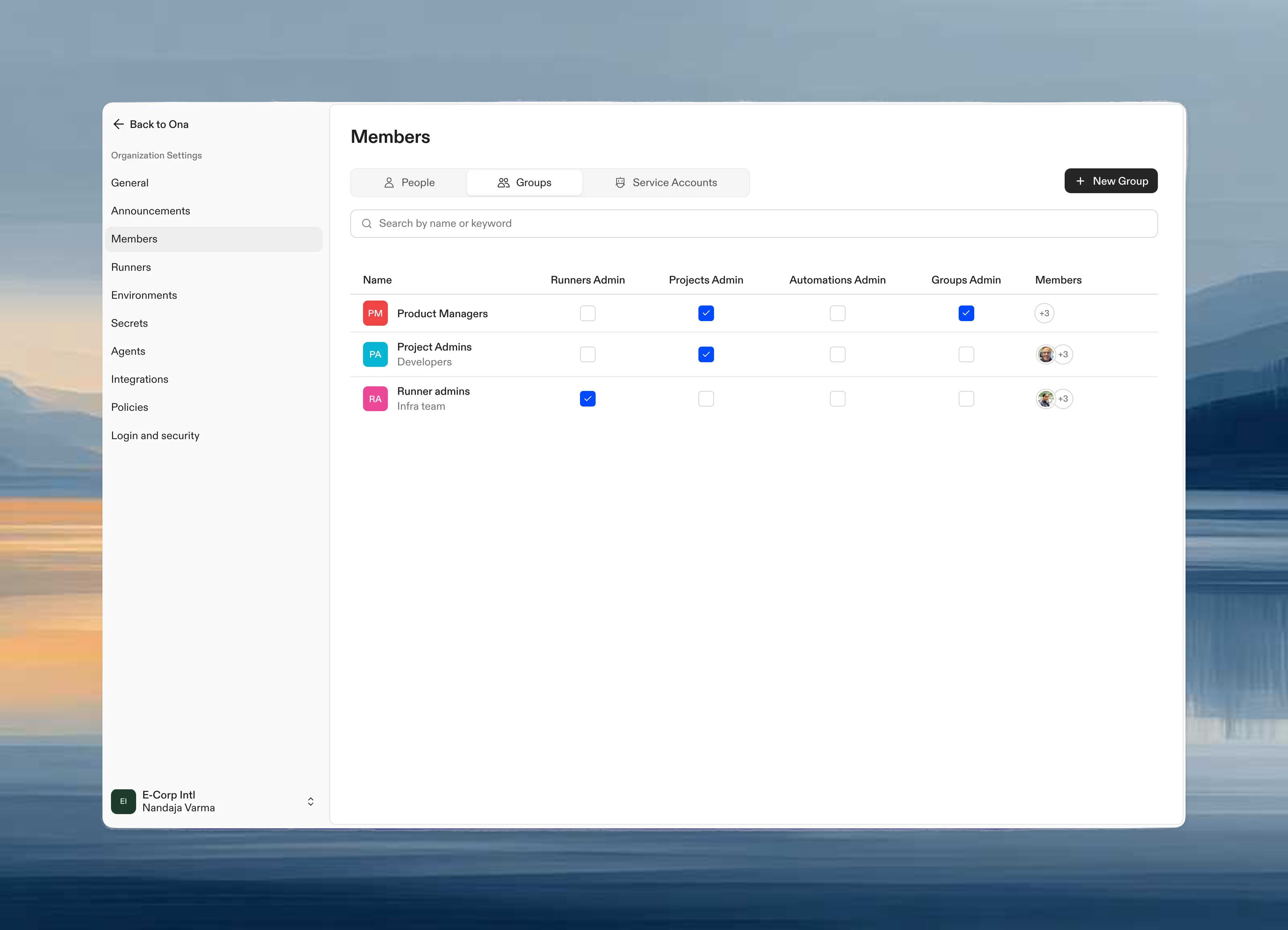
1. Go to **Settings → Members → Groups**
2. In the groups table, find the group you want to modify
3. Toggle the checkbox in the corresponding role column, such as **Runners Admin**, **Insights Viewer**, or **Billing Viewer**
The role is applied immediately when the checkbox is toggled.
 ## Permissions by role
### Runners Admin
Members of groups with this role can:
| Permission | Granted |
| ----------------------------------- | --------------------- |
| View all runners | |
| Create runners | |
| Update runner settings | |
| Delete runners | |
| Share runners with users and groups | |
| Manage environment classes | |
| Manage SCM and LLM integrations | |
| Access runner logs | |
### Projects Admin
Members of groups with this role can:
| Permission | Granted |
| ------------------------------------ | --------------------- |
| View all projects | |
| Create projects | |
| Update project settings | |
| Delete projects | |
| Share projects with users and groups | |
| Manage project secrets | |
| Configure environment classes | |
| Manage prebuilds | |
### Groups Admin
Members of groups with this role can:
| Permission | Granted |
| ---------------------------- | --------------------- |
| View all groups | |
| Create groups | |
| Update group settings | |
| Delete groups | |
| Add and remove group members | |
### Automations Admin
Members of groups with this role can:
| Permission | Granted |
| --------------------------------------- | --------------------- |
| View all automations | |
| Create automations | |
| Update automation settings | |
| Delete automations | |
| Share automations with users and groups | |
| View all execution history | |
This role does not grant webhook management permissions. Creating and managing [webhooks](/ona/automations/webhooks) for automation triggers requires organization admin access.
### Insights Viewer
Members of groups with this role can:
| Permission | Granted |
| ---------------------------------------------------------- | --------------------- |
| View the Insights page | |
| View organization platform usage | |
| View Velocity and AI Adoption metrics for enabled projects | |
| Enable or disable project insights | |
Insights Viewers can only view data. Organization admins are required to enable project insights before Velocity and AI Adoption data appears.
### Audit Log Reader
Members of groups with this role can:
| Permission | Granted |
| ------------------------------------------- | --------------------- |
| View [audit logs](/ona/audit-logs/overview) | |
| Query audit logs from the CLI | |
| Change organization settings | |
### Billing Viewer
Members of groups with this role can:
| Permission | Granted |
| ---------------------------------------------------------------------------------------- | --------------------- |
| View the [Billing](/ona/billing/overview) page where available for the organization tier | |
| View the [Cost & Budgets](/ona/billing/usage) page | |
| Export usage reports where export is available | |
| Change subscriptions, payment methods, top-ups, or team budgets | |
Billing Viewers can only view billing and usage information. Organization admins are required for billing changes, credit top-ups, and budget management.
## Use cases
**DevOps team manages infrastructure**: Assign Runners Admin to a "DevOps" group so they can create and configure runners without full org admin access.
**Team leads manage their projects**: Assign Projects Admin to a "Tech Leads" group so they can manage project settings and secrets across the organization.
**HR manages team membership**: Assign Groups Admin to an "HR" group so they can add and remove members from groups as people join or leave.
**Platform team manages automations**: Assign Automations Admin to a "Platform" group so they can create and maintain organization-wide automations.
**Security team reviews audit logs**: Assign Audit Log Reader to security or compliance staff who need audit history without organization admin access.
**Finance team reviews billing and usage**: Assign Billing Viewer to finance stakeholders who need read-only access to billing and usage data without payment or budget controls.
**Engineering leaders review delivery metrics**: Assign Insights Viewer to stakeholders who need read-only access to organization insights without project or runner administration permissions.
## Combining roles
A group can have multiple organization roles. For example, a "Platform Engineering" group might have both Runners Admin and Automations Admin roles.
When a user belongs to multiple groups with different roles, they receive the combined permissions from all their groups.
## Next steps
* [Create groups](/ona/organizations/groups) to organize your team
* [Share resources](/ona/organizations/sharing-resources) for fine-grained access control
* [Manage members](/ona/organizations/manage-members) to invite teammates
## Permissions by role
### Runners Admin
Members of groups with this role can:
| Permission | Granted |
| ----------------------------------- | --------------------- |
| View all runners | |
| Create runners | |
| Update runner settings | |
| Delete runners | |
| Share runners with users and groups | |
| Manage environment classes | |
| Manage SCM and LLM integrations | |
| Access runner logs | |
### Projects Admin
Members of groups with this role can:
| Permission | Granted |
| ------------------------------------ | --------------------- |
| View all projects | |
| Create projects | |
| Update project settings | |
| Delete projects | |
| Share projects with users and groups | |
| Manage project secrets | |
| Configure environment classes | |
| Manage prebuilds | |
### Groups Admin
Members of groups with this role can:
| Permission | Granted |
| ---------------------------- | --------------------- |
| View all groups | |
| Create groups | |
| Update group settings | |
| Delete groups | |
| Add and remove group members | |
### Automations Admin
Members of groups with this role can:
| Permission | Granted |
| --------------------------------------- | --------------------- |
| View all automations | |
| Create automations | |
| Update automation settings | |
| Delete automations | |
| Share automations with users and groups | |
| View all execution history | |
This role does not grant webhook management permissions. Creating and managing [webhooks](/ona/automations/webhooks) for automation triggers requires organization admin access.
### Insights Viewer
Members of groups with this role can:
| Permission | Granted |
| ---------------------------------------------------------- | --------------------- |
| View the Insights page | |
| View organization platform usage | |
| View Velocity and AI Adoption metrics for enabled projects | |
| Enable or disable project insights | |
Insights Viewers can only view data. Organization admins are required to enable project insights before Velocity and AI Adoption data appears.
### Audit Log Reader
Members of groups with this role can:
| Permission | Granted |
| ------------------------------------------- | --------------------- |
| View [audit logs](/ona/audit-logs/overview) | |
| Query audit logs from the CLI | |
| Change organization settings | |
### Billing Viewer
Members of groups with this role can:
| Permission | Granted |
| ---------------------------------------------------------------------------------------- | --------------------- |
| View the [Billing](/ona/billing/overview) page where available for the organization tier | |
| View the [Cost & Budgets](/ona/billing/usage) page | |
| Export usage reports where export is available | |
| Change subscriptions, payment methods, top-ups, or team budgets | |
Billing Viewers can only view billing and usage information. Organization admins are required for billing changes, credit top-ups, and budget management.
## Use cases
**DevOps team manages infrastructure**: Assign Runners Admin to a "DevOps" group so they can create and configure runners without full org admin access.
**Team leads manage their projects**: Assign Projects Admin to a "Tech Leads" group so they can manage project settings and secrets across the organization.
**HR manages team membership**: Assign Groups Admin to an "HR" group so they can add and remove members from groups as people join or leave.
**Platform team manages automations**: Assign Automations Admin to a "Platform" group so they can create and maintain organization-wide automations.
**Security team reviews audit logs**: Assign Audit Log Reader to security or compliance staff who need audit history without organization admin access.
**Finance team reviews billing and usage**: Assign Billing Viewer to finance stakeholders who need read-only access to billing and usage data without payment or budget controls.
**Engineering leaders review delivery metrics**: Assign Insights Viewer to stakeholders who need read-only access to organization insights without project or runner administration permissions.
## Combining roles
A group can have multiple organization roles. For example, a "Platform Engineering" group might have both Runners Admin and Automations Admin roles.
When a user belongs to multiple groups with different roles, they receive the combined permissions from all their groups.
## Next steps
* [Create groups](/ona/organizations/groups) to organize your team
* [Share resources](/ona/organizations/sharing-resources) for fine-grained access control
* [Manage members](/ona/organizations/manage-members) to invite teammates