> ## Documentation Index
> Fetch the complete documentation index at: https://ona.com/docs/llms.txt
> Use this file to discover all available pages before exploring further.
# Organization policies
> Control resource usage, enforce consistency, and implement security restrictions across your organization.
Most policies require an [Enterprise plan](https://ona.com/pricing). Environment timeout is available on Core and Enterprise.
Go to **Settings → Organization → Policies** to configure. Only administrators can access policies.
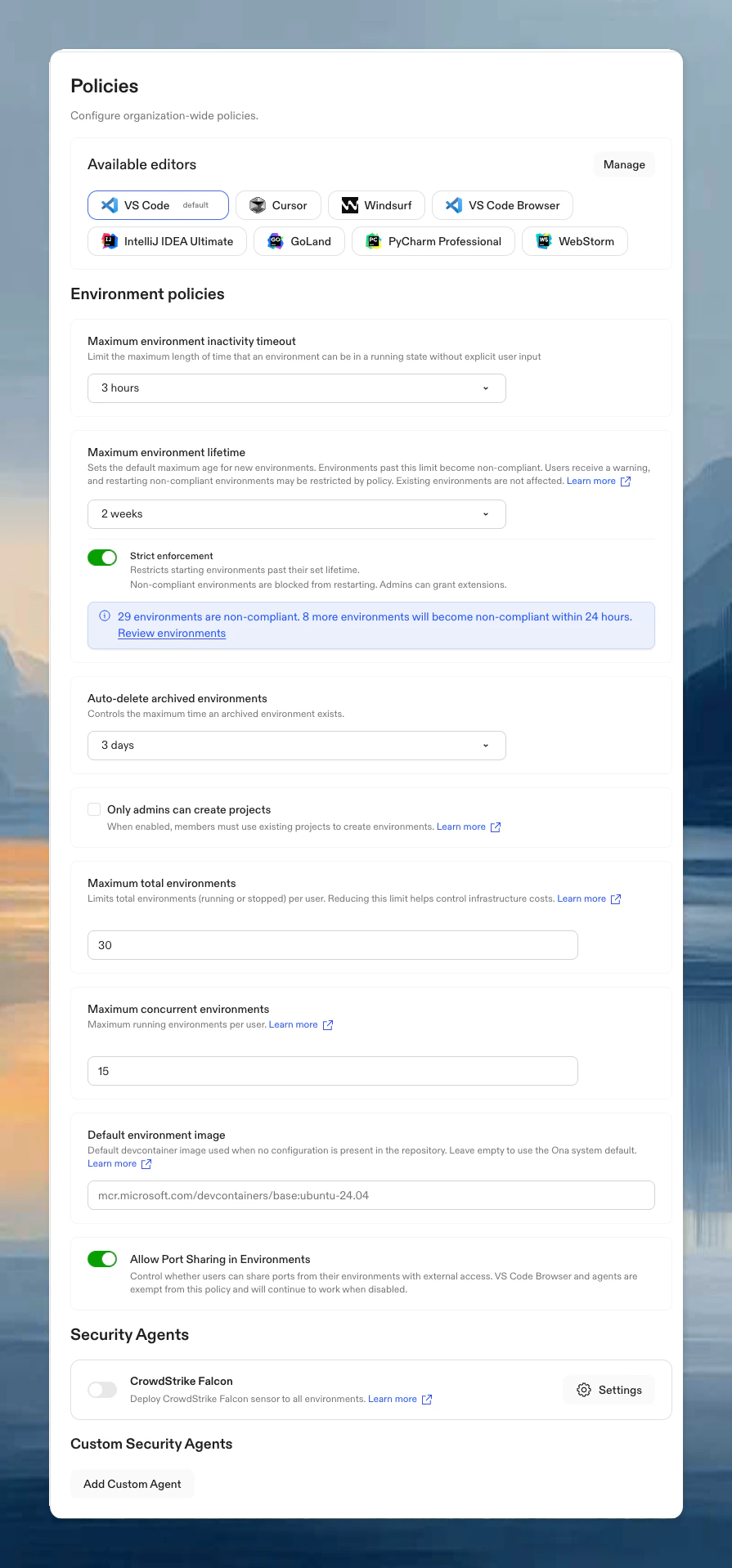 **Key behavior:**
* Changes take effect immediately for new actions
* Existing environments are not affected unless the policy governs a scheduled lifecycle action
## Available policies
| Policy | Purpose |
| ----------------------------------------------------------------------------------------- | ------------------------------------------------------------------------------- |
| [Editor restrictions](/ona/organizations/policies/editor-restrictions) | Standardize which editors and versions your team can use |
| [Environment timeout](/ona/organizations/policies/environment-timeout) | Limit auto-stop timeout options |
| [Environment limits](/ona/organizations/policies/environment-limits) | Cap total and concurrent environments per user |
| [Maximum environment lifetime](/ona/organizations/policies/environment-lifetime) | Set a maximum age for environments and optionally block restarting expired ones |
| [Archive timing](/ona/organizations/policies/archive-timing) | Set when stopped Enterprise environments move to Archived |
| [Environment creation](/ona/organizations/policies/environment-creation) | Restrict blank environment creation for members |
| [Project creation](/ona/organizations/policies/project-creation) | Restrict project creation to admins; members must use existing projects |
| [Port sharing](/ona/organizations/policies/port-sharing) | Control user-initiated port exposure from environments |
| [Web browser](/ona/organizations/policies/web-browser) | Control whether members can open the built-in browser from environment pages |
| [Default image](/ona/organizations/policies/default-image) | Set default devcontainer image |
| [Auto-delete](/ona/organizations/policies/auto-delete) | Set retention period for archived environments |
| [Security agents](/ona/organizations/policies/security-agents) | Deploy CrowdStrike Falcon to all environments |
| [Executable deny list](/ona/organizations/policies/executable-deny-list) | Block specific executables from running in environments |
| [Command deny list](/ona/command-deny-list) | Block specific commands from Ona Agent execution |
| [SCM tools](/ona/organizations/policies/scm-tools) | Control Ona Agent's GitHub/GitLab access |
| [Restrict account creation to SCIM](/ona/organizations/policies/scim-account-restriction) | Allow only SCIM-provisioned users to access the organization |
Looking for default environment image settings? See [Default image policy](/ona/organizations/policies/default-image).
## Tracking changes
All policy changes are recorded in [audit logs](/ona/audit-logs/overview), including who changed what and when.
## Best practices
* **Start gradually**: Begin with moderate limits and adjust based on usage patterns
* **Review regularly**: Check usage patterns quarterly or after team changes
* **Avoid over-restricting**: Use environment creation restrictions before requiring project-based creation for all member environments
**Key behavior:**
* Changes take effect immediately for new actions
* Existing environments are not affected unless the policy governs a scheduled lifecycle action
## Available policies
| Policy | Purpose |
| ----------------------------------------------------------------------------------------- | ------------------------------------------------------------------------------- |
| [Editor restrictions](/ona/organizations/policies/editor-restrictions) | Standardize which editors and versions your team can use |
| [Environment timeout](/ona/organizations/policies/environment-timeout) | Limit auto-stop timeout options |
| [Environment limits](/ona/organizations/policies/environment-limits) | Cap total and concurrent environments per user |
| [Maximum environment lifetime](/ona/organizations/policies/environment-lifetime) | Set a maximum age for environments and optionally block restarting expired ones |
| [Archive timing](/ona/organizations/policies/archive-timing) | Set when stopped Enterprise environments move to Archived |
| [Environment creation](/ona/organizations/policies/environment-creation) | Restrict blank environment creation for members |
| [Project creation](/ona/organizations/policies/project-creation) | Restrict project creation to admins; members must use existing projects |
| [Port sharing](/ona/organizations/policies/port-sharing) | Control user-initiated port exposure from environments |
| [Web browser](/ona/organizations/policies/web-browser) | Control whether members can open the built-in browser from environment pages |
| [Default image](/ona/organizations/policies/default-image) | Set default devcontainer image |
| [Auto-delete](/ona/organizations/policies/auto-delete) | Set retention period for archived environments |
| [Security agents](/ona/organizations/policies/security-agents) | Deploy CrowdStrike Falcon to all environments |
| [Executable deny list](/ona/organizations/policies/executable-deny-list) | Block specific executables from running in environments |
| [Command deny list](/ona/command-deny-list) | Block specific commands from Ona Agent execution |
| [SCM tools](/ona/organizations/policies/scm-tools) | Control Ona Agent's GitHub/GitLab access |
| [Restrict account creation to SCIM](/ona/organizations/policies/scim-account-restriction) | Allow only SCIM-provisioned users to access the organization |
Looking for default environment image settings? See [Default image policy](/ona/organizations/policies/default-image).
## Tracking changes
All policy changes are recorded in [audit logs](/ona/audit-logs/overview), including who changed what and when.
## Best practices
* **Start gradually**: Begin with moderate limits and adjust based on usage patterns
* **Review regularly**: Check usage patterns quarterly or after team changes
* **Avoid over-restricting**: Use environment creation restrictions before requiring project-based creation for all member environments