> ## Documentation Index
> Fetch the complete documentation index at: https://ona.com/docs/llms.txt
> Use this file to discover all available pages before exploring further.
# Security agents
> Deploy security agents like CrowdStrike Falcon to all organization environments.
Available on the Enterprise plan. [Contact sales](https://ona.com/contact/sales) to learn more.
Deploy endpoint security agents to all environments automatically. Useful when:
* Meeting compliance requirements for endpoint detection and response (EDR)
* Monitoring development environments for threats
* Maintaining security visibility across your organization
**Available agents:** CrowdStrike Falcon
## CrowdStrike Falcon
Deploy the [CrowdStrike Falcon](https://www.crowdstrike.com/platform/falcon-sensor/) sensor as a sidecar container reporting to your CrowdStrike console. Falcon provides endpoint detection and response (EDR): threat detection, process monitoring, and malware prevention. It does not act as a firewall or enforce network policies.
There is no additional Ona charge for this integration. It is included in the Enterprise plan. You need your own CrowdStrike Falcon subscription.
### Prerequisites
* CrowdStrike Falcon subscription with container sensor support
* Access to the `falcon-sensor` container image in your CrowdStrike registry
* Customer ID (CID)
### Resource impact
The Falcon sensor runs on the environment VM alongside your workload. It starts asynchronously and does not increase environment startup time. Typical steady-state overhead:
* **CPU:** 1–3% (uses the BPF backend by default), with brief spikes during scans
* **Memory:** approximately 200–500 MB RAM
Exact figures depend on your Falcon sensor version and CrowdStrike policy settings (scan aggressiveness, prevention policies, etc.). Consult your CrowdStrike account team for precise numbers based on your configuration.
### Configuration
1. Go to **Policies** and toggle **Enable CrowdStrike Falcon**
2. Click **Settings**
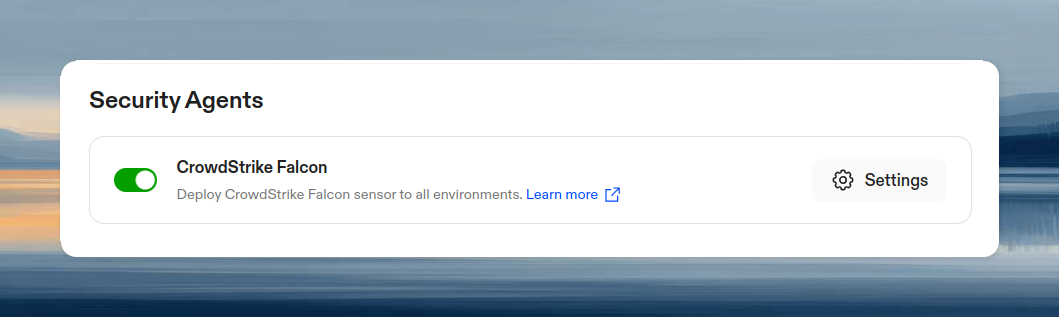 3. Enter required information:
* **Customer ID (CID)**: Stored securely, not visible in secrets list
* **Falcon Sensor Image**: Full image reference to the **`falcon-sensor`** container image from your CrowdStrike registry (e.g., `123456789.dkr.ecr.us-east-1.amazonaws.com/falcon-sensor:7.18.0-17106`)
Use the **`falcon-sensor`** image, not `falcon-container`. CrowdStrike publishes multiple container images. `falcon-sensor` is the one required for VM-based deployments like Ona environments. Using `falcon-container` will cause the sensor to fail on startup.
3. Enter required information:
* **Customer ID (CID)**: Stored securely, not visible in secrets list
* **Falcon Sensor Image**: Full image reference to the **`falcon-sensor`** container image from your CrowdStrike registry (e.g., `123456789.dkr.ecr.us-east-1.amazonaws.com/falcon-sensor:7.18.0-17106`)
Use the **`falcon-sensor`** image, not `falcon-container`. CrowdStrike publishes multiple container images. `falcon-sensor` is the one required for VM-based deployments like Ona environments. Using `falcon-container` will cause the sensor to fail on startup.
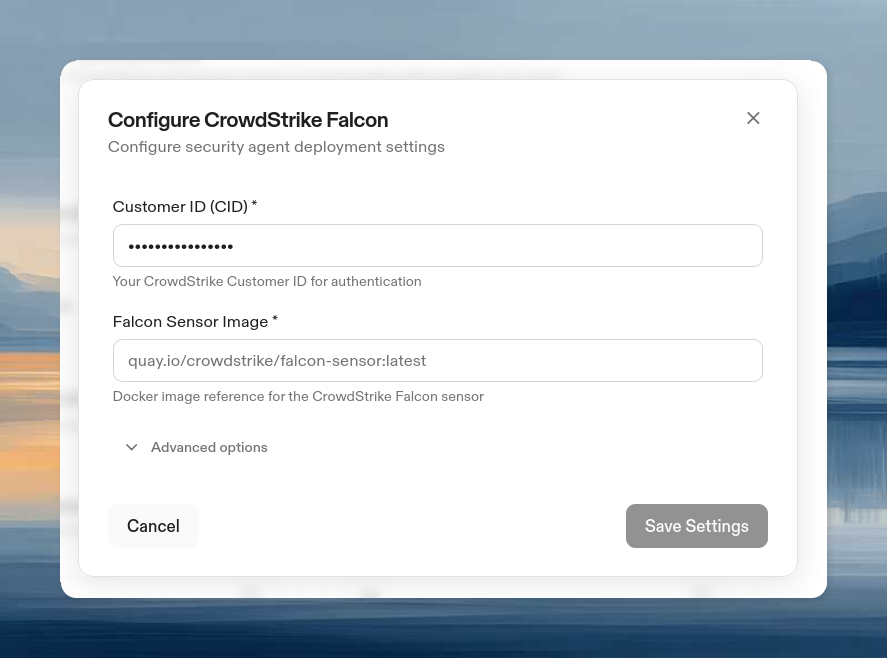 4. (Optional) Expand **Advanced Options**:
* **Tags**: Comma-separated tags for Falcon console grouping
* **Additional Falcon Options**: Key-value pairs passed as `FALCONCTL_OPT_` environment variables to the sensor. Use this to set any [falconctl](https://falcon.crowdstrike.com/documentation/page/c24e4485/falcon-sensor-for-linux#falconctl) option.
4. (Optional) Expand **Advanced Options**:
* **Tags**: Comma-separated tags for Falcon console grouping
* **Additional Falcon Options**: Key-value pairs passed as `FALCONCTL_OPT_` environment variables to the sensor. Use this to set any [falconctl](https://falcon.crowdstrike.com/documentation/page/c24e4485/falcon-sensor-for-linux#falconctl) option.
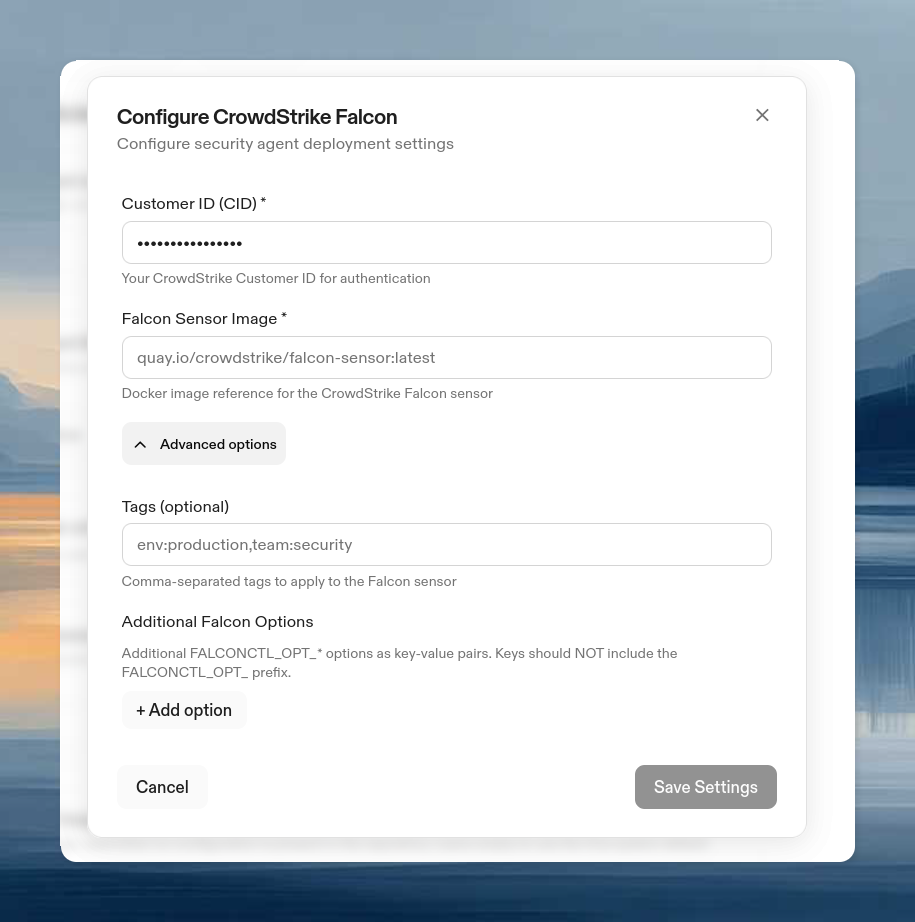 5. Click **Save**
If your Falcon sensor image is hosted in a private registry (e.g., ECR, GCR, Artifactory), the environment needs credentials to pull it. Configure a [container registry authentication](/ona/configuration/secrets/container-registry-secret) secret at the **organization level** so it applies to all environments, matching the org-wide scope of the security agent policy.
#### Configuring a proxy
The Falcon sensor does not use standard `HTTP_PROXY` / `HTTPS_PROXY` environment variables. If your environments route egress traffic through a proxy, configure it in **Advanced Options** → **Additional Falcon Options** with these keys:
| Key | Description | Example |
| ----- | -------------------------------------- | ---------------------------- |
| `APH` | Proxy host (hostname or IP, no scheme) | `proxy.internal.example.com` |
| `APP` | Proxy port | `3128` |
| `APD` | Disable proxy (`true` to disable) | `false` |
For example, to route Falcon traffic through `proxy.internal.example.com:3128`, add two entries in Additional Falcon Options:
* Key: `APH`, Value: `proxy.internal.example.com`
* Key: `APP`, Value: `3128`
### CLI configuration
```bash theme={null}
# View current configuration
ona organization security-agent get --organization-id
# Enable CrowdStrike Falcon
ona organization security-agent set \
--organization-id \
--crowdstrike-enabled \
--crowdstrike-image \
--crowdstrike-cid-secret-id
```
### Removal
To remove CrowdStrike Falcon from all environments:
1. Go to **Policies** and toggle off **Enable CrowdStrike Falcon**
2. Click **Save**
Existing environments will stop running the Falcon sensor on their next restart.
Via the CLI:
```bash theme={null}
ona organization security-agent set \
--organization-id \
--crowdstrike-enabled=false
```
### How it works
When enabled, the Falcon sensor deploys automatically as a privileged sidecar container to all environments. The container runs with full host-level visibility (`--pid=host`, `--net=host`, `--privileged`) using the BPF backend. These permissions are required for the sensor to monitor host-level processes and network activity.
Whether the sensor operates in detect-only mode (reporting threats) or prevention mode (blocking malicious processes) depends on your CrowdStrike Falcon console policy settings. Ona deploys the sensor; your CrowdStrike policies control its behavior.
Metadata tags are added automatically: `env_id/` and `org_id/`. These appear in your Falcon console for identifying which environment and organization each sensor belongs to.
### Effect on users
Users cannot view, modify, or disable the security agent. Only admins can configure it.
### Troubleshooting
| Issue | Solution |
| ------------------------------------- | --------------------------------------------------------------------------------------------------------- |
| Sensor not in Falcon console | Verify CID, check network connectivity, review environment logs |
| Image pull failures | Verify registry auth, check image reference, confirm IAM permissions (ECR) |
| Sensor offline | Check network to CrowdStrike, verify CID is active, review sensor logs |
| Sensor fails on startup | Verify you are using the `falcon-sensor` image, not `falcon-container` |
| Sensor cannot reach CrowdStrike cloud | Configure proxy via `APH` and `APP` in Advanced Options (see [Configuring a proxy](#configuring-a-proxy)) |
5. Click **Save**
If your Falcon sensor image is hosted in a private registry (e.g., ECR, GCR, Artifactory), the environment needs credentials to pull it. Configure a [container registry authentication](/ona/configuration/secrets/container-registry-secret) secret at the **organization level** so it applies to all environments, matching the org-wide scope of the security agent policy.
#### Configuring a proxy
The Falcon sensor does not use standard `HTTP_PROXY` / `HTTPS_PROXY` environment variables. If your environments route egress traffic through a proxy, configure it in **Advanced Options** → **Additional Falcon Options** with these keys:
| Key | Description | Example |
| ----- | -------------------------------------- | ---------------------------- |
| `APH` | Proxy host (hostname or IP, no scheme) | `proxy.internal.example.com` |
| `APP` | Proxy port | `3128` |
| `APD` | Disable proxy (`true` to disable) | `false` |
For example, to route Falcon traffic through `proxy.internal.example.com:3128`, add two entries in Additional Falcon Options:
* Key: `APH`, Value: `proxy.internal.example.com`
* Key: `APP`, Value: `3128`
### CLI configuration
```bash theme={null}
# View current configuration
ona organization security-agent get --organization-id
# Enable CrowdStrike Falcon
ona organization security-agent set \
--organization-id \
--crowdstrike-enabled \
--crowdstrike-image \
--crowdstrike-cid-secret-id
```
### Removal
To remove CrowdStrike Falcon from all environments:
1. Go to **Policies** and toggle off **Enable CrowdStrike Falcon**
2. Click **Save**
Existing environments will stop running the Falcon sensor on their next restart.
Via the CLI:
```bash theme={null}
ona organization security-agent set \
--organization-id \
--crowdstrike-enabled=false
```
### How it works
When enabled, the Falcon sensor deploys automatically as a privileged sidecar container to all environments. The container runs with full host-level visibility (`--pid=host`, `--net=host`, `--privileged`) using the BPF backend. These permissions are required for the sensor to monitor host-level processes and network activity.
Whether the sensor operates in detect-only mode (reporting threats) or prevention mode (blocking malicious processes) depends on your CrowdStrike Falcon console policy settings. Ona deploys the sensor; your CrowdStrike policies control its behavior.
Metadata tags are added automatically: `env_id/` and `org_id/`. These appear in your Falcon console for identifying which environment and organization each sensor belongs to.
### Effect on users
Users cannot view, modify, or disable the security agent. Only admins can configure it.
### Troubleshooting
| Issue | Solution |
| ------------------------------------- | --------------------------------------------------------------------------------------------------------- |
| Sensor not in Falcon console | Verify CID, check network connectivity, review environment logs |
| Image pull failures | Verify registry auth, check image reference, confirm IAM permissions (ECR) |
| Sensor offline | Check network to CrowdStrike, verify CID is active, review sensor logs |
| Sensor fails on startup | Verify you are using the `falcon-sensor` image, not `falcon-container` |
| Sensor cannot reach CrowdStrike cloud | Configure proxy via `APH` and `APP` in Advanced Options (see [Configuring a proxy](#configuring-a-proxy)) |