> ## Documentation Index
> Fetch the complete documentation index at: https://ona.com/docs/llms.txt
> Use this file to discover all available pages before exploring further.
# Sharing resources
Available on the Enterprise plan. [Contact sales](https://ona.com/contact/sales) to learn more.
Share projects and runners with individual users, groups, or everyone in your organization. Resource admins can manage sharing for their resources. See [Manage groups](/ona/organizations/groups) for group setup.
## Share a project
Project admins can share their projects with other users and groups. When you create a project, you automatically become its admin.
1. Open the project and click **Share**
2. Click **Add users or groups**
3. Select individual users or groups to add
4. Choose a permission level for each:
| Role | Capabilities |
| ---------- | -------------------------------------------------------------- |
| **User** | View and use the project |
| **Editor** | Modify settings, manage secrets, configure environment classes |
| **Admin** | Full control including sharing and deletion |
 ### Change permissions
1. In the Share dialog, find the user or group
2. Click the role dropdown
3. Select a new permission level (takes effect immediately)
### Change permissions
1. In the Share dialog, find the user or group
2. Click the role dropdown
3. Select a new permission level (takes effect immediately)
 ### Remove access
1. Click the role dropdown next to the user or group
2. Select **Remove access**
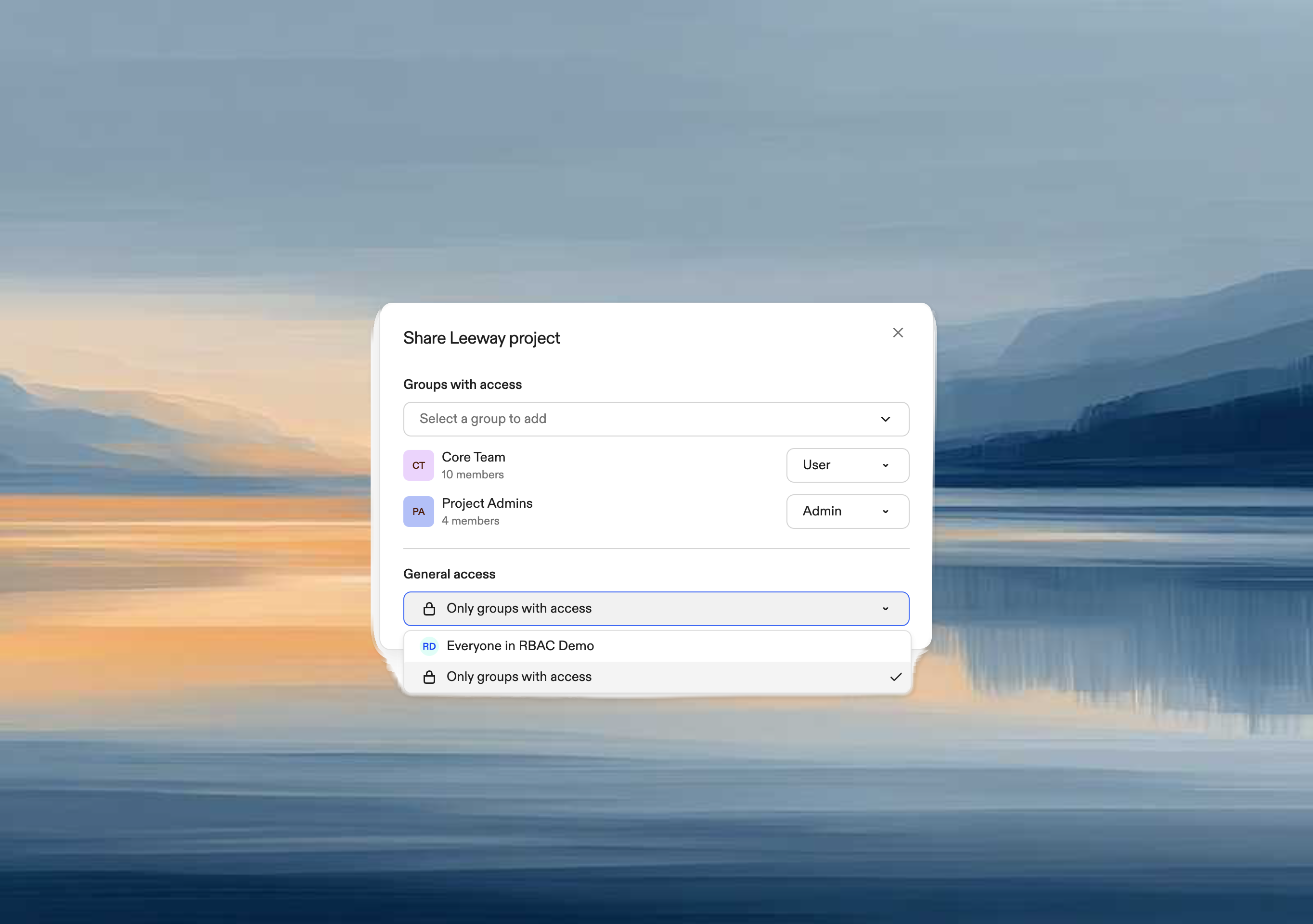
### Organization-wide access
To share with everyone in your organization:
1. In **General access**, select your organization name
2. All members get User access; you can still grant elevated permissions to specific users or groups
To restrict to specific users and groups only:
1. In **General access**, select **Only people with access**
### Remove access
1. Click the role dropdown next to the user or group
2. Select **Remove access**
### Organization-wide access
To share with everyone in your organization:
1. In **General access**, select your organization name
2. All members get User access; you can still grant elevated permissions to specific users or groups
To restrict to specific users and groups only:
1. In **General access**, select **Only people with access**
 ## Share a runner
Runner admins can share their runners with other users and groups.
1. Go to **Settings → Runners**
2. Click **⋯** → **Share runner**
3. Add users or groups and assign roles (same dialog as projects)
Runner roles:
| Role | Capabilities |
| --------- | ---------------------------------------------- |
| **User** | Create environments on this runner |
| **Admin** | Configure runner settings, manage integrations |
## Share a runner
Runner admins can share their runners with other users and groups.
1. Go to **Settings → Runners**
2. Click **⋯** → **Share runner**
3. Add users or groups and assign roles (same dialog as projects)
Runner roles:
| Role | Capabilities |
| --------- | ---------------------------------------------- |
| **User** | Create environments on this runner |
| **Admin** | Configure runner settings, manage integrations |
 ## Access dependencies
Users need access to **both** a project and at least one of its runners to create environments.
Projects use runners through environment classes. If a user has project access but no access to any of its runners, they can see the project but cannot create environments.
### Share dialog warnings
The Share dialog displays warnings to prevent access issues:
**When sharing a project:**
> "These users will not be able to use the project unless the underlying runner is also shared with them."
**When restricting runner access:**
> "Removing access to this runner may prevent these users from using projects that depend on it."
## Access dependencies
Users need access to **both** a project and at least one of its runners to create environments.
Projects use runners through environment classes. If a user has project access but no access to any of its runners, they can see the project but cannot create environments.
### Share dialog warnings
The Share dialog displays warnings to prevent access issues:
**When sharing a project:**
> "These users will not be able to use the project unless the underlying runner is also shared with them."
**When restricting runner access:**
> "Removing access to this runner may prevent these users from using projects that depend on it."