> ## Documentation Index
> Fetch the complete documentation index at: https://ona.com/docs/llms.txt
> Use this file to discover all available pages before exploring further.
# Costs & budgeting
Costs for runner infrastructure only. Does not include development environment costs or license fees.
AWS pricing varies by region. Check [AWS pricing](https://aws.amazon.com/pricing/) for current rates.
## Billable resources
| Resource | Purpose |
| ---------------- | ------------------------------------------------------------------------------------------------------------------ |
| ECS Service | Manages environments |
| DynamoDB Table | Stores environment state |
| S3 Bucket | Docker and image caches |
| ECR Repository | Dev container image cache (when [enabled](/ona/runners/devcontainer-image-cache)) |
| CloudWatch Logs | Runner task logs |
| Lambda Functions | CloudFormation Custom Resources for network configuration and capacity provider lifecycle (negligible / free tier) |
## Baseline costs
* **ECS task**: Less than \$8/month (covered by AWS free tier), fixed regardless of environment count
* **Other services** (DynamoDB, S3, CloudWatch): Less than 1% of runner cost
## Viewing costs in AWS Cost Explorer
### Runner costs
1. Open AWS Cost Explorer
2. Group by **Usage Type**
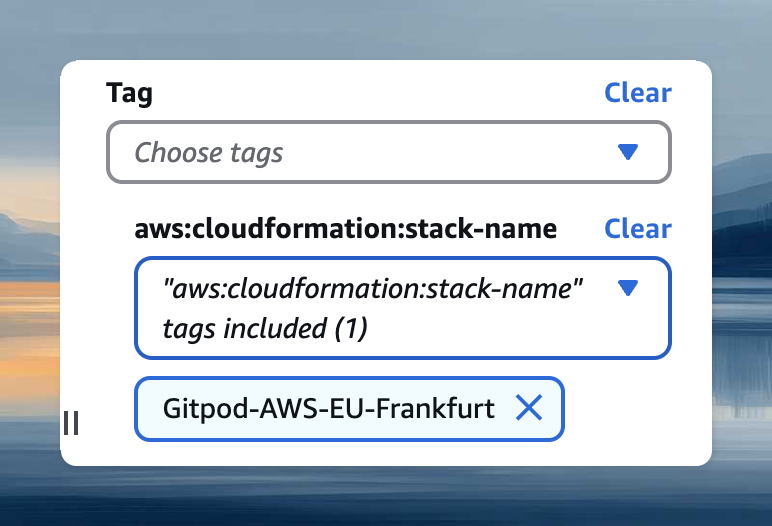
3. Filter by CloudFormation stack name (find it at **Settings → Runners**):
* Tag: `aws:cloudformation:stack-name`
* Or: `aws:ecs:clusterName`
 ### Environment costs
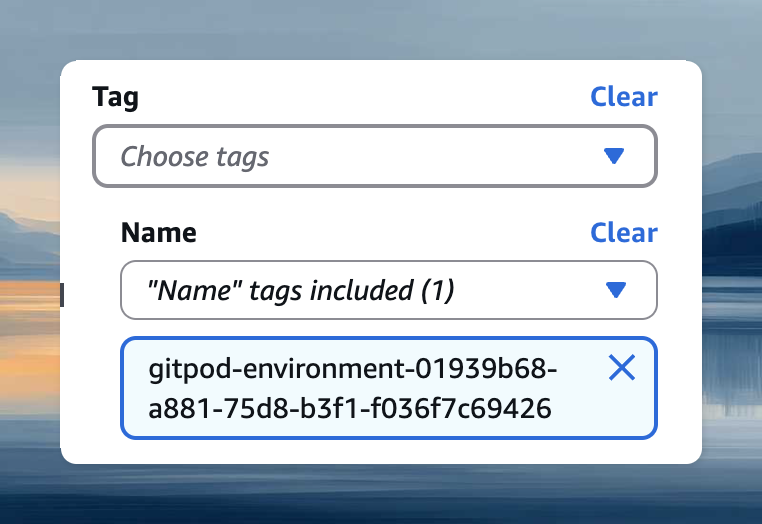
Filter by environment ID using the **Name** tag with value `gitpod-environment-`. Find the ID via **Copy ID** in environment details.
### Environment costs
Filter by environment ID using the **Name** tag with value `gitpod-environment-`. Find the ID via **Copy ID** in environment details.
 ## EC2 instance tagging
EC2 instances inherit tags from the CloudFormation template for cost allocation and access control.
**Add tags:**
1. Open your runner's CloudFormation stack
2. Select **Update** → **Use current template**
3. Add tags in format `Key=Value`
4. Complete the update
Tag changes don't apply to the running ECS task immediately. Force a new deployment: **ECS → Clusters → your cluster → Service → Update → Force new deployment**.
## EC2 instance tagging
EC2 instances inherit tags from the CloudFormation template for cost allocation and access control.
**Add tags:**
1. Open your runner's CloudFormation stack
2. Select **Update** → **Use current template**
3. Add tags in format `Key=Value`
4. Complete the update
Tag changes don't apply to the running ECS task immediately. Force a new deployment: **ECS → Clusters → your cluster → Service → Update → Force new deployment**.