> ## Documentation Index
> Fetch the complete documentation index at: https://ona.com/docs/llms.txt
> Use this file to discover all available pages before exploring further.
# Reference Architectures
The GCP Runner supports two load balancer modes. Choose the one that matches your network architecture and security requirements.
| | External Load Balancer | Internal Load Balancer |
| ----------------------- | -------------------------------------- | --------------------------------------- |
| **Access** | Internet-accessible | VPC and corporate network only |
| **Certificate storage** | Google Certificate Manager | Google Secret Manager |
| **Additional subnets** | None | Proxy subnet + routable subnet |
| **Corporate network** | Not required | VPN or Interconnect required |
| **Best for** | Teams accessing from various locations | Enterprise with strict network controls |
## External Load Balancer (Default)
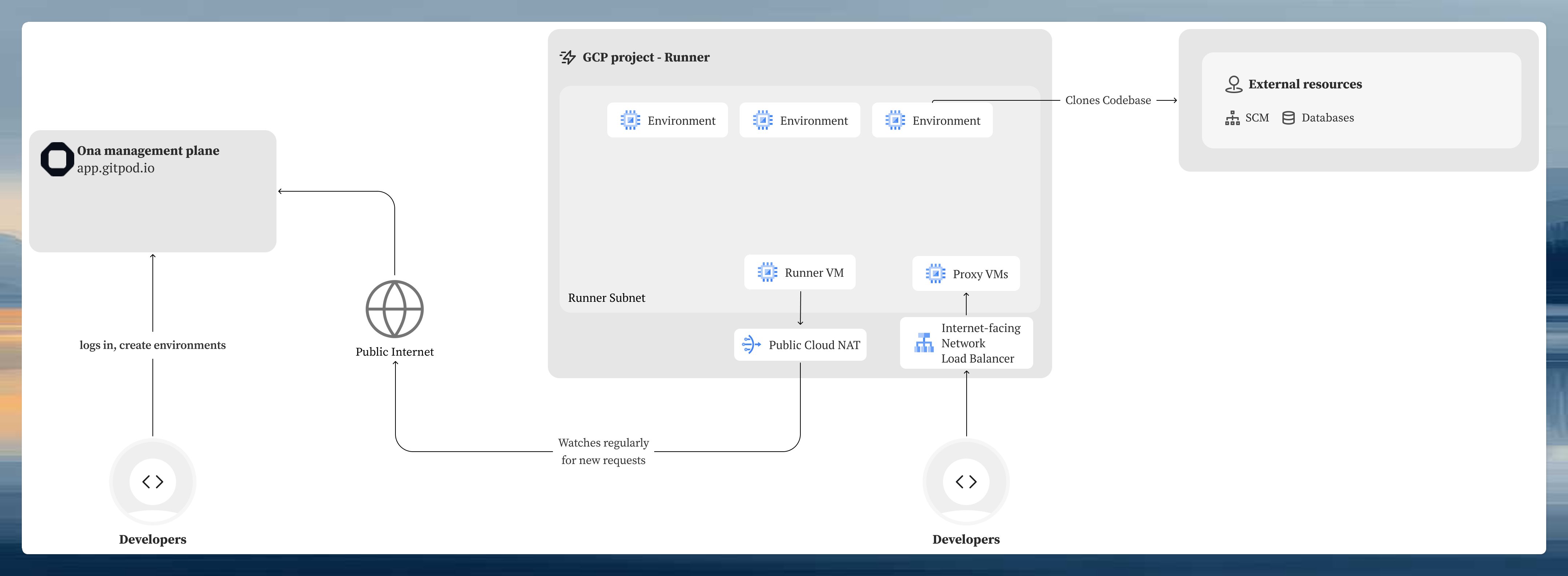
Environments are accessible over the internet through Google Cloud's global load balancer. This is the simpler configuration. No additional networking infrastructure is required beyond a standard VPC subnet.
 ### Subnet requirements
| Subnet | Purpose | CIDR recommendation |
| ----------------- | ---------------------------------------- | ---------------------------------------------------------------- |
| **Runner subnet** | Hosts runner service and environment VMs | `/16` for non-routable ranges, `/24` minimum for routable ranges |
If the runner subnet does not have external internet access, enable [Private Google Access](https://cloud.google.com/vpc/docs/configure-private-google-access) so VMs can reach GCP services through Google's internal network.
### SSL/TLS certificate
* Store your certificate in **Google Certificate Manager**
* The certificate must include both the root domain and wildcard as Subject Alternative Names (SANs):
* `yourdomain.com`
* `*.yourdomain.com`
* Managed certificates or uploaded certificates are both supported
* Reference format: `projects/{project}/locations/global/certificates/{name}`
For the Terraform variables to configure this mode, see [Setup: External Load Balancer](/ona/runners/gcp/setup#external-load-balancer-default).
## Internal Load Balancer
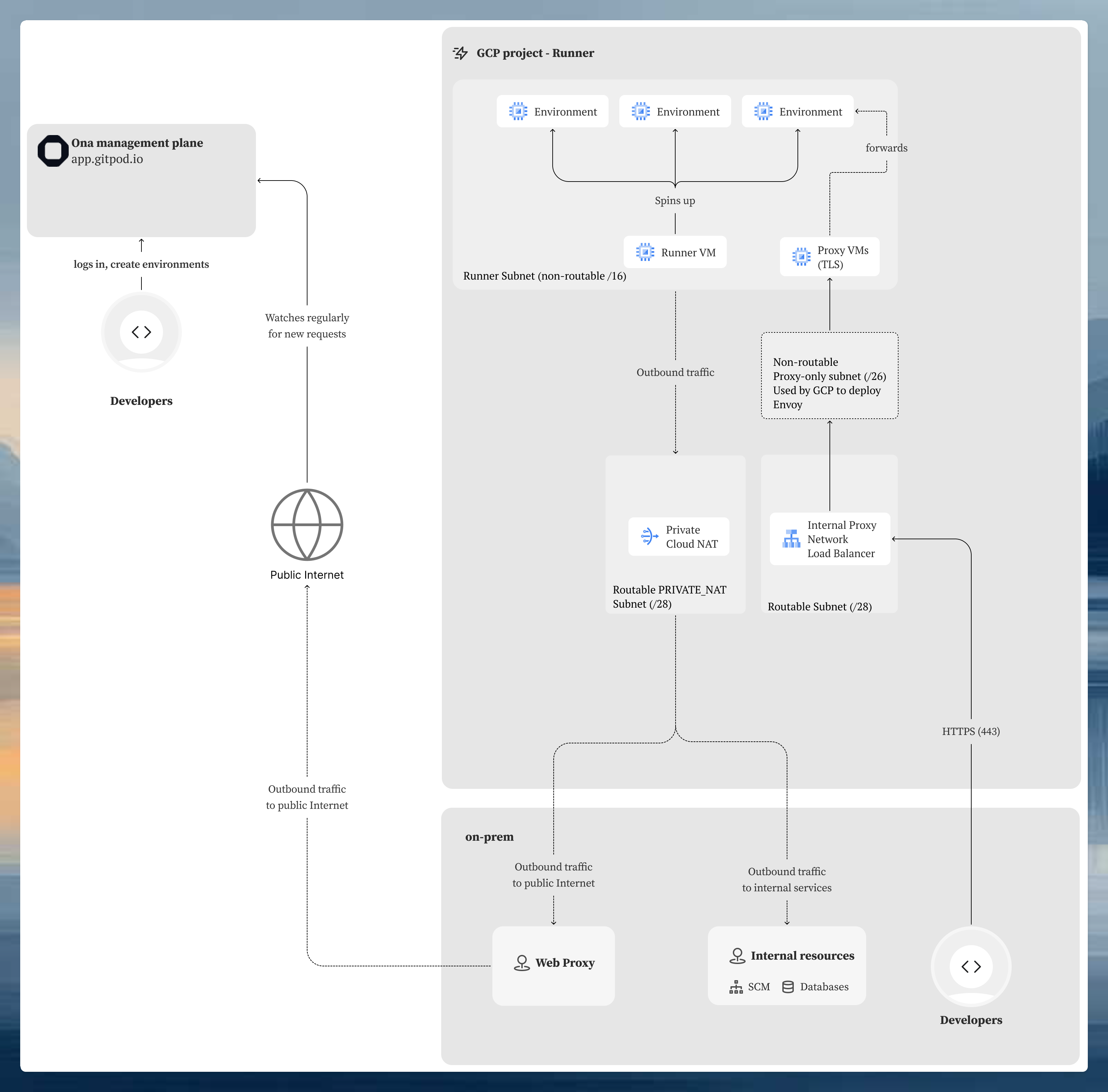
All traffic stays within your VPC and corporate network. Environments are not accessible from the internet. This mode requires corporate network connectivity (VPN, Interconnect, etc.) to your GCP VPC.
The architecture differs from the external mode because GCP's [internal passthrough Network Load Balancer](https://cloud.google.com/load-balancing/docs/internal) does not support TLS termination. TLS is instead terminated inside the Ona proxy component, which is why the certificate must be stored in Secret Manager (accessible to the proxy) rather than Certificate Manager. This also requires additional subnets:
* **Proxy subnet**: GCP provisions its own Envoy-based proxy infrastructure in this subnet to route traffic to the internal load balancer. This is a [GCP requirement for regional managed proxies](https://cloud.google.com/load-balancing/docs/proxy-only-subnets).
* **Routable subnet**: provides a routable IP address for the internal load balancer endpoint, reachable from your corporate network via VPN or Interconnect.
### Subnet requirements
| Subnet | Purpose | CIDR recommendation |
| ----------------- | ---------------------------------------- | ---------------------------------------------------------------- |
| **Runner subnet** | Hosts runner service and environment VMs | `/16` for non-routable ranges, `/24` minimum for routable ranges |
If the runner subnet does not have external internet access, enable [Private Google Access](https://cloud.google.com/vpc/docs/configure-private-google-access) so VMs can reach GCP services through Google's internal network.
### SSL/TLS certificate
* Store your certificate in **Google Certificate Manager**
* The certificate must include both the root domain and wildcard as Subject Alternative Names (SANs):
* `yourdomain.com`
* `*.yourdomain.com`
* Managed certificates or uploaded certificates are both supported
* Reference format: `projects/{project}/locations/global/certificates/{name}`
For the Terraform variables to configure this mode, see [Setup: External Load Balancer](/ona/runners/gcp/setup#external-load-balancer-default).
## Internal Load Balancer
All traffic stays within your VPC and corporate network. Environments are not accessible from the internet. This mode requires corporate network connectivity (VPN, Interconnect, etc.) to your GCP VPC.
The architecture differs from the external mode because GCP's [internal passthrough Network Load Balancer](https://cloud.google.com/load-balancing/docs/internal) does not support TLS termination. TLS is instead terminated inside the Ona proxy component, which is why the certificate must be stored in Secret Manager (accessible to the proxy) rather than Certificate Manager. This also requires additional subnets:
* **Proxy subnet**: GCP provisions its own Envoy-based proxy infrastructure in this subnet to route traffic to the internal load balancer. This is a [GCP requirement for regional managed proxies](https://cloud.google.com/load-balancing/docs/proxy-only-subnets).
* **Routable subnet**: provides a routable IP address for the internal load balancer endpoint, reachable from your corporate network via VPN or Interconnect.
 ### Subnet requirements
The internal load balancer requires three subnets:
| Subnet | Purpose | CIDR recommendation | Routable from corporate network? |
| ------------------- | ---------------------------------------- | ---------------------------------------------------------------- | -------------------------------------------- |
| **Runner subnet** | Hosts runner service and environment VMs | `/16` for non-routable ranges, `/24` minimum for routable ranges | Not required |
| **Proxy subnet** | Reserved for internal LB proxy instances | `/26` minimum (64 IPs), GCP recommends `/23` | No |
| **Routable subnet** | Allocates the internal LB IP address | `/28` (16 IPs) | **Yes**, must be reachable from your network |
Additional subnet requirements:
* The **proxy subnet** must have its purpose set to `REGIONAL_MANAGED_PROXY`
* The **routable subnet** must have routes from your internal/on-premises network
* If the runner subnet lacks external internet access, enable [Private Google Access](https://cloud.google.com/vpc/docs/configure-private-google-access)
### SSL/TLS certificate
* Store your certificate in **Google Secret Manager** as a JSON object containing both the certificate and private key
* The certificate must include both SANs: `yourdomain.com` and `*.yourdomain.com`
* Reference format: `projects/{project}/secrets/{secret-name}`
* See [Setup: Internal Load Balancer](/ona/runners/gcp/setup#internal-load-balancer) for the expected secret JSON format
For the Terraform variables to configure this mode, see [Setup: Internal Load Balancer](/ona/runners/gcp/setup#internal-load-balancer).
### Additional requirements
* **Corporate network connectivity** to your GCP VPC (VPN, Interconnect, or similar)
* **DNS resolution** from your corporate network for the runner domain
* The proxy subnet and routable subnet must exist before running `terraform apply`
## Outbound connectivity
The runner and environment VMs need outbound internet access to reach the Ona management plane, container registries, IDE downloads, and other external services. See [Access Requirements: Network Connectivity](/ona/runners/gcp/detailed-access-requirements#network-connectivity-requirements) for the full list of required endpoints.
How you provide this access depends on your network architecture:
| Strategy | When to use |
| --------------------------- | ----------------------------------------------------------------------------------------------------------------------------------------------------------------------------------------------- |
| **External IP addresses** | Simplest option. Each VM gets a public IP and routes directly to the internet. Suitable when your security policy allows direct egress. |
| **Cloud NAT** | VMs use private IPs only. A [Cloud NAT gateway](https://cloud.google.com/nat/docs/overview) provides outbound internet access without exposing VMs publicly. Common for production deployments. |
| **HTTP/HTTPS proxy** | Route outbound traffic through a corporate proxy. Configure via the `proxy_config` Terraform variable. See [Setup: HTTP Proxy Configuration](/ona/runners/gcp/setup#http-proxy-configuration). |
| **Private Service Connect** | Access specific Google APIs over private endpoints without internet egress. See [GCP Private Service Connect](https://cloud.google.com/vpc/docs/private-service-connect). |
If your VPC has no default internet route and you're not using Cloud NAT or a proxy, VMs will fail to pull container images, download IDE components, or connect to the Ona management plane. Ensure at least one egress path is configured before deployment.
For more on GCP egress options, see [Google Cloud network connectivity overview](https://cloud.google.com/vpc/docs/vpc#internet_access_reqs).
## Next steps
* [Setup guide](/ona/runners/gcp/setup): deploy your GCP Runner with Terraform
* [Access Requirements](/ona/runners/gcp/detailed-access-requirements): IAM permissions and network connectivity requirements
* [Troubleshooting](/ona/runners/gcp/troubleshooting-runners): diagnose load balancer and networking issues
### Subnet requirements
The internal load balancer requires three subnets:
| Subnet | Purpose | CIDR recommendation | Routable from corporate network? |
| ------------------- | ---------------------------------------- | ---------------------------------------------------------------- | -------------------------------------------- |
| **Runner subnet** | Hosts runner service and environment VMs | `/16` for non-routable ranges, `/24` minimum for routable ranges | Not required |
| **Proxy subnet** | Reserved for internal LB proxy instances | `/26` minimum (64 IPs), GCP recommends `/23` | No |
| **Routable subnet** | Allocates the internal LB IP address | `/28` (16 IPs) | **Yes**, must be reachable from your network |
Additional subnet requirements:
* The **proxy subnet** must have its purpose set to `REGIONAL_MANAGED_PROXY`
* The **routable subnet** must have routes from your internal/on-premises network
* If the runner subnet lacks external internet access, enable [Private Google Access](https://cloud.google.com/vpc/docs/configure-private-google-access)
### SSL/TLS certificate
* Store your certificate in **Google Secret Manager** as a JSON object containing both the certificate and private key
* The certificate must include both SANs: `yourdomain.com` and `*.yourdomain.com`
* Reference format: `projects/{project}/secrets/{secret-name}`
* See [Setup: Internal Load Balancer](/ona/runners/gcp/setup#internal-load-balancer) for the expected secret JSON format
For the Terraform variables to configure this mode, see [Setup: Internal Load Balancer](/ona/runners/gcp/setup#internal-load-balancer).
### Additional requirements
* **Corporate network connectivity** to your GCP VPC (VPN, Interconnect, or similar)
* **DNS resolution** from your corporate network for the runner domain
* The proxy subnet and routable subnet must exist before running `terraform apply`
## Outbound connectivity
The runner and environment VMs need outbound internet access to reach the Ona management plane, container registries, IDE downloads, and other external services. See [Access Requirements: Network Connectivity](/ona/runners/gcp/detailed-access-requirements#network-connectivity-requirements) for the full list of required endpoints.
How you provide this access depends on your network architecture:
| Strategy | When to use |
| --------------------------- | ----------------------------------------------------------------------------------------------------------------------------------------------------------------------------------------------- |
| **External IP addresses** | Simplest option. Each VM gets a public IP and routes directly to the internet. Suitable when your security policy allows direct egress. |
| **Cloud NAT** | VMs use private IPs only. A [Cloud NAT gateway](https://cloud.google.com/nat/docs/overview) provides outbound internet access without exposing VMs publicly. Common for production deployments. |
| **HTTP/HTTPS proxy** | Route outbound traffic through a corporate proxy. Configure via the `proxy_config` Terraform variable. See [Setup: HTTP Proxy Configuration](/ona/runners/gcp/setup#http-proxy-configuration). |
| **Private Service Connect** | Access specific Google APIs over private endpoints without internet egress. See [GCP Private Service Connect](https://cloud.google.com/vpc/docs/private-service-connect). |
If your VPC has no default internet route and you're not using Cloud NAT or a proxy, VMs will fail to pull container images, download IDE components, or connect to the Ona management plane. Ensure at least one egress path is configured before deployment.
For more on GCP egress options, see [Google Cloud network connectivity overview](https://cloud.google.com/vpc/docs/vpc#internet_access_reqs).
## Next steps
* [Setup guide](/ona/runners/gcp/setup): deploy your GCP Runner with Terraform
* [Access Requirements](/ona/runners/gcp/detailed-access-requirements): IAM permissions and network connectivity requirements
* [Troubleshooting](/ona/runners/gcp/troubleshooting-runners): diagnose load balancer and networking issues