> ## Documentation Index
> Fetch the complete documentation index at: https://ona.com/docs/llms.txt
> Use this file to discover all available pages before exploring further.
# Ona managed metrics
> Let Ona monitor your runner health with curated operational metrics
Available on the Enterprise plan. [Contact sales](https://ona.com/contact/sales) to learn more.
Want to send metrics to your own observability stack? See [Custom metrics pipeline](/ona/runners/monitoring-and-metrics).
Ona managed metrics lets you opt in to having Ona monitor your runner's operational health. When enabled, the runner pushes a curated set of Prometheus metrics to the Ona management plane, where the Ona team uses them to detect degradation and catch problems before they affect your developers.
This is independent of the [custom metrics pipeline](/ona/runners/monitoring-and-metrics), where you configure your own Prometheus remote write endpoint. Both can run simultaneously: managed metrics go to Ona, self-managed metrics go to your own observability stack.
## Why enable managed metrics
Without metrics visibility, Ona cannot detect runner issues until you report them. Managed metrics close this gap:
* **Proactive monitoring:** Ona detects degraded runners, resource exhaustion, and elevated error rates before developers are impacted.
* **Faster incident resolution:** When you contact support, the Ona team already has the operational context they need.
* **Zero setup on your side:** No Prometheus endpoint to configure, no dashboards to build. Toggle it on and the runner handles the rest.
* **Non-sensitive data only:** The curated metric set contains only operational counters, gauges, and histograms. No user data, source code, or secrets are ever sent.
## Enabling managed metrics
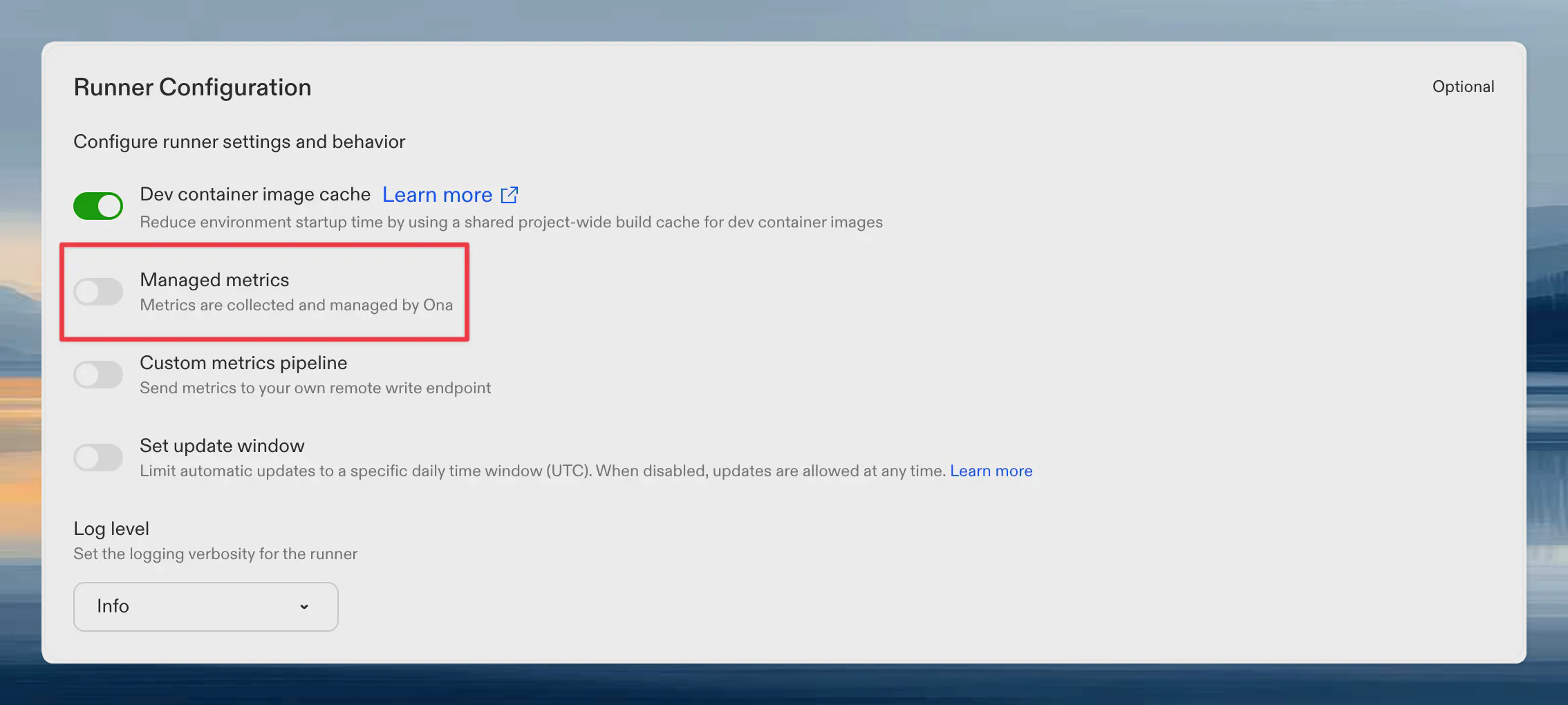
1. Go to **Settings → Runners**
2. Select your runner
3. Toggle **Ona managed metrics**
The setting saves immediately. No additional confirmation is needed.
 Metrics begin flowing within 60 seconds. No additional network configuration is required. The runner pushes metrics to the management plane over the same connection it already uses.
## What metrics are reported
The curated metric set answers: "Is this runner healthy and performing well?" Metrics are filtered to a hardcoded allowlist in the runner binary. Adding or removing metrics requires a runner release, which provides a natural review gate.
### Environment lifecycle
| Metric | Type | Description |
| --------------------------------------------------------- | --------- | -------------------------------------- |
| `gitpod_runnerkit_active_instances` | Gauge | Current environment count by state |
| `gitpod_runnerkit_environment_operation_duration_seconds` | Histogram | Duration of environment operations |
| `gitpod_runnerkit_function_calls_total` | Counter | Total function calls by function name |
| `gitpod_runnerkit_function_errors_total` | Counter | Total function errors by function name |
### Supervisor connectivity
| Metric | Type | Description |
| ------------------------------------------------- | ------- | -------------------------------------------- |
| `gitpod_runnerkit_supervisor_status_events_total` | Counter | Supervisor status events received |
| `gitpod_runnerkit_supervisor_watch_closes_total` | Counter | Supervisor watch connection closes by reason |
### Inverted RPC
These metrics track request delivery from the management plane to the runner over the runner's `WatchRequests` stream.
| Metric | Type | Description |
| ----------------------------------------------------------------- | --------- | ------------------------------------------------------------------------------------- |
| `gitpod_runnerkit_inverted_rpc_requests_received_total` | Counter | Inverted RPC requests and events received by request type |
| `gitpod_runnerkit_inverted_rpc_async_queue_depth` | Gauge | Current number of queued or running asynchronous inverted RPC requests |
| `gitpod_runnerkit_inverted_rpc_async_queue_capacity` | Gauge | Configured asynchronous inverted RPC queue capacity |
| `gitpod_runnerkit_inverted_rpc_async_queue_enqueues_total` | Counter | Asynchronous inverted RPC enqueue attempts by request type and outcome |
| `gitpod_runnerkit_inverted_rpc_async_queue_wait_duration_seconds` | Histogram | Time asynchronous inverted RPC requests spend waiting before handler execution starts |
| `gitpod_runnerkit_inverted_rpc_handler_duration_seconds` | Histogram | Runner-side inverted RPC handler duration by request type and result code |
| `gitpod_runnerkit_inverted_rpc_send_responses_total` | Counter | Attempts to send inverted RPC responses back to the management plane |
| `gitpod_runnerkit_inverted_rpc_watch_stream_connects_total` | Counter | `WatchRequests` stream connection attempts by delivery path and outcome |
| `gitpod_runnerkit_inverted_rpc_watch_stream_duration_seconds` | Histogram | `WatchRequests` stream session duration by delivery path and close reason |
### Snapshots and warm pools
| Metric | Type | Description |
| -------------------------------------- | --------- | --------------------------------- |
| `snapshot_reconcile_duration_seconds` | Histogram | Snapshot processing time by phase |
| `snapshot_in_progress` | Gauge | Active snapshot operations |
| `snapshot_timeouts_total` | Counter | Snapshot timeouts |
| `warm_pool_reconcile_duration_seconds` | Histogram | Warm pool reconciliation duration |
| `warm_pool_deletions_total` | Counter | Warm pool instance deletions |
### Work queue health
| Metric | Type | Description |
| ---------------------------------- | --------- | --------------------------------- |
| `workqueue_depth` | Gauge | Current queue depth |
| `workqueue_queue_duration_seconds` | Histogram | Time items spend waiting in queue |
| `workqueue_work_duration_seconds` | Histogram | Time spent processing items |
| `workqueue_retries_total` | Counter | Processing retries |
### LLM proxy health
Scoped to proxy health only. **No token counts, no prompts, no usage patterns.** Ona can see whether the proxy is succeeding and how fast it responds, but nothing about what you send through it.
| Metric | Type | Description |
| ------------------------------------------- | --------- | --------------------------------------------------------------------------------- |
| `gitpod_llm_proxy_requests_completed_total` | Counter | Final request outcome (`success`, `exhausted`, `rejected`) per endpoint and model |
| `gitpod_llm_requests_duration_seconds` | Histogram | End-to-end proxy request latency |
| `gitpod_llm_errors_total` | Counter | Provider-side errors returned inside 200 responses, by error type |
| `gitpod_llm_failover_total` | Counter | Failovers between configured LLM providers |
Token usage metrics (`gitpod_llm_input_tokens_total`, `gitpod_llm_output_tokens_total`, cache counters, etc.) are **deliberately excluded** from the allowlist. They remain available to your own [custom metrics pipeline](/ona/runners/monitoring-and-metrics) if you want them, but they are never forwarded to Ona.
### Agent and MCP
| Metric | Type | Description |
| ----------------- | ------- | --------------------------------------------------------- |
| `gitpod_mcp_*` | Various | MCP proxy request duration and count |
| `gitpod_memory_*` | Various | Redis memory usage, eviction cycles, and conversation age |
| `gitpod_skill_*` | Various | Skill API discovery metrics |
### Runner operations
| Metric | Type | Description |
| ------------------------- | ------- | ---------------------------------------------- |
| `gitpod_runner_manager_*` | Various | Runner manager operational metrics |
| `gitpod_runner_scm_*` | Various | SCM token refresh, cache invalidation, and TTL |
| `gitpod_runner_updater_*` | Various | Runner self-update duration and count |
| `gitpod_ip_allocator_*` | Various | IP address allocation metrics |
| `gitpod_kvstore_*` | Various | Key-value store operation metrics |
### Process health
| Metric | Type | Description |
| --------------------------- | ------- | ----------------------- |
| `go_goroutines` | Gauge | Current goroutine count |
| `go_memstats_alloc_bytes` | Gauge | Allocated heap memory |
| `process_cpu_seconds_total` | Counter | Total CPU time consumed |
### Cloud-specific metrics
| Metric | Type | Description |
| -------------------------------- | --------------- | ----------------------------------------------------------------------------- |
| `gitpod_ec2_runner_*` | Various | EC2 runner operational metrics |
| `gitpod_ecs_task_*` | Gauge / Counter | Task-level CPU, memory, and network usage from the ECS Task Metadata Endpoint |
| `gitpod_ecs_container_*` | Gauge / Counter | Per-container CPU, memory, and network usage within the runner task |
| `node_filesystem_*` | Gauge | Host filesystem capacity and availability metrics from node exporter |
| `node_disk_*` | Gauge / Counter | Host disk I/O metrics from node exporter |
| `environment_error_errors_total` | Counter | Environment errors by code and component |
| Metric | Type | Description |
| -------------------------------------------------- | --------- | --------------------------------------- |
| `gitpod_gcp_*` | Various | GCP runner operational metrics |
| `gitpod_gcp_compute_rate_limit_hits_total` | Counter | GCP API rate limit hits |
| `gitpod_gcp_compute_api_throttle_duration_seconds` | Histogram | Time spent throttled by GCP API |
| `gitpod_gcp_compute_circuit_breaker_state` | Gauge | Circuit breaker state for GCP API calls |
| `gitpod_gcp_runtime_reconciler_errors_total` | Counter | Runtime reconciler errors |
## How it works
1. The runner's Prometheus registry collects metrics every 15 seconds (this already happens for normal runner operation).
2. A managed metrics reporter filters the registry to the curated allowlist, encodes the result as a Prometheus remote write payload, and compresses it with Snappy.
3. The runner pushes the compressed payload to the Ona management plane every 60 seconds over the existing authenticated connection.
4. The management plane validates the payload, adds identifying labels (`organization_id`, `runner_id`, `runner_region`, `runner_type`), and forwards it to Ona's internal monitoring infrastructure.
Typical payloads are 5–15 KB compressed. The reporter runs independently of any self-managed metrics endpoint you may have configured.
## Auditing reported metrics
Every metrics payload the runner sends to Ona is also written to your cloud storage bucket, so you can audit exactly what data leaves your network.
Audit payloads are stored as Snappy-compressed Prometheus remote write protobufs at:
```
metrics/runner/{runner-id}/{YYYY}/{MM}/{DD}/{HHmmss}.pb.snappy
```
### Finding the bucket name
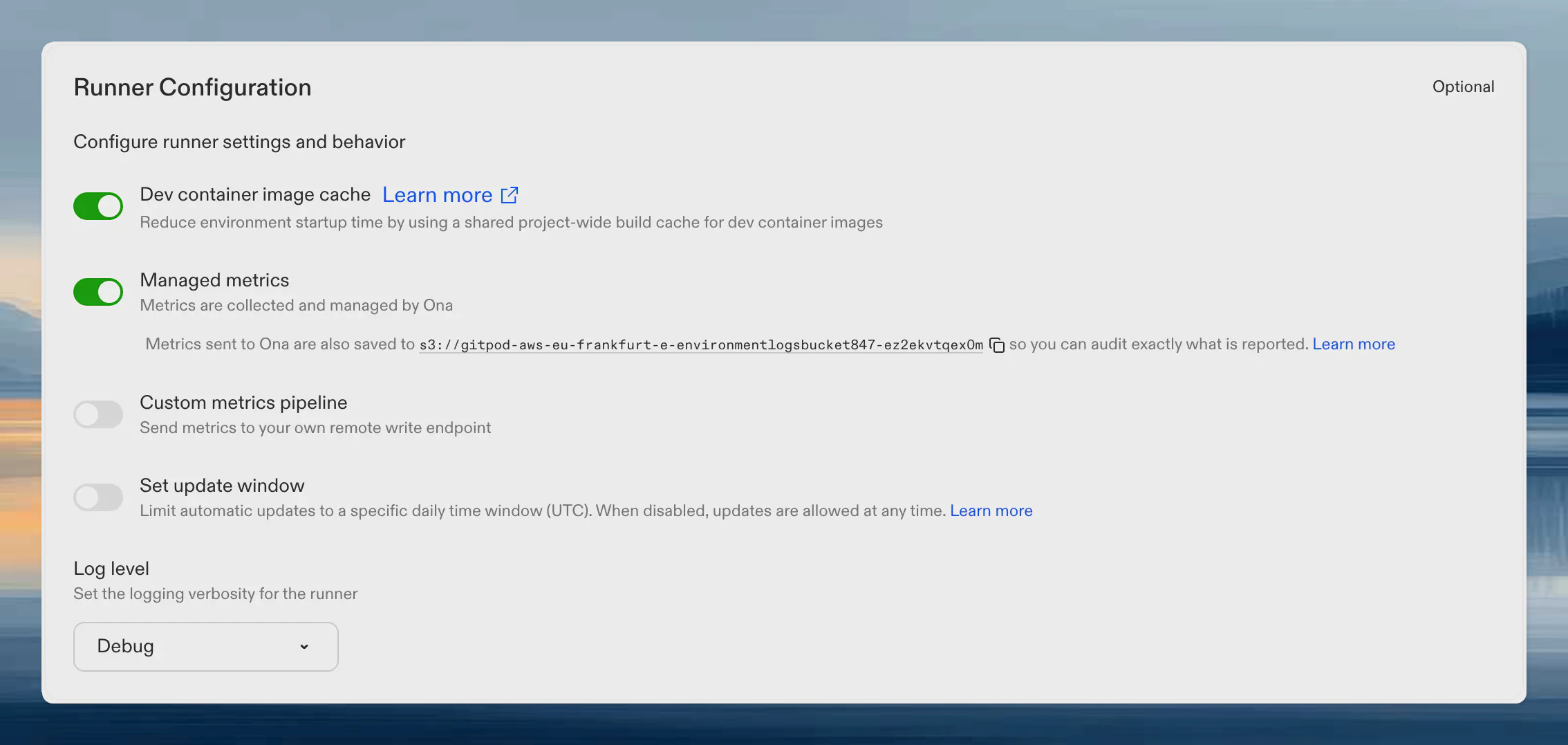
The bucket name is shown on your runner's settings page. When Ona managed metrics is enabled, the bucket URI appears below the toggle. Click the copy icon to copy it.
Metrics begin flowing within 60 seconds. No additional network configuration is required. The runner pushes metrics to the management plane over the same connection it already uses.
## What metrics are reported
The curated metric set answers: "Is this runner healthy and performing well?" Metrics are filtered to a hardcoded allowlist in the runner binary. Adding or removing metrics requires a runner release, which provides a natural review gate.
### Environment lifecycle
| Metric | Type | Description |
| --------------------------------------------------------- | --------- | -------------------------------------- |
| `gitpod_runnerkit_active_instances` | Gauge | Current environment count by state |
| `gitpod_runnerkit_environment_operation_duration_seconds` | Histogram | Duration of environment operations |
| `gitpod_runnerkit_function_calls_total` | Counter | Total function calls by function name |
| `gitpod_runnerkit_function_errors_total` | Counter | Total function errors by function name |
### Supervisor connectivity
| Metric | Type | Description |
| ------------------------------------------------- | ------- | -------------------------------------------- |
| `gitpod_runnerkit_supervisor_status_events_total` | Counter | Supervisor status events received |
| `gitpod_runnerkit_supervisor_watch_closes_total` | Counter | Supervisor watch connection closes by reason |
### Inverted RPC
These metrics track request delivery from the management plane to the runner over the runner's `WatchRequests` stream.
| Metric | Type | Description |
| ----------------------------------------------------------------- | --------- | ------------------------------------------------------------------------------------- |
| `gitpod_runnerkit_inverted_rpc_requests_received_total` | Counter | Inverted RPC requests and events received by request type |
| `gitpod_runnerkit_inverted_rpc_async_queue_depth` | Gauge | Current number of queued or running asynchronous inverted RPC requests |
| `gitpod_runnerkit_inverted_rpc_async_queue_capacity` | Gauge | Configured asynchronous inverted RPC queue capacity |
| `gitpod_runnerkit_inverted_rpc_async_queue_enqueues_total` | Counter | Asynchronous inverted RPC enqueue attempts by request type and outcome |
| `gitpod_runnerkit_inverted_rpc_async_queue_wait_duration_seconds` | Histogram | Time asynchronous inverted RPC requests spend waiting before handler execution starts |
| `gitpod_runnerkit_inverted_rpc_handler_duration_seconds` | Histogram | Runner-side inverted RPC handler duration by request type and result code |
| `gitpod_runnerkit_inverted_rpc_send_responses_total` | Counter | Attempts to send inverted RPC responses back to the management plane |
| `gitpod_runnerkit_inverted_rpc_watch_stream_connects_total` | Counter | `WatchRequests` stream connection attempts by delivery path and outcome |
| `gitpod_runnerkit_inverted_rpc_watch_stream_duration_seconds` | Histogram | `WatchRequests` stream session duration by delivery path and close reason |
### Snapshots and warm pools
| Metric | Type | Description |
| -------------------------------------- | --------- | --------------------------------- |
| `snapshot_reconcile_duration_seconds` | Histogram | Snapshot processing time by phase |
| `snapshot_in_progress` | Gauge | Active snapshot operations |
| `snapshot_timeouts_total` | Counter | Snapshot timeouts |
| `warm_pool_reconcile_duration_seconds` | Histogram | Warm pool reconciliation duration |
| `warm_pool_deletions_total` | Counter | Warm pool instance deletions |
### Work queue health
| Metric | Type | Description |
| ---------------------------------- | --------- | --------------------------------- |
| `workqueue_depth` | Gauge | Current queue depth |
| `workqueue_queue_duration_seconds` | Histogram | Time items spend waiting in queue |
| `workqueue_work_duration_seconds` | Histogram | Time spent processing items |
| `workqueue_retries_total` | Counter | Processing retries |
### LLM proxy health
Scoped to proxy health only. **No token counts, no prompts, no usage patterns.** Ona can see whether the proxy is succeeding and how fast it responds, but nothing about what you send through it.
| Metric | Type | Description |
| ------------------------------------------- | --------- | --------------------------------------------------------------------------------- |
| `gitpod_llm_proxy_requests_completed_total` | Counter | Final request outcome (`success`, `exhausted`, `rejected`) per endpoint and model |
| `gitpod_llm_requests_duration_seconds` | Histogram | End-to-end proxy request latency |
| `gitpod_llm_errors_total` | Counter | Provider-side errors returned inside 200 responses, by error type |
| `gitpod_llm_failover_total` | Counter | Failovers between configured LLM providers |
Token usage metrics (`gitpod_llm_input_tokens_total`, `gitpod_llm_output_tokens_total`, cache counters, etc.) are **deliberately excluded** from the allowlist. They remain available to your own [custom metrics pipeline](/ona/runners/monitoring-and-metrics) if you want them, but they are never forwarded to Ona.
### Agent and MCP
| Metric | Type | Description |
| ----------------- | ------- | --------------------------------------------------------- |
| `gitpod_mcp_*` | Various | MCP proxy request duration and count |
| `gitpod_memory_*` | Various | Redis memory usage, eviction cycles, and conversation age |
| `gitpod_skill_*` | Various | Skill API discovery metrics |
### Runner operations
| Metric | Type | Description |
| ------------------------- | ------- | ---------------------------------------------- |
| `gitpod_runner_manager_*` | Various | Runner manager operational metrics |
| `gitpod_runner_scm_*` | Various | SCM token refresh, cache invalidation, and TTL |
| `gitpod_runner_updater_*` | Various | Runner self-update duration and count |
| `gitpod_ip_allocator_*` | Various | IP address allocation metrics |
| `gitpod_kvstore_*` | Various | Key-value store operation metrics |
### Process health
| Metric | Type | Description |
| --------------------------- | ------- | ----------------------- |
| `go_goroutines` | Gauge | Current goroutine count |
| `go_memstats_alloc_bytes` | Gauge | Allocated heap memory |
| `process_cpu_seconds_total` | Counter | Total CPU time consumed |
### Cloud-specific metrics
| Metric | Type | Description |
| -------------------------------- | --------------- | ----------------------------------------------------------------------------- |
| `gitpod_ec2_runner_*` | Various | EC2 runner operational metrics |
| `gitpod_ecs_task_*` | Gauge / Counter | Task-level CPU, memory, and network usage from the ECS Task Metadata Endpoint |
| `gitpod_ecs_container_*` | Gauge / Counter | Per-container CPU, memory, and network usage within the runner task |
| `node_filesystem_*` | Gauge | Host filesystem capacity and availability metrics from node exporter |
| `node_disk_*` | Gauge / Counter | Host disk I/O metrics from node exporter |
| `environment_error_errors_total` | Counter | Environment errors by code and component |
| Metric | Type | Description |
| -------------------------------------------------- | --------- | --------------------------------------- |
| `gitpod_gcp_*` | Various | GCP runner operational metrics |
| `gitpod_gcp_compute_rate_limit_hits_total` | Counter | GCP API rate limit hits |
| `gitpod_gcp_compute_api_throttle_duration_seconds` | Histogram | Time spent throttled by GCP API |
| `gitpod_gcp_compute_circuit_breaker_state` | Gauge | Circuit breaker state for GCP API calls |
| `gitpod_gcp_runtime_reconciler_errors_total` | Counter | Runtime reconciler errors |
## How it works
1. The runner's Prometheus registry collects metrics every 15 seconds (this already happens for normal runner operation).
2. A managed metrics reporter filters the registry to the curated allowlist, encodes the result as a Prometheus remote write payload, and compresses it with Snappy.
3. The runner pushes the compressed payload to the Ona management plane every 60 seconds over the existing authenticated connection.
4. The management plane validates the payload, adds identifying labels (`organization_id`, `runner_id`, `runner_region`, `runner_type`), and forwards it to Ona's internal monitoring infrastructure.
Typical payloads are 5–15 KB compressed. The reporter runs independently of any self-managed metrics endpoint you may have configured.
## Auditing reported metrics
Every metrics payload the runner sends to Ona is also written to your cloud storage bucket, so you can audit exactly what data leaves your network.
Audit payloads are stored as Snappy-compressed Prometheus remote write protobufs at:
```
metrics/runner/{runner-id}/{YYYY}/{MM}/{DD}/{HHmmss}.pb.snappy
```
### Finding the bucket name
The bucket name is shown on your runner's settings page. When Ona managed metrics is enabled, the bucket URI appears below the toggle. Click the copy icon to copy it.
 ### Listing and downloading audit payloads
```bash theme={null}
aws s3 ls s3://YOUR_LOGS_BUCKET/metrics/runner/YOUR_RUNNER_ID/ --recursive
```
```bash theme={null}
# Download a specific payload
aws s3 cp s3://YOUR_LOGS_BUCKET/metrics/runner/YOUR_RUNNER_ID/2026/04/10/143000.pb.snappy ./payload.pb.snappy
```
```bash theme={null}
gcloud storage ls gs://YOUR_ASSETS_BUCKET/metrics/runner/YOUR_RUNNER_ID/ --recursive
```
```bash theme={null}
# Download a specific payload
gcloud storage cp gs://YOUR_ASSETS_BUCKET/metrics/runner/YOUR_RUNNER_ID/2026/04/10/143000.pb.snappy ./payload.pb.snappy
```
### Decoding audit payloads
Each `.pb.snappy` file is a Snappy-compressed [Prometheus remote write `WriteRequest`](https://prometheus.io/docs/concepts/remote_write_spec/) protobuf. You can decode it with standard Prometheus tooling or any protobuf decoder:
```bash theme={null}
# Using protoc (requires prometheus remote write proto definition)
cat payload.pb.snappy | python3 -c "
import sys, snappy
sys.stdout.buffer.write(snappy.decompress(sys.stdin.buffer.read()))
" | protoc --decode=prometheus.WriteRequest remote.proto
```
The decoded output shows every metric name, label set, and sample value: the exact data that was sent to Ona.
## Privacy and data handling
* **Opt-in only.** Disabled by default. You explicitly enable it per runner.
* **Push-based.** The runner pushes metrics to Ona. Ona never reaches into your runner or network.
* **Non-sensitive.** Only operational counters, gauges, and histograms. No user data, source code, environment variables, or secrets.
* **Non-interfering.** Independent of any self-managed metrics endpoint. Both can run simultaneously.
* **Auditable.** Every payload is persisted to your cloud storage for inspection.
* **Transparent.** The metric allowlist is hardcoded in the runner binary. Changes require a runner release and are documented on this page.
### Listing and downloading audit payloads
```bash theme={null}
aws s3 ls s3://YOUR_LOGS_BUCKET/metrics/runner/YOUR_RUNNER_ID/ --recursive
```
```bash theme={null}
# Download a specific payload
aws s3 cp s3://YOUR_LOGS_BUCKET/metrics/runner/YOUR_RUNNER_ID/2026/04/10/143000.pb.snappy ./payload.pb.snappy
```
```bash theme={null}
gcloud storage ls gs://YOUR_ASSETS_BUCKET/metrics/runner/YOUR_RUNNER_ID/ --recursive
```
```bash theme={null}
# Download a specific payload
gcloud storage cp gs://YOUR_ASSETS_BUCKET/metrics/runner/YOUR_RUNNER_ID/2026/04/10/143000.pb.snappy ./payload.pb.snappy
```
### Decoding audit payloads
Each `.pb.snappy` file is a Snappy-compressed [Prometheus remote write `WriteRequest`](https://prometheus.io/docs/concepts/remote_write_spec/) protobuf. You can decode it with standard Prometheus tooling or any protobuf decoder:
```bash theme={null}
# Using protoc (requires prometheus remote write proto definition)
cat payload.pb.snappy | python3 -c "
import sys, snappy
sys.stdout.buffer.write(snappy.decompress(sys.stdin.buffer.read()))
" | protoc --decode=prometheus.WriteRequest remote.proto
```
The decoded output shows every metric name, label set, and sample value: the exact data that was sent to Ona.
## Privacy and data handling
* **Opt-in only.** Disabled by default. You explicitly enable it per runner.
* **Push-based.** The runner pushes metrics to Ona. Ona never reaches into your runner or network.
* **Non-sensitive.** Only operational counters, gauges, and histograms. No user data, source code, environment variables, or secrets.
* **Non-interfering.** Independent of any self-managed metrics endpoint. Both can run simultaneously.
* **Auditable.** Every payload is persisted to your cloud storage for inspection.
* **Transparent.** The metric allowlist is hardcoded in the runner binary. Changes require a runner release and are documented on this page.