> ## Documentation Index
> Fetch the complete documentation index at: https://ona.com/docs/llms.txt
> Use this file to discover all available pages before exploring further.
# Configure multiple instance types
Available on the Enterprise plan. [Contact sales](https://ona.com/contact/sales) to learn more.
Add multiple AWS EC2 instance types or GCP machine types to one environment class to improve capacity availability. Ona tries the types in priority order while projects continue to select a single environment class.
Choose instance types with the same or similar CPU, memory, architecture, and accelerator resources. Projects and Insights refer to the environment class, not a guaranteed instance type, so unlike types can make environment performance and class-level usage data inconsistent.
## Use the fallbacks configured by default
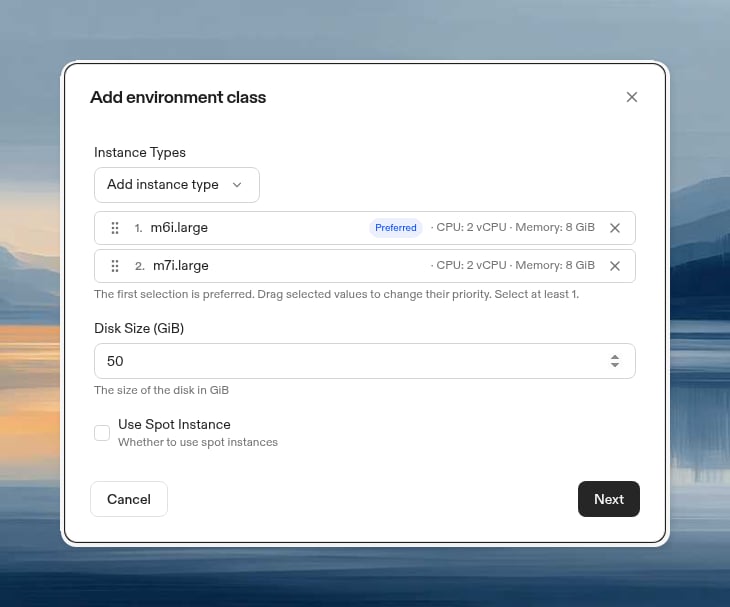
When you set up a new AWS or GCP runner, Ona automatically configures ordered fallback types in its default environment classes. For example, the default AWS Small class can prefer `m6i.large` and fall back to `m7i.large`, while the default GCP Small class can prefer `n4-standard-2` and fall back to `n4d-standard-2`.
The runner only includes types available in its region, so the exact fallback list can vary. If a default class meets your resource requirements, you can use it without creating a custom class. Create a custom class when you need a different resource profile or priority order.
## Create an environment class with fallback types
1. In the Ona dashboard, go to **Settings → Runners**.
2. Select an AWS or GCP runner.
3. Under **Customize your environment classes**, select **New environment class**.
4. Select **Add instance type** (AWS) or **Add machine type** (GCP), then choose each type that the class can use.
5. Drag the selected types into priority order. The first type is marked **Preferred**.
6. Configure the disk size and Spot or preemptible setting, then select **Next**.
7. Enter a class name and description, then select **Create**.
 ## How Ona selects an instance type
Ona starts with the preferred instance type and tries its eligible zones or placements. If the cloud provider reports insufficient capacity, Ona tries the next instance type in the configured order.
Ona stops after it exhausts every configured instance type and eligible placement. Errors unrelated to capacity do not trigger an instance type fallback.
## Choose compatible instance types
Treat each environment class as one resource profile. Good fallback types have:
* The same number of virtual CPUs and a similar CPU generation
* The same amount of memory
* The same CPU architecture and required instruction sets
* The same accelerator type and count for GPU workloads
* Similar price and performance characteristics
* Availability in the regions and zones used by the runner
For example, `m6i.large` and `m7i.large` are suitable EC2 candidates for one class because they provide the same resource size across two instance generations. Create separate environment classes when workloads need different resource sizes.
## Understand project and Insights behavior
A project continues to select environment classes, not individual instance types. An environment can run on any instance type configured for its selected class.
[Insights](/docs/ona/organizations/insights) aggregates environment usage by class. If one class contains instance types with substantially different resources, the class name no longer represents a consistent environment size. Use a separate class for each distinct resource profile.
## Limitations
* Multiple instance types are available for AWS and GCP runners. You cannot configure instance types for Ona Cloud environment classes.
* Disk size and Spot or preemptible settings apply to the whole class, not to individual instance types.
* Available instance types depend on the runner's cloud provider, region, quotas, and supported machine types.
## Related guides
* [AWS environment classes](/docs/ona/runners/aws/environment-classes)
* [AWS capacity planning](/docs/ona/runners/aws/capacity-planning)
* [GCP runner setup](/docs/ona/runners/gcp/setup)
## How Ona selects an instance type
Ona starts with the preferred instance type and tries its eligible zones or placements. If the cloud provider reports insufficient capacity, Ona tries the next instance type in the configured order.
Ona stops after it exhausts every configured instance type and eligible placement. Errors unrelated to capacity do not trigger an instance type fallback.
## Choose compatible instance types
Treat each environment class as one resource profile. Good fallback types have:
* The same number of virtual CPUs and a similar CPU generation
* The same amount of memory
* The same CPU architecture and required instruction sets
* The same accelerator type and count for GPU workloads
* Similar price and performance characteristics
* Availability in the regions and zones used by the runner
For example, `m6i.large` and `m7i.large` are suitable EC2 candidates for one class because they provide the same resource size across two instance generations. Create separate environment classes when workloads need different resource sizes.
## Understand project and Insights behavior
A project continues to select environment classes, not individual instance types. An environment can run on any instance type configured for its selected class.
[Insights](/docs/ona/organizations/insights) aggregates environment usage by class. If one class contains instance types with substantially different resources, the class name no longer represents a consistent environment size. Use a separate class for each distinct resource profile.
## Limitations
* Multiple instance types are available for AWS and GCP runners. You cannot configure instance types for Ona Cloud environment classes.
* Disk size and Spot or preemptible settings apply to the whole class, not to individual instance types.
* Available instance types depend on the runner's cloud provider, region, quotas, and supported machine types.
## Related guides
* [AWS environment classes](/docs/ona/runners/aws/environment-classes)
* [AWS capacity planning](/docs/ona/runners/aws/capacity-planning)
* [GCP runner setup](/docs/ona/runners/gcp/setup)