

/ in the chat.
Why this matters
Without shared skills, quality varies. One developer’s code review catches security issues; another’s misses them. One person knows how to write tests that actually test behavior; others write tests that only hit coverage targets. With skills:- Expertise scales: A senior engineer’s review checklist becomes available to the whole team
- Quality standardizes: Everyone follows the same thorough process
- Onboarding accelerates: New team members immediately have access to proven workflows
- Agents get smarter: Skills are discoverable by the agent, so it can apply them proactively without being asked
What a great skill looks like
Here’s a real example - a code review skill that captures one engineer’s review philosophy:/review-like-mads and get a review with that level of rigor. The agent can also apply this skill on its own when it detects a code review task.
More examples
Create your first skill
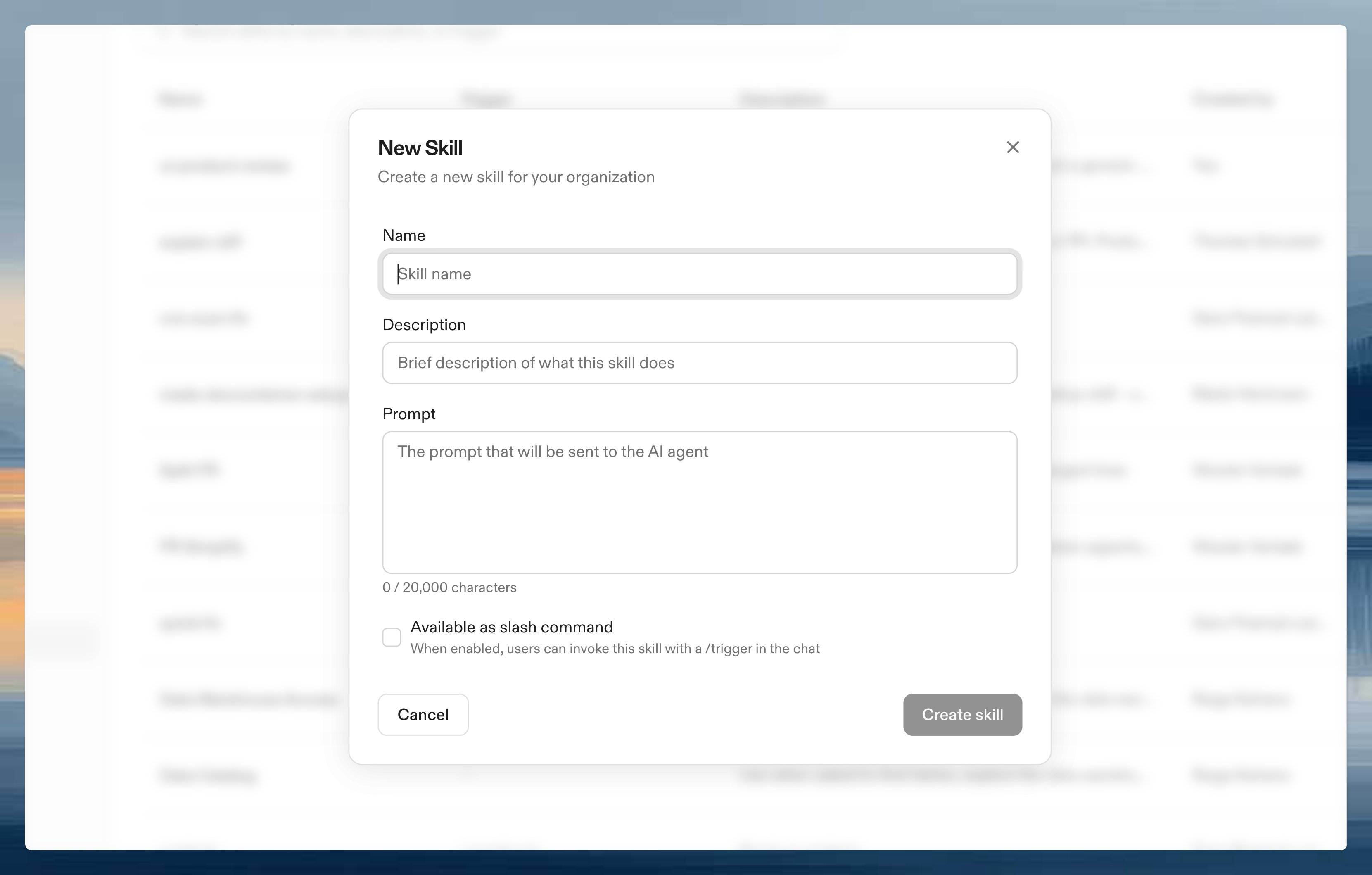
- Go to Settings > Agents > Skills
- Click New Skill
- Configure:
- Name: What appears in the skill list (e.g., “Review like Mads”)
- Description: When to use it
- Prompt: The full prompt text
- Available as slash command: Toggle on if you want users to invoke it with a
/trigger - Command trigger: The slash trigger (e.g.,
review-like-mads). Only shown when the slash command toggle is on
- Click Create Skill
Using skills
Skills work in two ways:- Proactive discovery: The agent automatically discovers skills and applies them when a task matches. No user action needed.
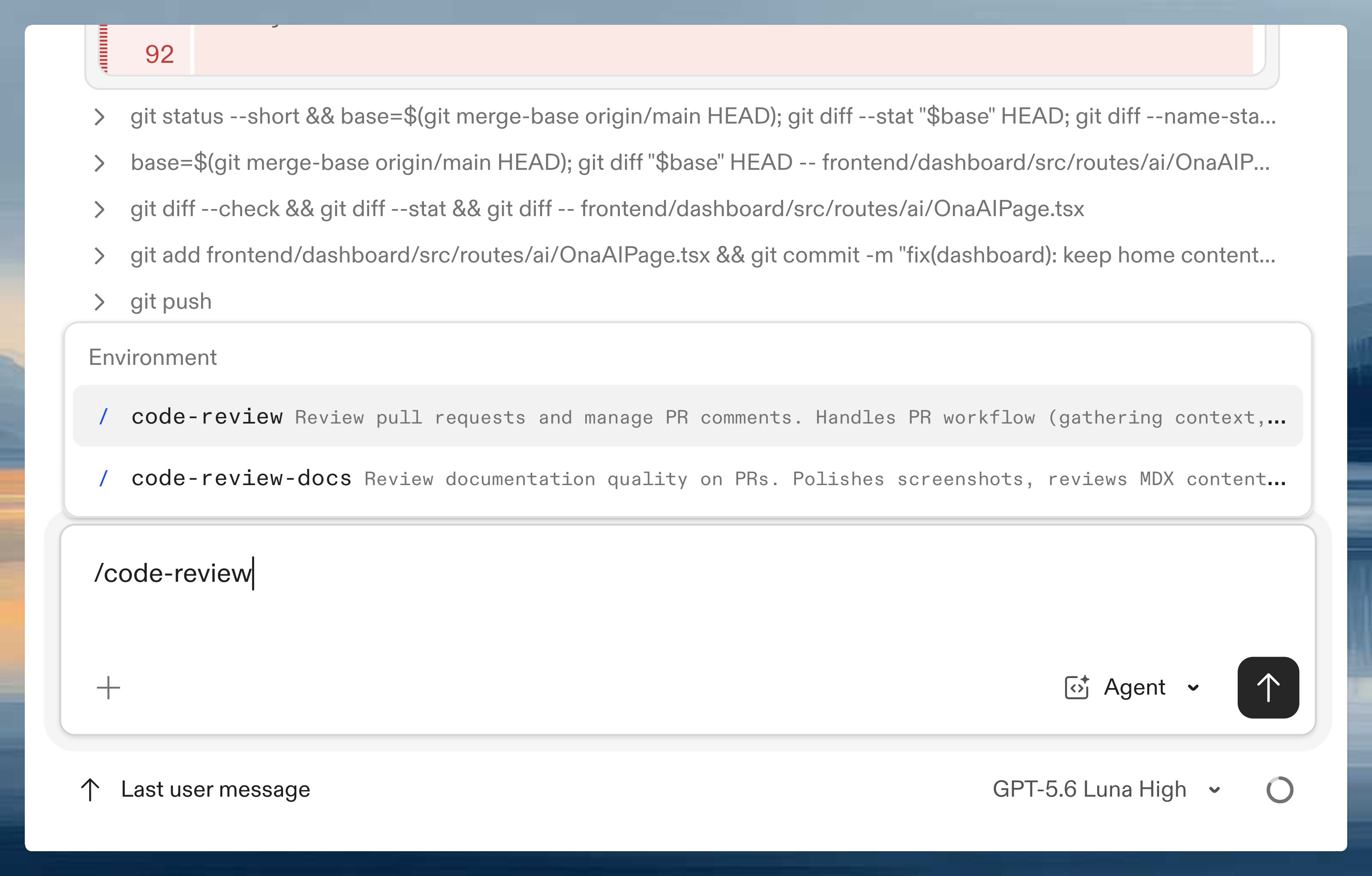
- Slash commands: For skills with a command trigger, type
/in the agent prompt to see available commands. Start typing to filter, then select with arrow keys or click.
Migrating legacy commands
Existing slash commands created before skills were introduced appear as Legacy Commands in the settings page. They continue to work as before, but won’t be discovered proactively by the agent. To migrate a legacy command to a skill, click Edit on the command card and use the Migrate to Skill button in the banner. Migration preserves the slash command trigger while enabling proactive discovery.Tips for good skills
Capture real expertise: Base skills on how your best people actually work, not theoretical ideals. Be specific: “Security Review” is better than “Review”. Include the actual checklist, not “check for security issues.” Include priorities: Tell agents what matters most. “Focus on X before Y” helps them make tradeoffs. Update over time: When someone catches something your skill missed, add it to the prompt.Example skills we use at Ona
These are real skills from our own workflow. They show what a well-structured skill looks like at scale./create-pr: Raise pull requests
/create-pr: Raise pull requests
Automates the full PR lifecycle from diff to merge-ready. The skill:
- Cleans up code and runs formatters/linters
- Detects linked Linear issues automatically from branch names
- Creates a branch using your initials and a short description
- Commits with Conventional Commits format
- Opens a draft PR using your repo’s PR template
- Auto-categorizes for the changelog (feature, improvement, fix, or skip)
- Cross-references documentation and runs a docs content review
- Posts a summary and asks for changelog confirmation
/code-review: Review pull requests
/code-review: Review pull requests
PR workflow skill that gathers context, reads diffs, posts comments, and submits reviews. The skill:
- Gathers PR metadata, diffs, existing reviews, and CI status
- Fetches context from Linear (linked issues), GitHub (discussions), and Notion (design docs)
- Delegates code quality analysis to a separate
reviewskill that detects scope (backend Go, frontend React/TS, or mixed) and loads the appropriate checklist - Classifies findings by severity:
[P0]Must fix,[P1]Should fix,[P2]Suggestion - Posts inline comments on specific lines with actionable fixes
- Submits formal PR reviews (approve, request changes, or comment) via the GitHub API
- Runs documentation review and product principles checks on frontend PRs
- Auto-applies changelog labels if missing
/changelog: Generate weekly changelog entries
/changelog: Generate weekly changelog entries
Generates changelog entries from merged PRs in two modes: weekly (default) and major (standalone feature launch page).For weekly changelogs, the skill:
- Finds the boundary using git tags from the previous changelog run
- Collects all merged PRs since the boundary via GitHub
- Classifies each PR as New, Improvement, Bug fix, or Skip using labels, commit types, and LLM analysis
- Filters out internal-only changes, feature-flagged work, and infrastructure PRs
- Picks a headline feature and generates a 2-4 sentence description
- Produces a Mintlify
Updateblock with the headline, screenshot placeholder, and collapsible accordion sections - Opens a draft PR with the entry
technical-writing and blog-writing skill rules. The skill bans internal jargon (like “management plane”, “Ent schema”, “orchestrator”) and rewrites everything from the user’s perspective./fix-flaky-tests: Find and fix flaky tests in CI
/fix-flaky-tests: Find and fix flaky tests in CI
Finds flaky Go tests and CI build failures on main, diagnoses root causes, fixes what’s mechanical, and raises individual PRs per fix. The skill:
- Queries Honeycomb for Go test failures on main (last 24h and 7d trend)
- Queries Honeycomb and GitHub Actions for CI build failures
- Triages and ranks failures by frequency, impact, and fixability
- For each flaky test, diagnoses the root cause (race conditions, shared state, non-deterministic ordering, testcontainer lifecycle, etc.)
- Applies mechanical fixes under 20 lines, only proceeding when the root cause is clear
- Runs the full test package 3 times with
-raceto verify stability - Opens individual ready-for-review PRs with re-run evidence
/technical-writing: Writing style guide for documentation
/technical-writing: Writing style guide for documentation
A style guide that ensures consistent tone and structure across all developer-facing content. Key principles:
- Bottom line up front: If the reader stops after the first paragraph, they should have what they need
- Show, don’t tell: Prefer code examples over explanations, prompts over tutorials
- Diataxis classification: Every page belongs to exactly one type (tutorial, how-to guide, reference, or explanation)
- Verify against source code: Every claim must match the current code. When docs and code disagree, the code is right
- Agent-ready: Write docs that work as context for coding agents. Structure content so an agent can find the right page, extract the answer, and act on it
/honeycomb: Query production tracing data
/honeycomb: Query production tracing data
Query distributed tracing data across production, CI, and development environments. The skill documents:
- Production datasets: Backend API traces, EC2/GCP runner traces, and supervisor (in-environment) traces
- CI datasets: GitHub Actions workflow traces (via Thoth), Leeway build traces with Go test results
- Key columns: Environment IDs, organization IDs, RPC error codes, startup durations, test results, cache status
- Example queries: Environment startup duration, slowest RPC endpoints, failed builds, flaky test detection, supervisor setup times
Next steps
- Teach agents your codebase with AGENTS.md and Skills
- Configure integrations to connect agents with your project management