Ona works out of the box, but it gets better as you configure it. This page walks through best practices in the order most teams adopt them, from writing your first prompt to automating recurring work. Start with the basics and add more as your workflow matures. Environment management showing one environment per task

Write effective prompts

A good prompt has four parts:
  1. Goal: What are you trying to change or build?
  2. Context: Which files, docs, errors, or examples matter?
  3. Constraints: What conventions, patterns, or boundaries to follow?
  4. Done when: What should be true when the task is complete?
Example:
Goal: Add rate limiting to the /api/upload endpoint.
Context: See src/middleware/rateLimit.ts for the existing rate limiter
used on /api/auth. The upload endpoint is in src/routes/upload.ts.
Constraints: Use the same express-rate-limit library and configuration
pattern as the auth endpoint. Limit to 10 requests per minute per user.
Done when: The rate limiter is applied, a 429 response is returned when
the limit is exceeded, and the existing upload tests still pass.
For simple tasks, goal and context are enough. For anything larger, all four parts help Ona stay scoped.

Be explicit

Ona performs best with explicit instructions, to the point of over-specification. Clear instructions and pointers increase the duration of autonomous sensible work.
Not GreatGood
add a new database entity fooadd a database entity foo for the backend which has a name, description and magic value. Users will search for the magic value, but name and desc are only shown. The magic value cannot be changed and is a number from 1 to 100.
add a new endpoint to our backend that allows users to get all of their purchasesTake a look at purchase.go. This file contains the definition for an endpoint that returns a single purchase by ID. Please note how authorization is done and how the tests in purchase_test.go look - these are in line with our best practices. Add a new endpoint (GET /purchases) in the same file to get all of a user’s purchases following the same authorization and testing best practices.
explain the codebaseAnalyze this codebase and explain its general structure, architecture, and key components. What are the most important things a developer should know to get started? Include information about the tech stack, main directories, entry points, and any critical patterns or conventions used.
the sidebar height changes when sessions startUnderstand how:
• we currently keep a stable height for sidebar entries despite font weight changes
• the progress counter pill changes the height of the sidebar item
• we could avoid that height change in line with existing patterns.

Implement that fix.
Learning to specify your intent is the key skill to master when using AI SWE agents.

Give Ona context

Ona is great at understanding intent, but it cannot read minds. Give it the context it needs. URLs: Ona can read from web URLs. Point it at documentation, API references, or design specs. For example, ask Ona to read the Anthropic reference before implementing prompt caching. Ona agent reading external documentation (Anthropic prompt caching docs) and creating todos Screenshots: Attach images directly to your prompt by dropping them into the prompt box, using the paperclip button, or pasting from your clipboard. This is the fastest way to give Ona visual context like UI bugs, design mockups, or error screenshots. Shell commands: !pwd runs a command directly instead of instructing the agent. The command and output become part of the agent’s context. This is a direct way to share file listings, test failures, or environment state. Bang command execution showing !pwd command running directly in Ona interface TODOs: Ona plans its todos at the beginning of a task. You can steer the plan at any point:
  • Add a todo item to review and simplify your code
  • Remove the next todo item

Plan before building

For substantial changes that span multiple components, the explore-plan-build workflow works well.
  1. Explore: Start by having Ona understand the system. Prompt: “Examine the authentication flow, including failure modes, security features, database connections, and audit logging. Give me a report of your findings.” This helps both you and Ona build a mental model of the codebase.
  2. Plan: With context established, design the change. For example: “We need to add audit logs to every login attempt. Ensure this doesn’t impact failure rates and maintains compatibility with all SSO providers. Design a change that achieves this. A particularly effective pattern is asking Ona to write the design to a markdown file, then iterating on it in VS Code. Whenever you update the file, tell Ona explicitly to incorporate your changes. This creates a collaborative design loop where you maintain control while using Ona’s capabilities.
  3. Build: Once the design feels right, implementation requires nothing more than “implement it.” Ona already has the context and plan, and now it executes.
For larger changes, ask Ona to reflect on its work. This leads to simpler code and the discovery of misunderstandings: review and critique your changes. How can you simplify things?

Teach agents your codebase

Write an AGENTS.md

AGENTS.md is a readme for agents. Ona pulls this file into context for every session, making it an ideal place for describing:
  • Common commands, e.g. how to test or rebuild generated code
  • Key files and parts of the system
  • Where code style guides can be found, e.g. pointing to another file or a website
  • Branch naming conventions
This file has no specific format, and is ideally kept short and concise. You can refer to other files and Ona will read them when necessary. Here’s an example from our own repo:
AGENTS.md
## System Architecture
For architectural understanding, refer to the .llm/ directory which contains
a high-level overview, entity glossary, and tech stack documentation.

## Feature work
- use feature branches from main for pushing work following this naming pattern:
  - [2-3 initials from git config user.name]/[numeric-part-of-issue-ID]-[2-3 word shorthand]
  - should not be more than 24 characters total
IMPORTANT: Always run git config user.name first to get the actual name

## Commit messages
- Follow Conventional Commits: <type>[scope]: <description>
- Types: feat, fix, build, chore, ci, docs, style, refactor, perf, test

## Go Conventions
- Accept interfaces, return concrete types
- Always wrap errors with fmt.Errorf and %w
- Every Ent query must use .Select() to fetch only needed columns

## Code generation
- ALWAYS use leeway scripts to generate code, e.g. `leeway run api/def:generate`
  instead of running `buf generate` directly.
Small changes can have a big impact. Like all prompts you should iterate on the effectiveness of your instructions. Ona uses Anthropic’s Claude Opus 4.6, and the use of all-caps IMPORTANT and ALWAYS is effective to give extra emphasis to some rules. Once a prompting pattern works, stop repeating it manually. Put it in AGENTS.md so every session starts with the right context. See Teach agents your codebase for the full guide.

Tools (Dev Container) and automations

devcontainer.json describes the tools needed to work on a particular codebase. Developers and agents share this setup. Use Microsoft Dev Container images and align tool versions with the CI pipeline (e.g. use an exact version of Java). Ona’s automations.yaml extends it with tasks and services that automate setup and recurring tasks. For example, you might have automations for running the backend, frontend, and rebuilding API code. Ona Agents can use these automations and add their own, such as serving previews.

Extend with integrations

Ona has first-class integrations that connect at the organization level, with no MCP configuration or API keys required. These are set up by an admin under Organization Settings > Integrations, and individual team members connect their accounts under User Settings > Integrations.

Linear

Linear is a first-class integration. Once connected, Ona can create and update issues, search tickets, add comments, and link code changes to issues without any MCP setup. This powers automation templates like 10x engineer and enables workflows like “pick up my next Linear ticket and implement it.”

Slack

Slack is a first-class integration. Connect it to receive notifications, post standup updates, share weekly digests, and let team members interact with Ona directly from Slack channels.

SCM integration: GitHub, GitLab, Bitbucket

Ona integrates with your SCM directly to check out code in environments. For deeper integration like opening pull requests and reading CI logs, connect your SCM provider under Organization Settings > Integrations.

Additional integrations via MCP

For tools beyond the first-class integrations, Ona supports stdio MCP servers configured in .ona/mcp-config.json. The format is aligned with other common MCP server configuration files, such as Claude Desktop or Cursor. See the configuration guides for Atlassian (Jira), Sentry, and Notion.
User and organization secrets provide secure means to store API keys, as compared to committing them to the repository.
Note: some organizations might not allow the use of MCP, and can disable MCP support in the settings.

Encode expertise in skills

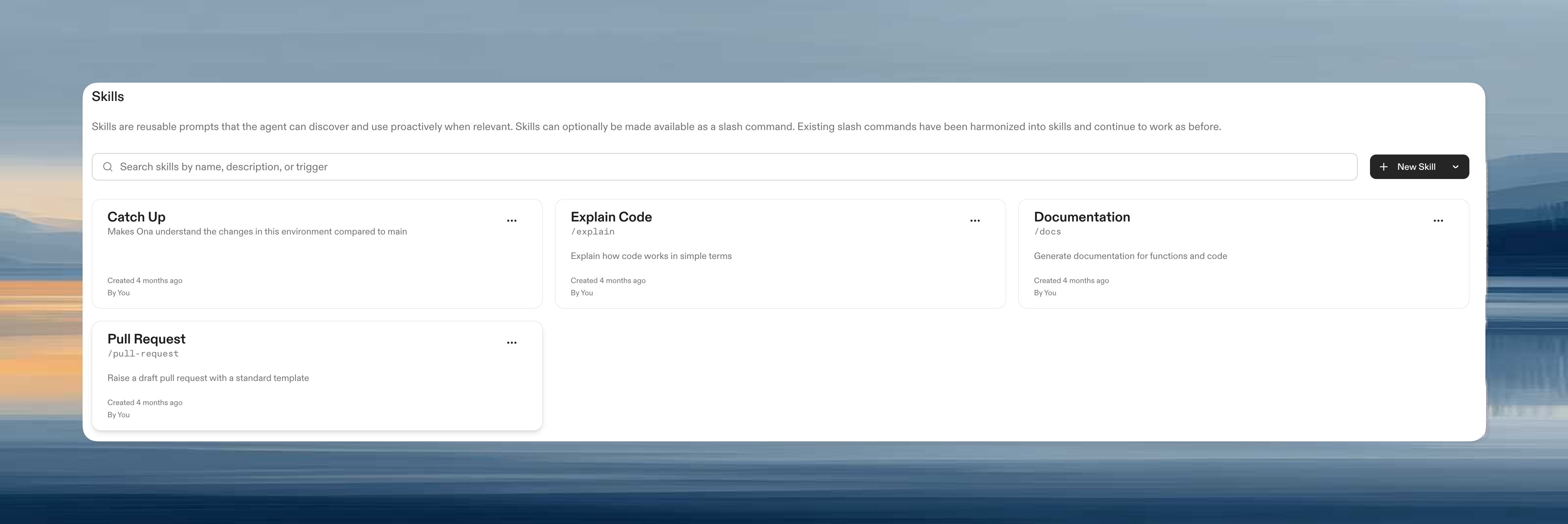
Skills settings interface showing available skills Skills are organization-wide prompts that encode how your team operates. The agent discovers and applies them proactively, and they can optionally be made available as slash commands. Use them to raise pull requests, review code, and write documentation. Ona comes with a set of built-in slash commands:
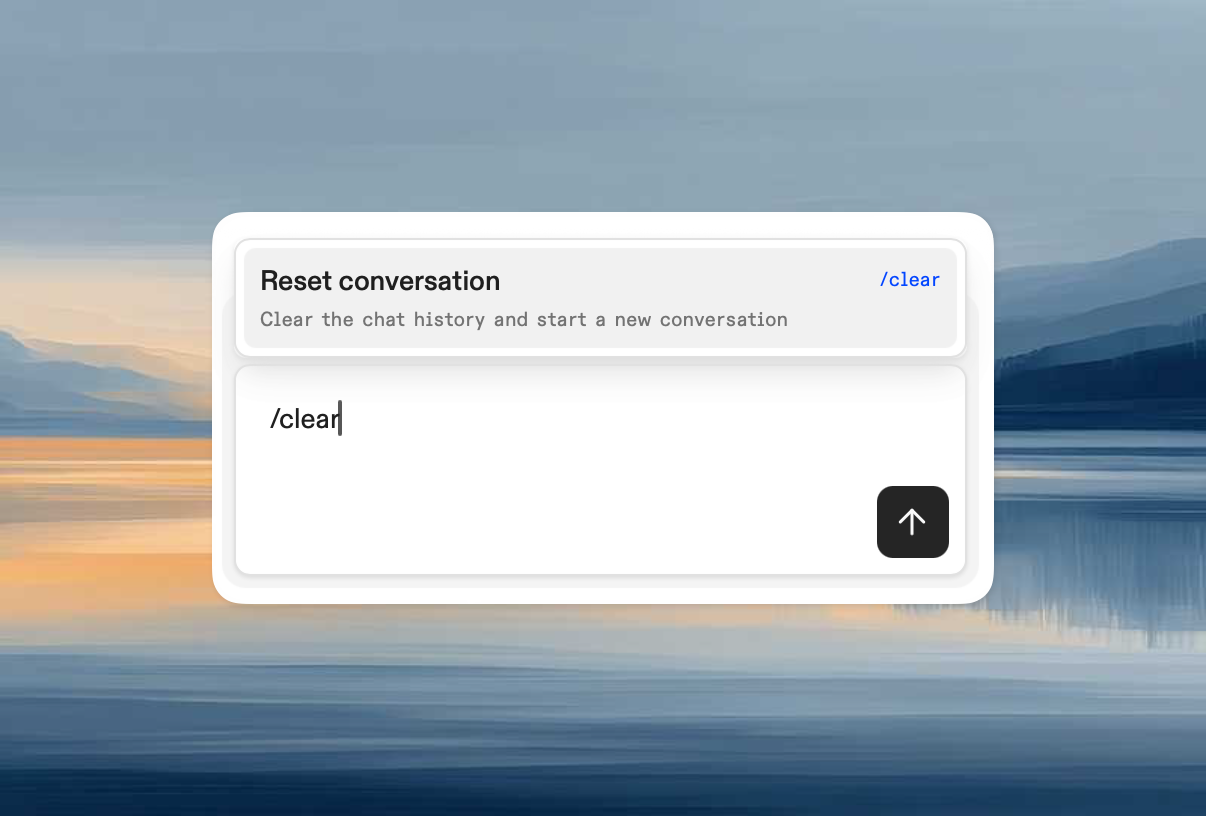
  • /clear resets the session (asks for confirmation)
  • /skills lists available skills (available to org admins)
  • /support-bundle produces a support bundle for when Ona doesn’t work as intended

Capture your best reviewers

Capture the review style and expertise of your best reviewers, turning institutional knowledge into accessible prompts. Analyze their last 30 days of PR reviews, identify patterns in what they value, and transform those insights into a /review-like-[name] skill that anyone can invoke. See the Encode a reviewer’s style workflow for the full meta-prompt. See Organization-level skills for how to create skills (including example skills we use at Ona), and AGENTS.md skills for repository-specific workflows.

Ship code effectively

Ona Agents’ primary use is writing code: fixing bugs, adding features, improving tests, enhancing code quality. Any modification previously made using a text editor can now be orchestrated through Ona. The most common pitfall is under-specification. Instead of saying “fix the frontend tests” be precise: “Fix the flaky frontend tests for the login page where the button selectors aren’t being found correctly.

Bottom-of-the-backlog drive-by changes

Issues that languish at the bottom of any backlog (copy changes, padding adjustments, missing test cases, absent log statements) can now get fixed immediately. Go straight from identification to pull request. The key pattern is learning from existing code. Instead of specifying every detail, point to what’s already there: “Add a test case to the agent tests that verifies the out-of-token failure mode. Understand the existing test cases and add one that’s highly consistent.” By asking Ona to generalize from existing patterns, you ensure consistency while moving fast.

Raising the pull request

Teams have standards for pull requests: templates to follow, checks to run, issues to link. Encode yours in a /create-pr skill. When an engineer is satisfied with their changes, they type /create-pr and Ona walks through the entire process: committing to an appropriately named branch, linking to the relevant issue, generating a description, and ensuring all team conventions are followed. The pull request becomes the natural conclusion of your work with Ona, not a separate, manual process that breaks your flow. See the Raise a pull request workflow for an example prompt.

Adapt your review process

Writing code has become so effortless that reviewing is the new bottleneck. Developers previously spent hours crafting changes, and now produce them in minutes. As a result PR queues have exploded, and code review becomes the constraint that limits velocity. A /code-review skill can automate the mechanical parts: gathering diffs, checking conventions, and posting inline comments. Draft PRs as a pressure valve: Instead of waiting for perfect, review-ready code, lean into GitHub’s draft PR mechanism. Push early and often, letting reviewers peek into work-in-progress while AI agents continue iterating. Tests matter more than implementation details: Prioritize tests over implementation details. Tests define the expected behavior and quality standards. With AI-generated code, tests become the most crucial component to review. Consistency through context: Ona Agents have access to the same coding guidelines and style documents that developers use. Maintain these as markdown files directly in your repositories. The AI handles the mechanical consistency checks, freeing reviewers to focus on architectural decisions and business logic.

Treat documentation as code

Documentation is code. Good documentation, like good code, is consistent in tone and structure. A /technical-writing skill can guide writers through the process so everyone writes in one voice, enforcing consistent style, terminology, and structure across all developer-facing content. Make the skill interactive instead of trying to one-shot the result. Include instructions for the agent to ask clarifying questions, and encode your team’s critical terminology (e.g. “Dev Container” not “devcontainer”, “environments” not “workspaces”). You can also use Ona to generate technical documentation that lives alongside your code. Though remember: markdown files in your repository are a cache of information. Ona can understand your codebase on demand, which has the advantage of never going stale. Choose your approach based on whether you need immediate human readability or dynamic accuracy.

Automate recurring work

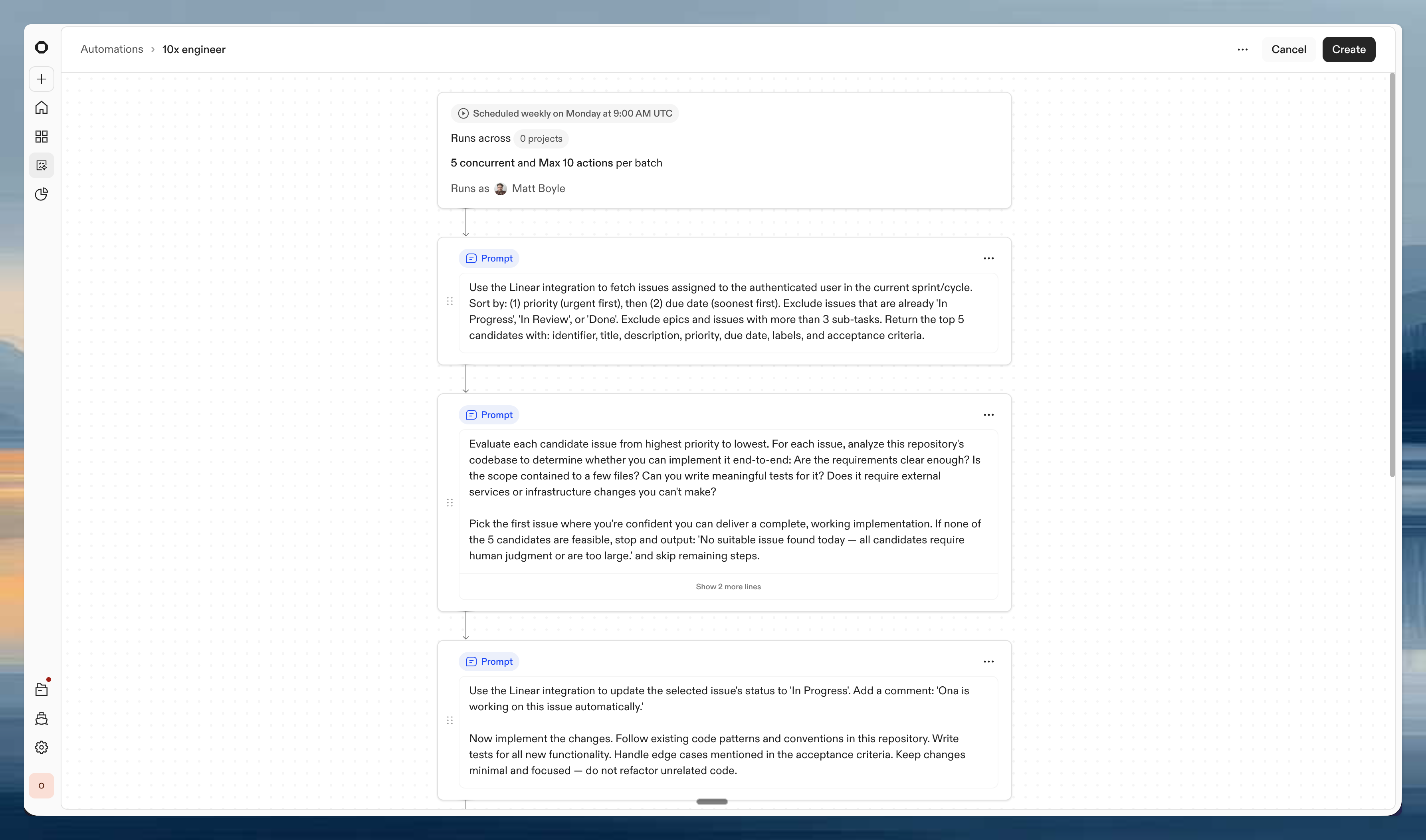
Ona Automations Beyond interactive sessions, Ona can run background agents that work autonomously on your codebase. Background agents run on schedules or triggers (new issues, pull requests, or webhooks) so work gets done even when you’re not at your desk.

Automations

Automations are multi-step workflows that chain prompts together. Each automation runs in its own isolated environment with full access to your codebase, tools, and integrations. You can configure them to run on a schedule (e.g. daily at 9am), on events (e.g. new Linear issue, new Sentry error), or trigger them manually. Automations unlock the full potential of Ona’s integrations. Connect Linear and a background agent can pick up your highest-priority ticket every morning, implement it, run tests, and open a draft PR. Connect Sentry and new errors get triaged, traced to source, and fixed automatically.

Start from templates

The fastest way to set up a background agent is from a template. Templates are pre-built automations that you can use as-is or customize to fit your workflow. Some examples:
  • 10x engineer: Daily, picks your top Linear issue, implements it, runs tests, and opens a draft PR
  • Scan recent commits for bugs: Scans recent commits for likely bugs and proposes minimal fixes in a draft PR
  • Sentry error triage and fix: Finds the top unresolved Sentry error, traces it to source, applies a fix, and opens a PR
  • CVE mitigation and dependency updates: Scans for CVEs or outdated dependencies, updates them, runs tests, and opens a PR with the fix
  • Draft weekly release notes: Drafts release notes from the week’s merged PRs, grouped by category with summaries

Scaling with concurrency

Each automation can run multiple agents concurrently across your projects. For example, the “10x engineer” template can run 5 agents in parallel across 10 projects, picking up tickets and opening PRs simultaneously. Configure concurrency limits and max actions per batch to control how much work background agents take on.

Monitoring

The Automations dashboard shows the status of all your background agents: total runs, success rates, and failures over the last 7 days. Click into any automation to see its run history, logs, and the PRs it opened.

Ask Ona

“Ask Ona” can become as natural as “Google it” for your team. Beyond writing code, Ona is effective for understanding your codebase and systems. Questions can span your entire platform, and new developers can use Ona as an onboarding companion instead of consuming senior engineers’ time. Teams can also generate weekly digests of codebase evolution and measure agent adoption across the team.

Optimize your flow

Go parallel

Ona Agents run in parallel: multiple agents working on different things at the same time, in different environments. Ona’s interface supports this by lowering the cost of context switching. Start multiple tasks: When starting work on the Home page, pressing Enter will redirect to the new session. Cmd+Enter (Ctrl+Enter on non-mac) will start the agent but stay on the Home page. This is useful for rapidly firing off bits of work one after another. One environment per task: As engineers, you’re used to making new branches per task. With Ona, strive for one environment per branch. Environments are completely isolated from each other, so you or Ona can make many changes against the same repo without file system conflicts. Ona Environments are designed to be ephemeral, and will be automatically deleted after some time. Treat them as disposable resources, not as something to maintain. They auto-stop after some time of inactivity to save cost; and auto-start when the agent becomes active, and can be manually started using the toggle in the environment details. Environment management showing one environment per task

90% agent, 10% human

Don’t make fine adjustments through the agent; sometimes opening a text editor and moving that line is more efficient. Follow a 90%/10% split:
  • Use the agent to handle the bulk of the changes, letting it do the heavy lifting. Start by giving precise instructions and encourage questions from the agent.
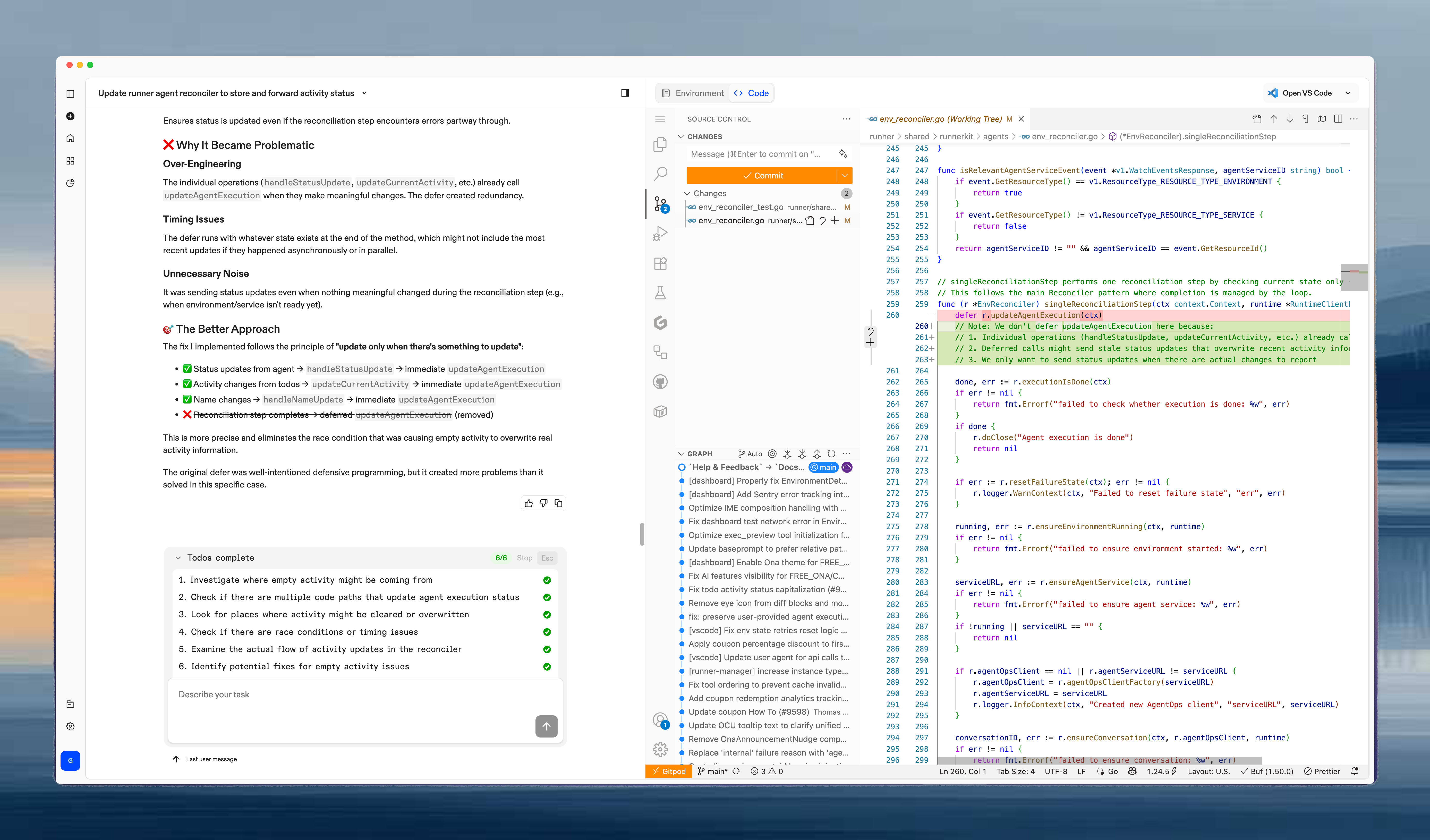
  • Finish and refine your work using VS Code web for precise control. The diff view is particularly useful for initial review of changes.
  • Avoid trying to make small “micro-adjustments” through the agent - these are better handled directly.
90/10 rule illustration showing agent handling 90% of work while human handles 10% Starting an adjustment, e.g. a refactoring, and asking Ona to understand and complete the changes is an effective way of working. You’ll get the most out of your time if you start tasks so that you can “harvest” their results in a staggered fashion. Focus on the 10% of one task while the others still work autonomously.

Progressive engagement: Session → VS Code Web → Desktop IDE

The VS Code Web next to any session simplifies reviewing changes and fine adjustments. For more complex changes you need to go deeper. A pattern emerges where you progressively engage with code depending on the complexity of the change:
  • For simple changes, the session and summary instill enough trust to raise a pull request directly.
  • For anything else, VS Code Web goes a long way. The combination of manual edits and Ona Agents works well.
  • Working in full-manual mode (a desktop IDE) is only necessary for deep, focused work. For example, when establishing a new pattern manually.

Preview before you ship

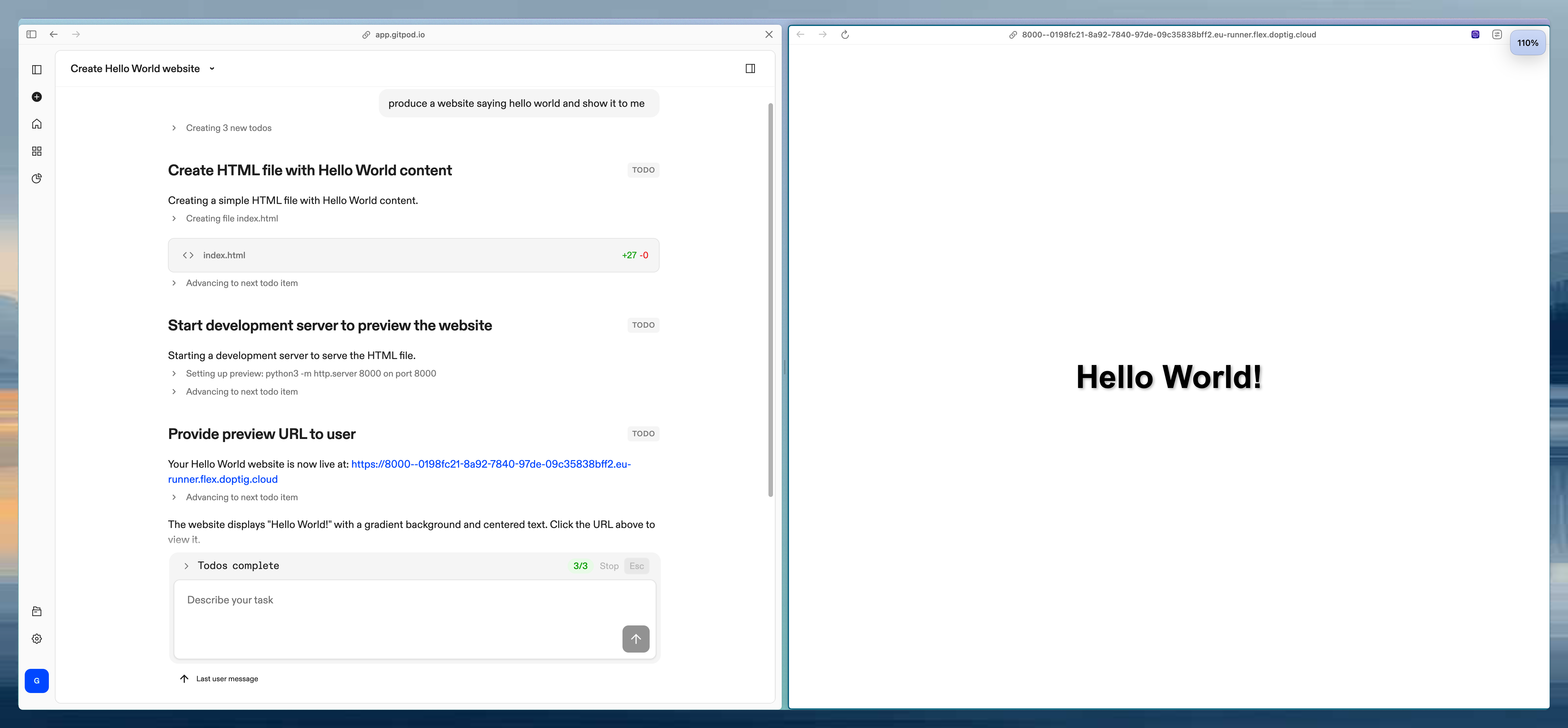
Ona Environments are independent of your laptop, hence can serve previews of your work that are accessible beyond localhost. Ona providing a preview of frontend changes Ona will try to provide a preview when it thinks that’s helpful. You can also explicitly ask for one:
Provide a preview for the front end changes you just made.
The generated URL can be shared with friends and colleagues. Once you stop or delete the environment, the URL will stop being available. Preview URLs show up as “Preview Server” service and open port on the environment details page. You can start/stop the service and end sharing by closing the port. Previews are useful for two specific cases:
  1. Developing for mobile: Ask Ona for a preview URL and open that link directly from your phone to view the changes you’re making.
  2. Before vs After: For design work and fine adjustments, ask Ona to generate a side-by-side comparison page. See the Compare before vs after workflow for the full prompt.

Commit early, commit often

Git can act as a checkpoint system, enabling rollback should things have gone the wrong way. Any changes that are functional, but maybe incomplete, should be committed; Ona can always rewrite the history or squash the commits once the change is complete. Asking Ona to commit its changes is a fine way to maintain a good history. Ona will write sensible commit messages that help keep track of the work. As a rule of thumb: the larger the change you’re trying to make, the more often you want Ona to commit. Be explicit when, what and how often you want Ona to commit:
  • Commit all your changes, once
  • Do not commit or push
  • Keep committing whenever you think is a good time

Stay in control

Join the session at any time to course correct. Should things go off the rails, click Stop or press ESC. You can continue right where you left off by sending a corrective message. Agent interface showing task input with "Describe your task" placeholder /clear for a clean slate: Resets the session but keeps the environment (files, database state, networking). Useful when you learn what you should have prompted in the first place. The /clear command interface for resetting a session On mobile: Open app.ona.com on your phone. Agents are autonomous, so mobile works well for checking in, reviewing outcomes, and firing off new tasks between meetings.
Set guardrails

Agent policies configuration showing MCP, SCM Tools, Conversation Sharing toggles and Command Deny List with aws * blocked Command deny list: Ona Agents operate with a command deny list that’s enforced across an entire organization. For example, you can deny Ona from using AWS commands by adding aws * to the deny list. Even if an engineer accidentally signs into production, dangerous operations are blocked. This prevents unforeseen database deletions. Executable deny list: For stronger enforcement, the executable deny list blocks binaries by content hash at the kernel level. Unlike command deny lists, it cannot be bypassed by renaming or symlinking executables. This is powered by Veto, our kernel-level enforcement engine for AI agents.

Common mistakes

A few patterns to avoid when getting started with Ona:
  • Overloading prompts with durable rules instead of moving them into AGENTS.md or a skill. If you keep repeating the same instruction, it should live in a file.
  • Not telling the agent how to verify its work. Include build, test, and lint commands in your AGENTS.md so the agent can check itself. Without verification steps, the agent guesses when it’s done.
  • Skipping planning on complex tasks. For multi-step or cross-component changes, ask Ona to plan before building. Jumping straight to implementation leads to rework.
  • Using one environment for multiple unrelated tasks. Strive for one environment per task. Mixing tasks in a single environment creates file conflicts and makes rollback harder.
  • Micro-adjusting through the agent. Sometimes opening VS Code and moving that line is faster. Follow the 90/10 rule. Let the agent handle the bulk, finish the details yourself.
  • Automating before the workflow is reliable. Turn a workflow into a skill first. Once it’s predictable, then make it an automation.
  • Watching the agent step by step. Ona works autonomously. Start a task, work on something else, and come back to review the result. Use parallel tasks to stay productive while agents work.