

How it works
When you open a port, Ona creates a URL with automatic TLS termination. All shared URLs use HTTPS. You can configure whether Ona connects to your service via HTTP (default) or HTTPS. If the runner supports port authentication, each open port also has an access level that controls who can reach the URL. You may need to upgrade the runner before those access controls are available. Until then, shared ports behave likeeveryone.
Prerequisites
Services must:- Listen on
0.0.0.0(notlocalhostor127.0.0.1) - Use the host network stack if running inside a container
Open ports
Open ports are accessible according to the port’s configured admission level, your organization policy, and your runner network configuration. If access controls are unavailable in the dashboard, the runner may need an upgrade before it supports port authentication. For access level definitions and policy caps, see Port sharing policy.Open a port in the dashboard
- Open the environment details page and go to Ports.
- Select Add port.
- Enter the port number and optional name.
- Choose HTTP or HTTPS.
- If available, choose an Access level.
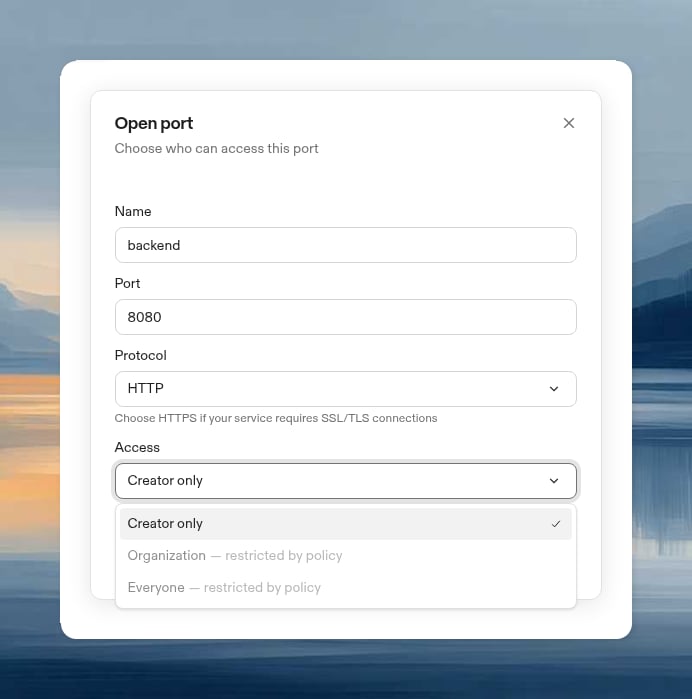
Open a port in VS Code
- In the Ona view, expand Ports.
- Select Open Port.
- Enter a port name and number.
Open a port from the CLI
By default, the CLI opens the port for the environment creator only. If the runner is too old to enforce private access, the CLI opens the port for everyone instead and prints a warning to stderr. For admission level definitions, see Port access levels.Forwarded request headers
The gateway discards incomingForwarded, X-Forwarded-*, and X-Real-IP headers
before forwarding requests to your service. It sets X-Forwarded-For and
X-Real-IP to the connection peer’s IP address without a port, X-Forwarded-Host
to the requested host (including custom domains), and X-Forwarded-Proto to
https.
AWS runner load balancers preserve the client IP. If you add a reverse proxy in
front of the gateway, your service receives that proxy’s IP instead; the gateway
does not trust client IPs supplied in HTTP headers. Configure application proxy
trust only for the gateway, not for arbitrary request sources.
Access denied and retry
When a shared port needs authentication, the browser is sent through Ona’s/auth/port/start flow before loading the port URL. This flow establishes or refreshes the browser’s port-access session and then returns the user to the requested port.
If access is still not allowed, Ona shows Port Access Denied and explains why. Common reasons include:
- The port is shared as
creator_onlyororganization, and your identity does not satisfy that access level. - Your organization policy blocks the port’s current sharing level.
- The runner needs an upgrade before it can enforce port access control.
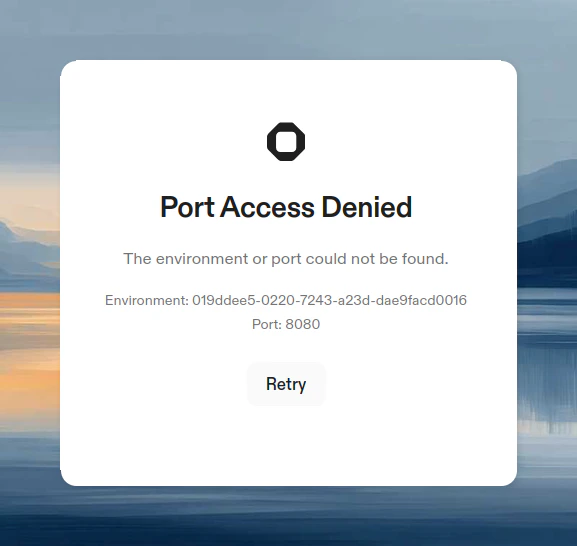
/auth/port/start with the original environment and port parameters.
Services that only listen on localhost
Some tools hardcodelocalhost as their bind address with no option to change it. AWS SSM port forwarding (session-manager-plugin) is a common example. Since Ona’s port-sharing proxy connects from outside the loopback interface, these services return “Service Unavailable” (503) when accessed through a shared port URL.
Two workarounds are available:
Option A: iptables (no extra packages)
Use kernel-level NAT to redirect incoming traffic to the loopback address. This is already available in the environment and lets you keep the same port number.Option B: socat (userspace relay)
Usesocat to relay traffic from 0.0.0.0 on a second port to the localhost-bound service. Requires installing socat (apt-get install -y socat) but does not need root.
Host network stack
By default, the Dev Container network is isolated from the VM. For port sharing to work, services must be accessible on the host network. There are several scenarios to consider:Dev Container network mode
To make your Dev Container itself use the host network stack, configure yourdevcontainer.json:
Single container setup:
network_mode: host on all services:
Containers inside Dev Container (Docker-in-Docker)
When running containers inside your Dev Container using Docker-in-Docker, those containers must also share the host network namespace. Otherwise, ports are only accessible within Docker’s bridge network and Ona cannot forward them. Docker run:Ona Tasks and Services
When running containerized services withdocker run, use --network host or map ports explicitly with -p to make them accessible. See containerized service examples for recommended patterns.
Relationship to devcontainer port properties
Thedevcontainer.json spec includes forwardPorts and portsAttributes properties. These are standard devcontainer properties that tell the editor which ports to forward from the container and how to configure them (labels, auto-forward behavior).
These properties work in Ona across VS Code-based editors, but they operate independently from Ona’s port sharing. They do not create shareable URLs or open ports in the Ona dashboard.
Opening a port and previewing in the browser
Use the built-in web browser when you want a preview to stay inside the environment page and remain available to Ona. You can open a port and launch the preview URL in a single command using the$BROWSER variable:
Limitations
- Ports 1024–65535 can be exposed. System ports (1–1023) are not supported.
- Not available on local environments
- Subject to fair use policies and bandwidth limits
- Organization administrators can disable port sharing via organization policies. VS Code Browser and agents are exempt from this restriction.
Network flags like
--network=host in build.options are stripped during Dev Container builds. Host network mode is only applied at runtime when the container starts.