

- Enterprise tier: projects are visible to admins only by default, until access is granted to specific groups or users via the Share dialog
- All other tiers: projects are shared with the entire organization by default
To give a team admin access to all projects in the organization, assign the Projects Admin role to their group.
What visibility controls
Project visibility controls who can discover a project in the UI and who can use it to create environments. It does not change who can access the underlying repository outside Ona, and it does not hide a project from organization admins. In practice, visibility answers three questions:- who can see the project
- who can create environments from it
- whether the project is broadly available or limited to a smaller team
Change visibility
- Open the project from your dashboard
- Click the Share button in the project header
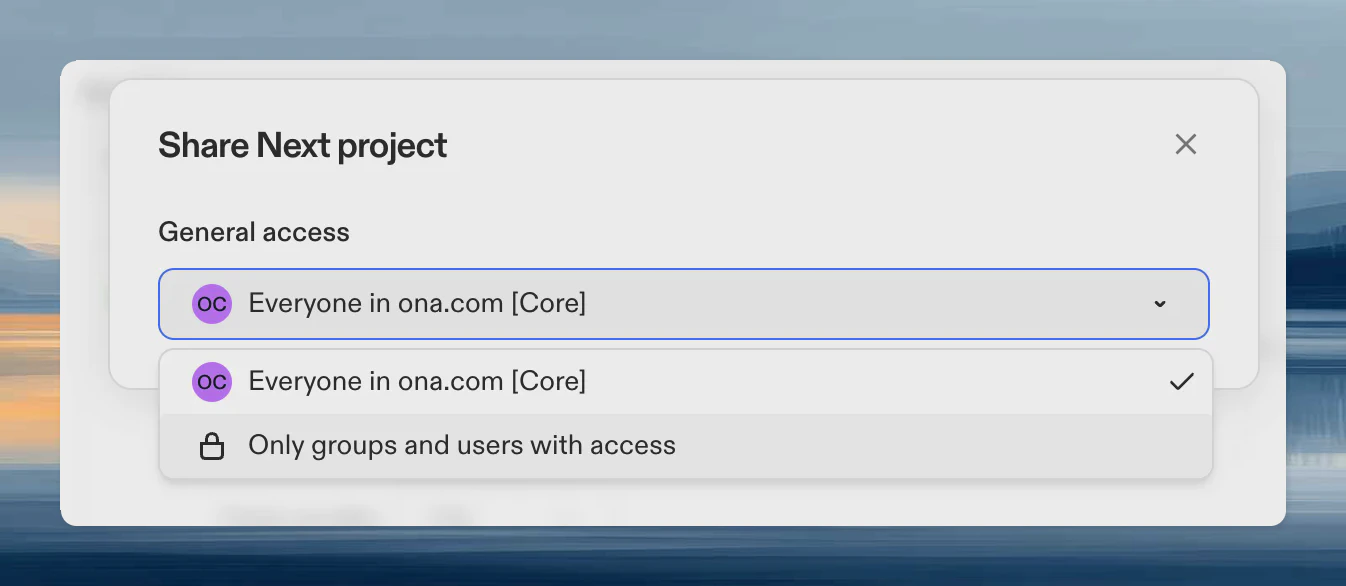
- Under General access, select:
- Everyone in : all members can see and use the project
- Only groups and users with access: restricted to explicitly added groups and users
Projects cannot be hidden from admins.
When to use each mode
- Everyone in : use this for common services, shared internal platforms, templates, and repositories many engineers need.
- Only groups and users with access: use this while a project is being prepared, when access should be tightly controlled, or when the project should only be available to specific teams.
Create an environment from a shared project
Once a project is shared with you, you can create an environment from it directly. On the Projects page, click Create Environment on the project card. The environment inherits the project’s repository, secrets, and configuration.Access dependencies
Project access alone is not always enough to create an environment. A user also needs access to at least one runner used by that project. Runner access can come from a group the user belongs to, even when the project is shared directly with that user. When you change a project’s environment classes, Ona checks that each directly shared user or service account can still create environments on at least one of the selected runners. If someone can see a project but cannot start an environment from it, check:- whether the project is shared with them
- whether a compatible runner is shared with them
- whether organization policies restrict environment creation