

The AWS runner runs as a Fargate service in your VPC. The ECS cluster contains three services: the runner orchestrator, a proxy for routing traffic to environments, and AWS ADOT for metrics export (when configured). Each Fargate task gets its own elastic network interface (ENI) in your subnets, so the subnets must provide a path to the AWS services the runner depends on.Documentation Index
Fetch the complete documentation index at: https://ona.com/docs/llms.txt
Use this file to discover all available pages before exploring further.
Required AWS service endpoints
The runner must reach the following AWS services over HTTPS (port 443):| Service | Endpoint | Purpose |
|---|---|---|
| Secrets Manager | secretsmanager.<region>.amazonaws.com | Retrieve runner token and configuration secrets |
| CloudWatch Logs | logs.<region>.amazonaws.com | Ship runner and container logs |
| ECR API | api.ecr.<region>.amazonaws.com | Authenticate and authorize container image pulls |
| ECR Docker | *.dkr.ecr.<region>.amazonaws.com | Pull runner container images |
| S3 | s3.<region>.amazonaws.com | Download ECR image layers |
<region> with your AWS region.
Connectivity options
Choose the method that fits your network architecture.NAT gateway
Route traffic from private subnets to AWS service public endpoints via a NAT gateway in a public subnet. When to use: Private subnets that already have a NAT gateway for general internet access. No additional configuration is needed. As long as the Fargate task subnets have a route to a NAT gateway, the runner can reach AWS service endpoints over their public addresses.Internet gateway (with public IP)
Assign a public IP directly to the Fargate task and route traffic through an internet gateway. When to use: Public subnets without NAT gateway, or development/test environments where simplicity is preferred. To enable this, set the Assign Public IP CloudFormation parameter totrue when deploying the runner stack. ECS assigns a public IP to each Fargate task ENI when this parameter is enabled.
VPC endpoints (AWS PrivateLink)
Route traffic to AWS services over private IPs within your VPC, without traversing the public internet. When to use: Private subnets with no internet access, or when security policy prohibits public internet egress. See VPC endpoints reference below for the full list of endpoints and creation instructions.Cost consideration: VPC endpoints incur additional AWS charges (~$7.20/month per endpoint per AZ plus data processing fees). See AWS PrivateLink pricing for details.
Transit gateway / VPC peering / VPN
Route traffic to AWS service endpoints through a transit gateway, VPC peering connection, or VPN tunnel to a VPC that has access to the services. When to use: Hub-and-spoke network architectures where AWS service access is centralized in a shared-services VPC. Ensure the route tables on the Fargate task subnets include routes to the AWS service endpoint IP ranges through the transit gateway or peering connection.Automatic connectivity checks
The runner automatically checks connectivity to all required endpoints on startup and every 5 minutes. Results are reported to the management plane as a network readiness status. Each endpoint check:- Resolves the hostname via DNS
- Opens a direct TCP connection on port 443
| Access type | Meaning |
|---|---|
vpc_endpoint | DNS resolved to private IPs. Traffic stays within the VPC |
nat_gateway | DNS resolved to public IPs, task has no public IP. Traffic routes through NAT |
internet_gateway | DNS resolved to public IPs, task has a public IP. Traffic routes through IGW |
VPC endpoints reference
If your network does not allow public internet egress, create VPC endpoints to give the runner infrastructure private access to AWS services. The table below lists all endpoints required by the runner stack, including those used by the ECS control plane, CloudFormation, environment VMs, and the runner services themselves.Prerequisites
Before creating VPC endpoints, ensure:- Your VPC has both DNS hostnames and DNS resolution enabled
- You have the VPC ID, subnet IDs, and security group IDs ready
- You are creating endpoints in the same region as your runner deployment
Required interface endpoints
Replace<region> with your AWS region.
| Service | VPC Endpoint Service Name |
|---|---|
| EC2 | com.amazonaws.<region>.ec2 |
| ECR API | com.amazonaws.<region>.ecr.api |
| ECR Docker | com.amazonaws.<region>.ecr.dkr |
| SSM | com.amazonaws.<region>.ssm |
| STS | com.amazonaws.<region>.sts |
| CloudFormation | com.amazonaws.<region>.cloudformation |
| Secrets Manager | com.amazonaws.<region>.secretsmanager |
| ECS | com.amazonaws.<region>.ecs |
| ECS Agent | com.amazonaws.<region>.ecs-agent |
| ECS Telemetry | com.amazonaws.<region>.ecs-telemetry |
| SSM Messages | com.amazonaws.<region>.ssmmessages |
| EC2 Messages | com.amazonaws.<region>.ec2messages |
| CloudWatch Logs | com.amazonaws.<region>.logs |
| IAM | com.amazonaws.<region>.iam |
| Elastic Load Balancing | com.amazonaws.<region>.elasticloadbalancing |
| ACM | com.amazonaws.<region>.acm |
IAM is a global service, but its VPC endpoint is created as a regional interface endpoint. See the AWS documentation on creating an IAM VPC endpoint for setup instructions.
Required gateway endpoints
| Service | VPC Endpoint Service Name |
|---|---|
| S3 | com.amazonaws.<region>.s3 |
| DynamoDB | com.amazonaws.<region>.dynamodb |
Gateway endpoints (S3, DynamoDB) are configured differently than interface endpoints. See the AWS documentation on gateway endpoints for details.
Creating VPC endpoints
Using AWS CLI
Using AWS PowerShell
Using AWS Management Console
-
Navigate to VPC Console
- Open the AWS VPC Console
- Select “Endpoints” from the left navigation
-
Create Endpoint
- Click “Create endpoint”
- Name tag (optional): Enter a descriptive name like
ona-management-plane - Service type: Select “Endpoint services that use NLBs and GWLBs”
-
Service Settings
- Service name: Enter
com.amazonaws.vpce.us-east-1.vpce-svc-08de744d433e60ff2 - Enable Cross Region endpoint: Check this box to connect across regions (Note: For us-east-1 region, leave this unchecked)
- Region: Select us-east-1 as the region
- Click “Verify service” to confirm the service is available
- Service name: Enter
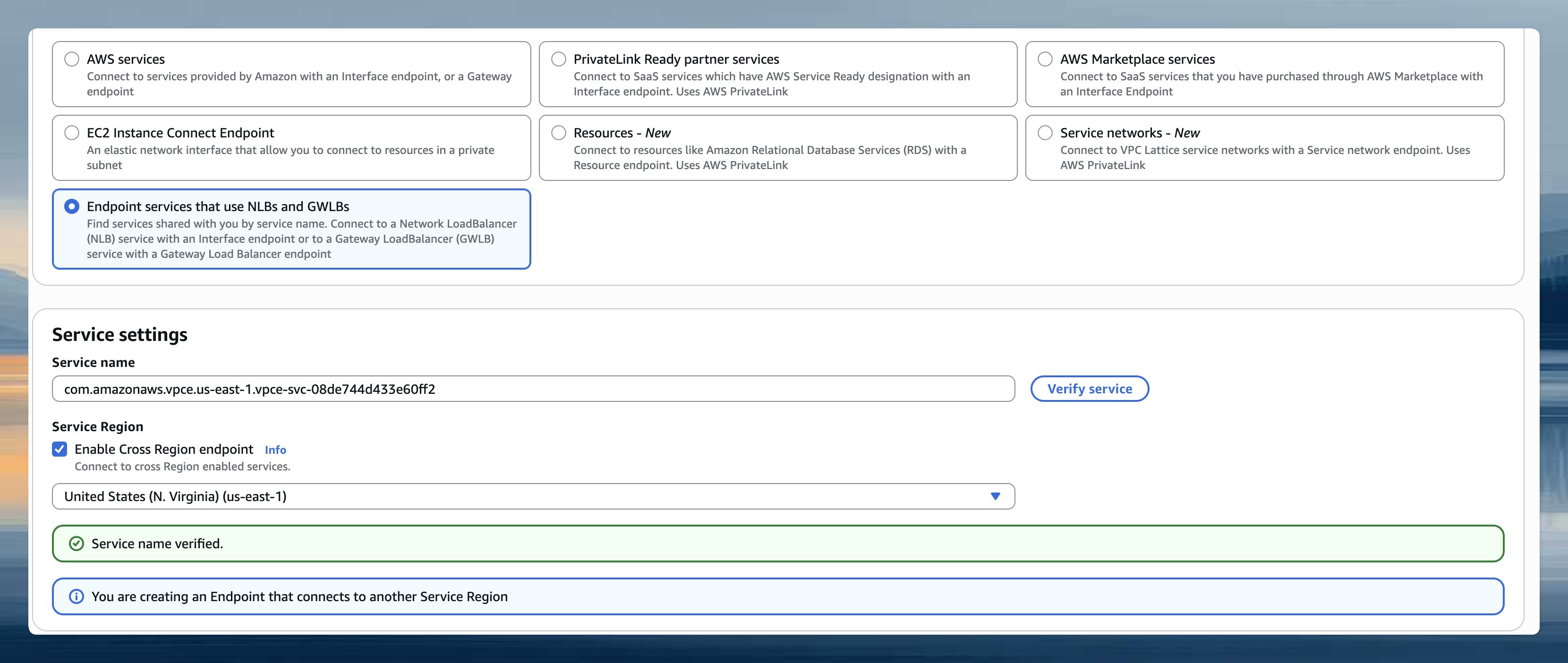
- Network Settings
- VPC: Select the same VPC where your runner is deployed
- Enable DNS name: Check this box to enable private DNS names (this allows
app.gitpod.ioto resolve to the endpoint) - Subnets: Choose private subnets in available AZs (can be the same subnets as your EC2 runner instances)
- Security groups: Select or create a security group that allows HTTPS traffic (port 443, inbound). Include the runner security group and the security group for environment access (you can find these in the Output section of the Runner CloudFormation template).
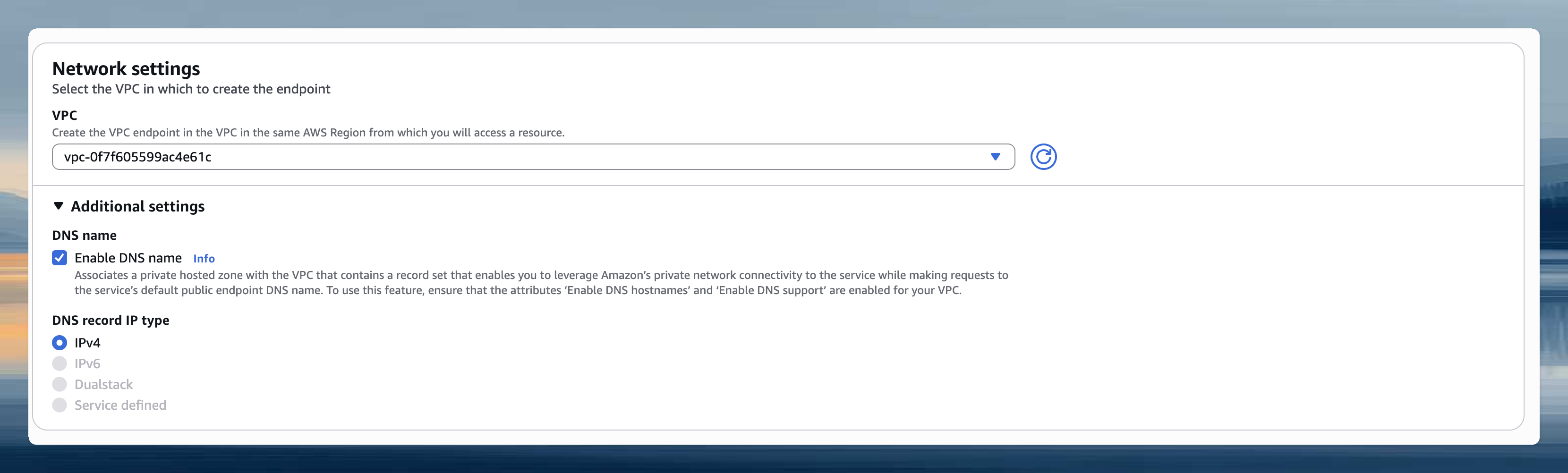
- Create and Verify
- Click “Create endpoint”
- Wait for the endpoint status to become “Available”
Key configuration settings
When creating interface endpoints:- Enable private DNS names: This allows AWS service hostnames to resolve to your VPC endpoint’s private IP addresses
- Subnets: Select subnets in multiple availability zones for high availability
- Security groups: Configure to allow HTTPS (443) traffic from your runner subnets
us-east-1 region specific: When creating VPC endpoints in the us-east-1 region, disable cross-region support. This is due to availability zone mapping differences between AWS accounts that can prevent endpoint creation. The endpoint only needs to exist in one AZ within your VPC. Clients in other AZs can still reach it via DNS.
Security group configuration
Your VPC endpoint security group needs these rules: Inbound Rules:- Type: HTTPS (443)
- Source: Your runner subnets CIDR or the security group attached to your runner instances
- Description: Allow runner access to AWS services
- Type: All traffic
- Destination: 0.0.0.0/0 (or keep the default outbound rule)
Troubleshooting
Runner fails to start or reports degraded status
Runner fails to start or reports degraded status
- Check subnet route tables: Verify the subnets assigned to the Fargate service have routes to the required endpoints (via NAT gateway, internet gateway, transit gateway, or VPC endpoints).
-
Check security groups: The ECS task security group must allow outbound HTTPS (port 443) to the AWS service endpoints. The default
AllowAllOutboundrule covers this. -
Check VPC endpoint configuration (if using PrivateLink):
- Ensure private DNS is enabled on interface endpoints
- Ensure the endpoint security group allows inbound HTTPS from the Fargate task subnets
- If using an S3 gateway endpoint, ensure it is associated with the correct route tables
-
Check public IP assignment (if using internet gateway):
- Verify the
AssignPublicIpCloudFormation parameter is set totrue - Verify the subnet has an internet gateway attached and a route to
0.0.0.0/0via the IGW
- Verify the
-
DNS resolution: From a test instance in the same subnet, verify endpoints resolve correctly:
If using VPC interface endpoints, these should resolve to private IPs within your VPC CIDR.If using an S3 gateway endpoint (recommended),
nslookup s3.<region>.amazonaws.comwill still resolve to public IPs. This is expected. Gateway endpoints route traffic via route table entries, not DNS overrides. Verify connectivity by checking that the gateway endpoint is associated with the correct route tables. If using an S3 interface endpoint instead, DNS should resolve to private IPs.
VPC endpoint issues
VPC endpoint issues
- DNS resolution fails: Verify DNS hostnames and DNS resolution are enabled on your VPC
- Connection timeouts: Check security group rules allow HTTPS (443) from runner subnets
- Endpoint creation fails in us-east-1: Disable cross-region support when creating the endpoint
- Service unavailable: Ensure the endpoint is in “Available” state and private DNS is enabled