

docker CLI.
This is how agents access custom tooling images your organization maintains in private registries.
Create a container registry secret
- Navigate to Project → Secrets or Settings → Secrets
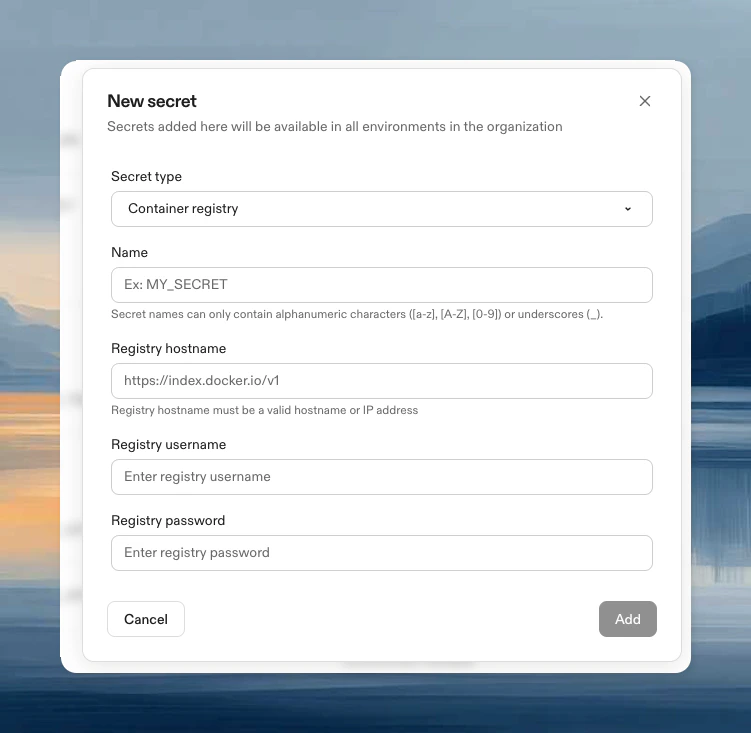
- Click New Secret, then choose Container registry from the Secret type dropdown
- Configure:
- Name: Identifier for the secret
- Registry hostname: Your registry URL (see examples below)
- Registry username: Registry username
- Registry password: Registry password or access token
Common registry hostnames
Cloud provider native authentication
For AWS and GCP, you can use runner-native authentication instead of managing credentials manually:- AWS ECR (EC2 runners): See AWS ECR with IAM authentication below
- Google Artifact Registry (GCP runners): See Using Private GAR Images
How it works
Container registry secrets serve two purposes:- Pull Dev Container images: Authenticate during environment creation to pull your private base image
- Access inside environments: If your Dev Container includes
dockerCLI, Ona automatically runsdocker login
For AWS ECR and Google Artifact Registry with runner-native auth, you won’t be automatically logged in from within the environment. Use AWS native auth, gcloud auth, or Ona OIDC for additional access.
Update a secret
- Navigate to Project → Secrets or Settings → Secrets
- Click Edit, update username/password, click Update
Using AWS ECR with IAM authentication
For AWS EC2 runners, you can use IAM-based authentication instead of managing ECR credentials manually.Prerequisites
- AWS EC2 runners for your Ona environments
- ECR registry in the same AWS account (or cross-account access configured)
Setup
- Navigate to Project → Secrets → New Secret
- Choose Container registry from the Secret type dropdown
- Enter your ECR hostname:
[account-id].dkr.ecr.[region].amazonaws.com - Username and password auto-fill with
runner-native - Click Add
Configure IAM permissions
Add this policy to your environment instance role (findEnvironmentRoleArn in your CloudFormation stack outputs):
Limitations
- ECR runner-native support is only available for AWS EC2 runners
- Existing environments must be recreated to apply permission changes
Troubleshooting
New environments required
New environments required
After creating or updating a container registry secret, you must create a new environment for the changes to take effect. Restarting an existing environment may not apply the new authentication settings.